
Pra'Hyu Suite
Quality-of-life tweak suite for Minecraft: freecam, zoom, improved HUD, inventory management, and more, in a single JAR per version.
Screenshots
About this Mod
Pra'Hyu Suite
Pra'Hyu Suite is a collection of quality-of-life tweaks for Minecraft, designed to make your everyday gameplay smoother and more comfortable. Distributed as a single JAR per version for Fabric, the mod brings together dozens of independent modules that you can enable or disable as you see fit, without ever weighing down your setup.
Supported Versions
Pra'Hyu Suite is built for Minecraft 1.21 and later versions. Earlier versions are not supported.
Visual & Camera
Freecam. Fully detaches the camera from the player, letting you move freely through the world. Perfect for exploring, filming, or admiring a build from every angle.
Zoom. Provides a smooth scroll-wheel zoom with a precisely adjustable level, without ever affecting your regular FOV.
Fullbright. Fully illuminates the scene so you can see clearly even in total darkness.
Clear Lava View. Removes the fog and the red lava overlay while you're protected by fire resistance.
Block Overlay. Highlights the targeted block with a fully customizable outline and fill.
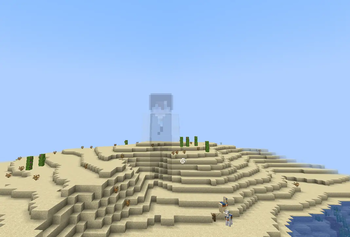
See Invisible. Reveals normally invisible players on the client side.
Inventory & Equipment
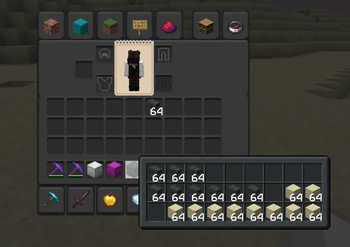
Inventory Manager. Reimagines inventory management with improved drag-and-drop, smoother scrolling, quick-craft, and automatic highlighting of matching items.
Tool Changer. Automatically selects the best available tool before mining or interacting.
Favorite Slots. Lets you mark certain slots as favorites so they're never accidentally moved or dropped.
Elytra Swap. Instantly swaps between elytra and chestplate with a single keypress.
Stack Refill. Automatically replaces an empty stack with an identical one from your inventory.
Container Preview. Shows the contents of shulker boxes, ender chests, and bundles as soon as you hover over them.
Slot Preview. Gives you a preview of regular inventory slot contents.
InvMove. Lets you keep moving even while a container is open.
Armor Visibility. Gives you fine control over the opacity of each piece of armor, your cape, and your elytra.
HUD & Interface
Mace Meter. Estimates in real time the damage your mace will deal based on fall height.
Potion Bar. Displays all your active potion effects clearly and in a customizable way directly in the HUD.
Entity Vitals. Projects entity health bars in 3D within the world, with fully customizable styles and colors.
Player Locator. Adds a discreet marker showing the direction of nearby players above your XP bar.
Keybind Atlas. Offers an interactive atlas bringing together all your keybinds at a glance.
Social
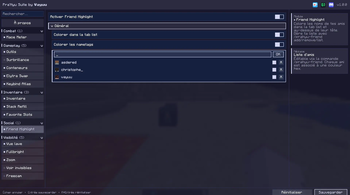
Friend Highlight. Colors your friends' names in the tab list and above their heads, with a customizable color for each one.
Macros. Provides ten fully configurable slots to automate your most-used commands or chat messages.
Ambiance
Better Smoke. Extends the lifespan of campfire smoke particles for a more immersive atmosphere.
Sea Surface. Animates the water's surface with realistic splash and foam effects.
Tools On My Back. Displays the last tool or weapon you used on your character's back whenever you switch slots.
Compatibility
Replay More. Extends Replay Mod's capabilities by giving you control over time, weather, and FOV during playback.
Configuration
All settings are managed directly in-game, either through ModMenu if you have it installed, or by simply pressing the H key by default. Each module remains independent and can be enabled, disabled, or customized at your own pace, with keybinds you're free to remap.
Author
Pra'Hyu Suite is developed by "Vayuu". All rights reserved.
Available Versions
How to Install Pra'Hyu Suite on Your Server
Order Server
Order a Minecraft Java server with at least 3 GB RAM (4 GB recommended).
Set fabric Loader
In the panel under "Egg", select the fabric loader and matching Minecraft version (1.21).
Install Mod
Open the mod browser in the dashboard and search for "Pra'Hyu Suite". Click "Install" – done! Alternatively, upload the .jar via SFTP to the /mods folder.
Compatibility
Mod Loaders
Minecraft Versions
1.21
Server-side
✗ UnsupportedRecommended RAM
4 GB(min. 3 GB)Frequently Asked Questions
Pra'Hyu Suite server crashes on startup – what to do?
Most common cause: wrong fabric version or insufficient RAM. Check the server log (latest.log) for "OutOfMemoryError" or "Mixin" errors. With Mado Hosting: ensure at least 3 GB RAM is allocated and the loader matches the mod version (1.21). You can switch loaders with one click in the panel.
Is Pra'Hyu Suite compatible with fabric?
Pra'Hyu Suite officially supports fabric for Minecraft 1.21. The Mado dashboard automatically detects incompatible loader combinations.
Server lagging with Pra'Hyu Suite – how to optimize performance?
Recommended RAM: 4 GB (per 8 players). Use /spark profiler to check if Pra'Hyu Suite consumes the most tick time. Common fixes: reduce server view-distance to 8-10, install "performant" or "starlight" as supplementary mods on Forge. With Mado Hosting, your server runs on NVMe SSDs with dedicated CPU cores for minimal latency.
Similar Mods



![[TaCZ] Timeless and Classics Zero](https://cdn.modrinth.com/data/SzzJttH8/fd27766d2bb8390d284696b1dbd358f87e081439_96.webp)


Rent Modded Server
Install Pra'Hyu Suite with just one click on your server.