
Senarium
Changes numbers in Minecraft to sezimal!
Screenshots
About this Mod
Senarium
What changes
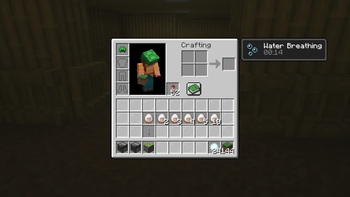
- Item counts
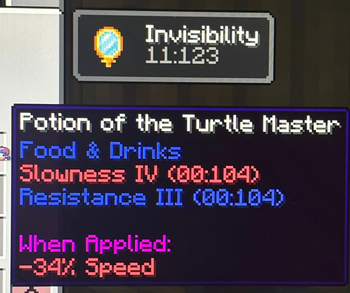
- Potion effects
- Book pages
- Settings
- ...and many other numbers throughout the game. If you notice something I missed, please let me know!
What stays the same
- F3 debug information and game modes
- Numbers shown by Sodium and Mod Menu
- Minecraft version strings
HOW IT WORKS
Minecraft normally uses the familiar decimal system with 10 digits (0-9). Senarium replaces those numbers with sezimal (base-6), which uses only the digits 0-5.
That means 10 in sezimal is equal to 6 in decimal, 11 is 7, 12 is 8, and so on.
- Item counts, experience levels, page numbers, timers, and many other values are displayed in sezimal.
- Percentages are converted to match the new base. For example, 100% becomes 100% in sezimal (which equals 36 in decimal), while fractions such as 1/2 become much simpler to represent.
- Decimal numbers are converted as well, so values after the radix point are represented in base 6.
The goal of Senarium is simple: let you experience Minecraft through a different way of counting.
Enjoy exploring the world in base 6!
Available Versions
How to Install Senarium on Your Server
Order Server
Order a Minecraft Java server with at least 3 GB RAM (4 GB recommended).
Set fabric Loader
In the panel under "Egg", select the fabric loader and matching Minecraft version (26.1.2).
Install Mod
Open the mod browser in the dashboard and search for "Senarium". Click "Install" – done! Alternatively, upload the .jar via SFTP to the /mods folder.
Compatibility
Mod Loaders
Minecraft Versions
26.1.2, 26.1.1, 26.1
Server-side
✗ UnsupportedRecommended RAM
4 GB(min. 3 GB)Frequently Asked Questions
Senarium server crashes on startup – what to do?
Most common cause: wrong fabric version or insufficient RAM. Check the server log (latest.log) for "OutOfMemoryError" or "Mixin" errors. With Mado Hosting: ensure at least 3 GB RAM is allocated and the loader matches the mod version (26.1.2). You can switch loaders with one click in the panel.
Is Senarium compatible with fabric?
Senarium officially supports fabric for Minecraft 26.1.2, 26.1.1, 26.1. The Mado dashboard automatically detects incompatible loader combinations.
Server lagging with Senarium – how to optimize performance?
Recommended RAM: 4 GB (per 8 players). Use /spark profiler to check if Senarium consumes the most tick time. Common fixes: reduce server view-distance to 8-10, install "performant" or "starlight" as supplementary mods on Forge. With Mado Hosting, your server runs on NVMe SSDs with dedicated CPU cores for minimal latency.
Similar Mods





Rent Modded Server
Install Senarium with just one click on your server.