
Slots Unofficial
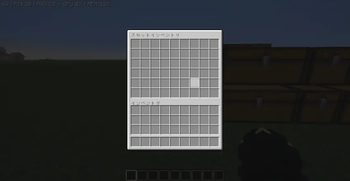
This mod allows earning new inventory slots with experience levels.
Screenshots
About this Mod
This is an unofficial fork of the Slots mod.
Slots(ketheroth) https://www.curseforge.com/minecraft/mc-mods/slots
It complies with the original MIT License.
In this mod, slots are unlocked as you gain experience and level up.
By default, one slot is unlocked every three levels (this can be changed in the settings).
The original game has a maximum of 27 slots, but this mod unlocks up to 54 slots.
If you die, any slots you’ve unlocked so far will be locked.
By default, you can open your inventory by pressing the Y key.
This mod uses ChatGPT.
Slots modの非公式フォーク版です。
Slots(ketheroth) https://www.curseforge.com/minecraft/mc-mods/slots
フォーク元のMIT Licenseに従っています
このmodは経験値レベルに応じてスロットが解放されていきます。
デフォルトでは3レベルごとに1スロット解放されます(設定で変更可能)
本家では最大27スロットですが、このmodでは、最大54スロット解放できます
死ぬとこれまでに解放したスロットがロックされます。
デフォルトではYキーでインベントリを開くことができます。
このmodはChatGPTを使用しています
Available Versions
How to Install Slots Unofficial on Your Server
Order Server
Order a Minecraft Java server with at least 3 GB RAM (4 GB recommended).
Set forge Loader
In the panel under "Egg", select the forge loader and matching Minecraft version (1.20.1).
Install Mod
Open the mod browser in the dashboard and search for "Slots Unofficial". Click "Install" – done! Alternatively, upload the .jar via SFTP to the /mods folder.
Compatibility
Mod Loaders
Minecraft Versions
1.20.1
Server-side
✓ RequiredRecommended RAM
4 GB(min. 3 GB)Frequently Asked Questions
Slots Unofficial server crashes on startup – what to do?
Most common cause: wrong forge version or insufficient RAM. Check the server log (latest.log) for "OutOfMemoryError" or "Mixin" errors. With Mado Hosting: ensure at least 3 GB RAM is allocated and the loader matches the mod version (1.20.1). You can switch loaders with one click in the panel.
Is Slots Unofficial compatible with forge?
Slots Unofficial officially supports forge for Minecraft 1.20.1. The Mado dashboard automatically detects incompatible loader combinations.
Server lagging with Slots Unofficial – how to optimize performance?
Recommended RAM: 4 GB (per 8 players). Use /spark profiler to check if Slots Unofficial consumes the most tick time. Common fixes: reduce server view-distance to 8-10, install "performant" or "starlight" as supplementary mods on Forge. With Mado Hosting, your server runs on NVMe SSDs with dedicated CPU cores for minimal latency.
Similar Mods


Rent Modded Server
Install Slots Unofficial with just one click on your server.