Sophisticated Backpacks: Advanced Crafting Upgrade
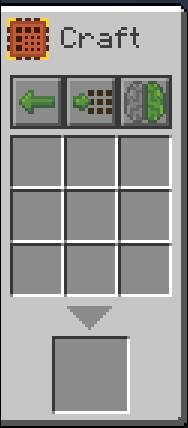
Adds an advanced Sophisticated Backpacks crafting upgrade that can craft using items inside nested backpacks.
Screenshots
About this Mod
Sophisticated Backpacks: Advanced Crafting
Adds an Advanced Crafting Upgrade for Sophisticated Backpacks, built for players who use nested backpack storage setups.
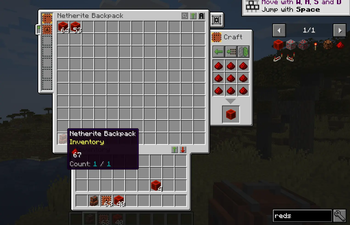
The upgrade works like the normal crafting upgrade, but can refill and craft using items stored inside backpacks that are accessible through Sophisticated Backpacks' inception-style nested storage behavior.
Features
- Adds a new Advanced Crafting Upgrade
- Craft directly from items inside nested backpacks
- JEI recipe transfer support for nested backpack contents
- Optional toggle to only pull from memorized backpack slots
- Works naturally with Sophisticated Backpacks' existing crafting upgrade UI
- Designed for compact, organized backpack-based crafting setups
Slot Memory Integration
The advanced upgrade can optionally restrict nested crafting pulls to backpack slots selected with Sophisticated Backpacks' slot memory feature.
This is useful if you only want crafting to pull from specific nested backpacks, such as a materials backpack, block backpack, or mob drops backpack, while ignoring other nested storage.
Requirements
- Minecraft 1.21.1
- NeoForge
- Sophisticated Backpacks
- Sophisticated Core
- JEI is optional, but supported
Notes
This mod is an addon for Sophisticated Backpacks and is intended to feel like a small extension of the original mod rather than a separate crafting system.
Available Versions
How to Install Sophisticated Backpacks: Advanced Crafting Upgrade on Your Server
Order Server
Order a Minecraft Java server with at least 3 GB RAM (4 GB recommended).
Set neoforge Loader
In the panel under "Egg", select the neoforge loader and matching Minecraft version (1.21.1).
Install Mod
Open the mod browser in the dashboard and search for "Sophisticated Backpacks: Advanced Crafting Upgrade". Click "Install" – done! Alternatively, upload the .jar via SFTP to the /mods folder.
Compatibility
Mod Loaders
Minecraft Versions
1.21.1
Server-side
✓ RequiredRecommended RAM
4 GB(min. 3 GB)Frequently Asked Questions
Sophisticated Backpacks: Advanced Crafting Upgrade server crashes on startup – what to do?
Most common cause: wrong neoforge version or insufficient RAM. Check the server log (latest.log) for "OutOfMemoryError" or "Mixin" errors. With Mado Hosting: ensure at least 3 GB RAM is allocated and the loader matches the mod version (1.21.1). You can switch loaders with one click in the panel.
Is Sophisticated Backpacks: Advanced Crafting Upgrade compatible with neoforge?
Sophisticated Backpacks: Advanced Crafting Upgrade officially supports neoforge for Minecraft 1.21.1. The Mado dashboard automatically detects incompatible loader combinations.
Server lagging with Sophisticated Backpacks: Advanced Crafting Upgrade – how to optimize performance?
Recommended RAM: 4 GB (per 8 players). Use /spark profiler to check if Sophisticated Backpacks: Advanced Crafting Upgrade consumes the most tick time. Common fixes: reduce server view-distance to 8-10, install "performant" or "starlight" as supplementary mods on Forge. With Mado Hosting, your server runs on NVMe SSDs with dedicated CPU cores for minimal latency.
Similar Mods


Rent Modded Server
Install Sophisticated Backpacks: Advanced Crafting Upgrade with just one click on your server.