
Systems Reworked: Enchanting
A vanilla+ overhaul of enchanting that fixes Minecraft's progression system.
Screenshots
About this Mod
Systems Reworked: Enchanting
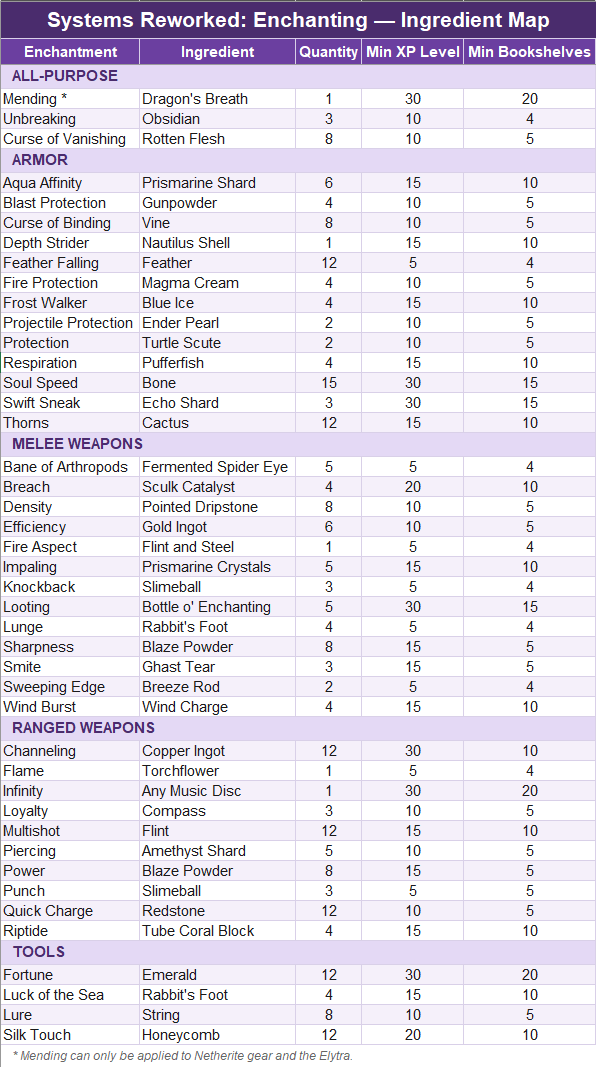
Enchanting should be a decision, not a dice roll. This mod tears out Minecraft's enchanting system and rebuilds it around one idea: every enchantment costs specific ingredients tied to the content that unlocks them (vanilla materials, no itemslop), progression is gated by exploration and effort, and you always know exactly what you're getting before you commit.
The Problem This Solves
Vanilla enchanting has a progression problem: there's no reason to enchant iron gear and lower level enchantments are useless. Since enchanting costs are identical regardless of tier, the optimal play is always to hoard lapis and bookshelves, skip enchanting iron entirely, and dump max enchants on diamond gear the moment you get it. Iron becomes a placeholder stage you rush through instead of a stage you actually play.
This mod fixes that by both making iron meaningfully cheaper to enchant than diamond and by making sure that your time invested in enchanted iron gear isn't wasted once you're ready to upgrade. The result is a much longer, more satisfying iron stage, with diamond feeling like a natural continuation of your progress instead of a hard reset.
How Enchanting Works Now
The Enchanting Table: To apply new enchantments
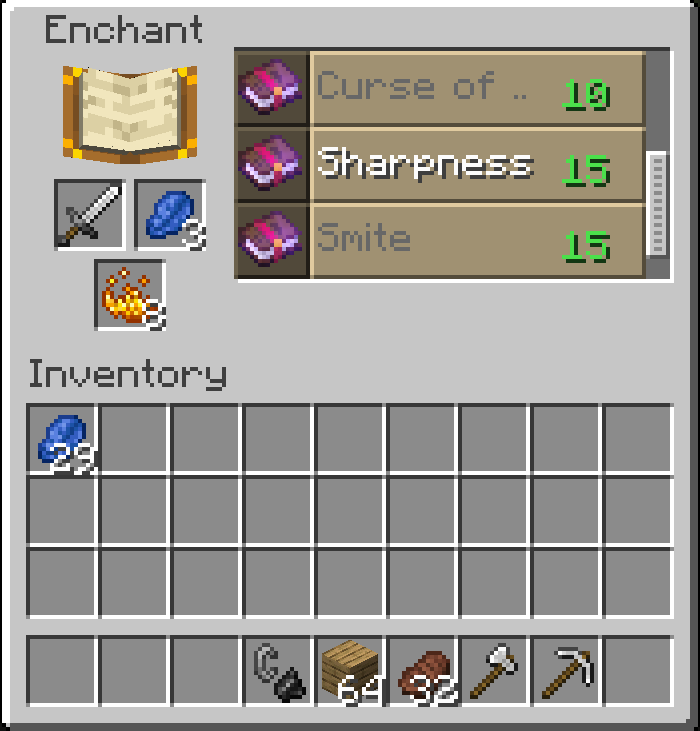
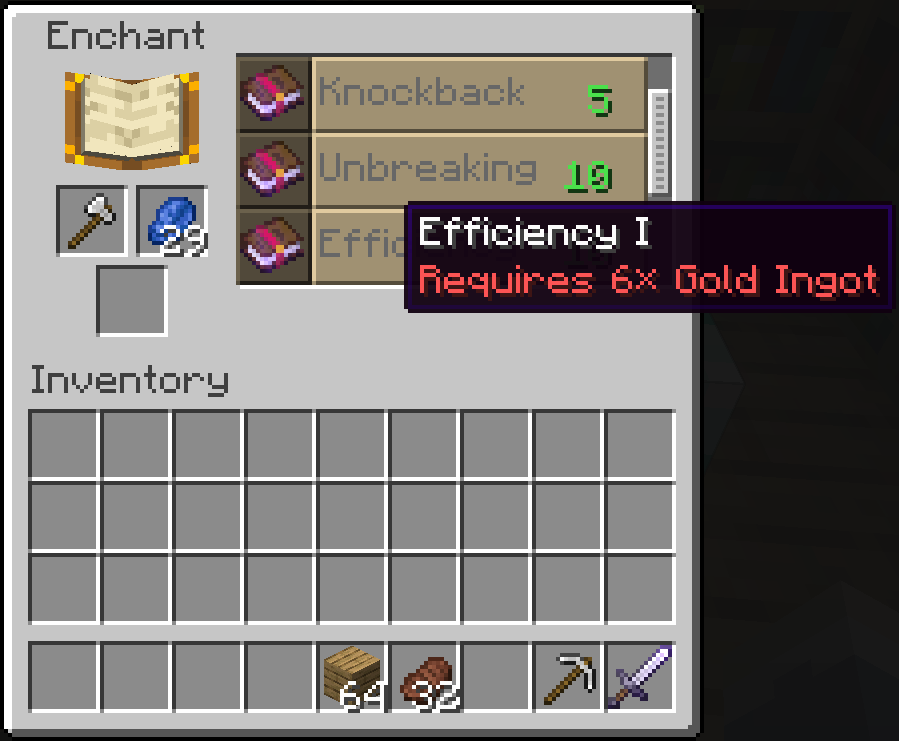
The table is where enchantments are first applied, and it's fully deterministic. No randomness, no slot machine. You place your gear and an ingredient, and the table shows you exactly which enchantment that ingredient unlocks, always at level 1.
- Bookshelves control which enchantments are visible in the table's list at all.
- XP level controls which visible enchantments can be clicked. XP represents the player's accumulated knowledge and experience in the world. You must be experienced enough to apply powerful enchantments. Enchants you aren't experienced enough to apply yet, are shown grayed out as a clear goal.
- The table costs 3 lapis + the ingredient. No XP is consumed at the table — the ingredient and lapis carry the cost.
The Anvil: To upgrade your gear
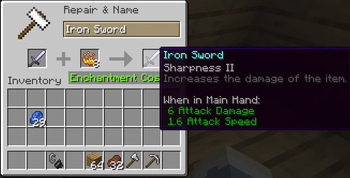
Every upgrade past level 1 happens here. Slot in your item and the same ingredient the table used for that enchantment, and the anvil advances it by one level.
- Costs a flat 5 XP levels per upgrade, regardless of which enchantment.
- Ingredient cost is fixed per enchantment on iron and below — and doubles on diamond and netherite gear.
- This is the core of the progression fix: upgrading iron gear is straightforwardly cheaper and faster than upgrading diamond, so there's a real, tangible reason to enchant your iron sword the day you get it instead of waiting.
- Levels apply sequentially — no skipping from I to III.
- The old "too expensive" anvil cap is gone entirely. An item can never become unworkable no matter how much history it's got.
- You can still combine enchanted books and gear you find through dungeon loot with your current gear, making finding enchanted items through exploration that much more rewarding as it allows you to skip levels of progression.
The Grindstone: To carry your progress forward
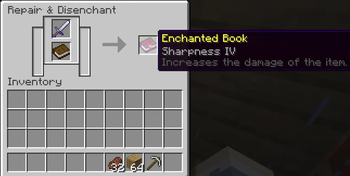
When you're ready to move from iron to diamond, you don't start over. Slot an enchanted item and a blank book into the grindstone, and it strips every enchantment off the item onto the book, each one level lower than it was (level 1 enchantments come back at level 1, never fully lost). Inspired by: Grind enchantments
This means the player who actually used their Sharpness II iron sword arrives at diamond with a Sharpness I book ready to go, only one upgrade level behind where they'd be if they'd had it on diamond the whole time. Playing your iron gear is now strictly better than banking around it.
Dying Doesn't Erase Your Progress
Enchanted gear (including enchanted books) no longer drops on death. Unenchanted items and your xp still drops exactly as it does in vanilla, so there's real risk, but now with the enchanting economy this much grindier, losing your enchanted tools and armor on top of that would be brutal. This again rewards players for enchanting their gear early with lower levels, as once your gear is enchanted, it is bound to you.
Reworked & Buffed Enchantments
Fire Protection IV now grants complete immunity to fire damage. It's no longer mutually exclusive with Blast Protection or Projectile Protection, so all three specialists can stack on one piece of armor; generic Protection remains the trade-off pick that covers everything at a lower rate. Fire Protection goes from a redundant Protection alternative to a dedicated Nether-survival enchantment nothing else replicates. This removes the objective "best" enchantment path, encouraging players to make actual choices and even have multiple sets of armor.
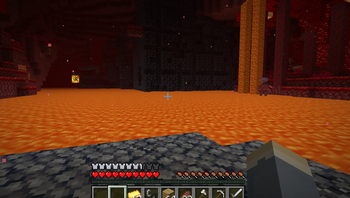
Frost Walker keeps its water-to-ice conversion but with the added functionality of turning lava into temporary basalt, letting you walk safely across lava lakes without taking damage. It is now a Nether traversal tool. Inspired by: Mallarad's Enchanting Rework
Smite and Bane of Arthropods are no longer mutually exclusive with each other. Each still triggers independently and doesn't compound with the other. Both remain exclusive with Sharpness, so you're choosing between all-purpose damage and a specialist build that covers undead and arthropods.
Horse Armor Gets Shiny
Horse armor can now be enchanted at the table and anvil using the same ingredients as player armor, gaining access to all three Protection types plus Frost Walker. A Frost Walker–enchanted horse can cross both water and lava, making horses a more viable mode of transport, especially when combined with other mods such as: Leaf Me Alone & Horseman.
Expanded Compatibility
- Axes can now take Sharpness, Smite, Bane of Arthropods, Fire Aspect, and Knockback. Sweeping Edge and Looting stay sword-exclusive.
- Bows and crossbows share most of their enchantments now (Power, Quick Charge, Piercing, Infinity and Flame work on both). Multishot stays crossbow-only and Punch stays bow-only.
- Tridents can be repaired with Prismarine Shards or Prismarine Crystals at the anvil instead of requiring another trident, which was one of vanilla's most punishing repair mechanics for a weapon you'll likely only own one of.
Mending Is a Prestige Enchantment
Mending only works on netherite gear and the elytra. It can't be applied at the table or via books at the anvil to any other item type. Netherite and the elytra already require serious investment to obtain, so Mending on them feels earned rather than mandatory, and material-based repair stays the primary way you maintain everything else.
Villager Trading Changes
Librarians no longer sell enchanted books at tier 1 or tier 2 as that was the main way to skip the entire enchanting system in vanilla. Tier 3+ trades remain as a mid-to-late game convenience that doesn't shortcut early or mid-game progression.
Requirements
- Loader: NeoForge 1.21.1
- Environment: Required on both client and server: the table's new GUI slot needs client rendering, and the enchanting rules need server-side enforcement, so this isn't a mod that degrades gracefully on just one side.
Copyright 2026 thefriend, Apache License 2.0. Please credit if you use or distribute my work.
Available Versions
How to Install Systems Reworked: Enchanting on Your Server
Order Server
Order a Minecraft Java server with at least 3 GB RAM (4 GB recommended).
Set neoforge Loader
In the panel under "Egg", select the neoforge loader and matching Minecraft version (1.21.1).
Install Mod
Open the mod browser in the dashboard and search for "Systems Reworked: Enchanting". Click "Install" – done! Alternatively, upload the .jar via SFTP to the /mods folder.
Compatibility
Mod Loaders
Minecraft Versions
1.21.1
Server-side
✓ RequiredRecommended RAM
4 GB(min. 3 GB)Frequently Asked Questions
Systems Reworked: Enchanting server crashes on startup – what to do?
Most common cause: wrong neoforge version or insufficient RAM. Check the server log (latest.log) for "OutOfMemoryError" or "Mixin" errors. With Mado Hosting: ensure at least 3 GB RAM is allocated and the loader matches the mod version (1.21.1). You can switch loaders with one click in the panel.
Is Systems Reworked: Enchanting compatible with neoforge?
Systems Reworked: Enchanting officially supports neoforge for Minecraft 1.21.1. The Mado dashboard automatically detects incompatible loader combinations.
Server lagging with Systems Reworked: Enchanting – how to optimize performance?
Recommended RAM: 4 GB (per 8 players). Use /spark profiler to check if Systems Reworked: Enchanting consumes the most tick time. Common fixes: reduce server view-distance to 8-10, install "performant" or "starlight" as supplementary mods on Forge. With Mado Hosting, your server runs on NVMe SSDs with dedicated CPU cores for minimal latency.
Similar Mods



![[TaCZ] Timeless and Classics Zero](https://cdn.modrinth.com/data/SzzJttH8/fd27766d2bb8390d284696b1dbd358f87e081439_96.webp)


Rent Modded Server
Install Systems Reworked: Enchanting with just one click on your server.