
UniversalFinder
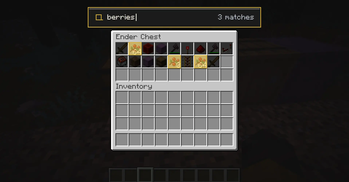
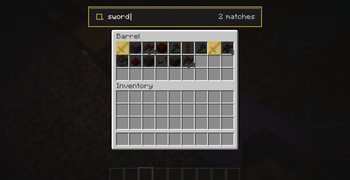
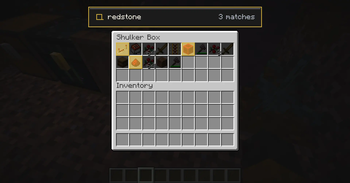
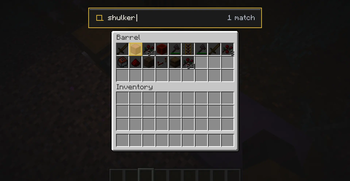
Universal Finder opens a search bar when a Chests, barrels, ender chests, shulkers, hoppers, etc is opened. it allows you to search any item present in that storage block which helps you to your precious time.
Screenshots
About this Mod
Universal Inventory Search
Find items instantly across supported storage containers with a fast, clean search interface.
Universal Inventory Search lets you search the contents of storage blocks without manually scanning every slot. Simply open a supported container, activate the search, and instantly filter items as you type.
Designed to feel like a natural part of Minecraft while staying lightweight and fast.
✨ Features
🔍 Instant real-time item search
📦 Works with most storage containers
⚡ Fast and lightweight
🎨 Clean, non-intrusive interface
🧩 Fabric compatible
💻 Minecraft 1.21.11
✅ Currently Supported
- Chests
- Double Chests
- Barrels
- Ender Chests
- Shulker Boxes
- Other vanilla storage containers
Note: Player inventory search is not available yet and will be added in a future update.
🚀 Planned Features
🔄 Player inventory search
⭐ Search result highlighting
⚙️ Configurable keybinds
🎨 UI improvements
📦 Better support for modded storage
🚀 Performance optimizations
📖 How to Use
- Open a supported storage container.
- click on the search tab above
- Start typing.
- Matching items update instantly.
❤️ Feedback
This is the first public release of Universal Inventory Search. If you encounter any bugs or have suggestions for new features, feedback is always appreciated.
Available Versions
How to Install UniversalFinder on Your Server
Order Server
Order a Minecraft Java server with at least 3 GB RAM (4 GB recommended).
Set fabric Loader
In the panel under "Egg", select the fabric loader and matching Minecraft version (1.21.11).
Install Mod
Open the mod browser in the dashboard and search for "UniversalFinder". Click "Install" – done! Alternatively, upload the .jar via SFTP to the /mods folder.
Compatibility
Mod Loaders
Minecraft Versions
1.21.11
Server-side
✗ UnsupportedRecommended RAM
4 GB(min. 3 GB)Frequently Asked Questions
UniversalFinder server crashes on startup – what to do?
Most common cause: wrong fabric version or insufficient RAM. Check the server log (latest.log) for "OutOfMemoryError" or "Mixin" errors. With Mado Hosting: ensure at least 3 GB RAM is allocated and the loader matches the mod version (1.21.11). You can switch loaders with one click in the panel.
Is UniversalFinder compatible with fabric?
UniversalFinder officially supports fabric for Minecraft 1.21.11. The Mado dashboard automatically detects incompatible loader combinations.
Server lagging with UniversalFinder – how to optimize performance?
Recommended RAM: 4 GB (per 8 players). Use /spark profiler to check if UniversalFinder consumes the most tick time. Common fixes: reduce server view-distance to 8-10, install "performant" or "starlight" as supplementary mods on Forge. With Mado Hosting, your server runs on NVMe SSDs with dedicated CPU cores for minimal latency.
Similar Mods


Rent Modded Server
Install UniversalFinder with just one click on your server.