
Whats Ur Name?你的名字?
用命名牌给朋友起个专属昵称吧!Give your friends a nickname with a name tag!
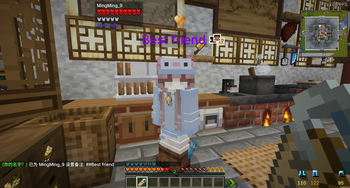
Screenshots
About this Mod
🏷️ 你的名字? (Whats Ur Name?)
用命名牌给朋友起个专属昵称吧!右键一下,备注到手——仅你自己看得见。
✨ 主要功能
| 操作 | 说明 |
|---|---|
| 设置备注 | 铁砧里给命名牌取名 → 右键玩家,该玩家头顶/Tab/聊天名字变为昵称 |
| 取消备注 | 手持空白命名牌右键已设备注的玩家 |
| 不消耗命名牌 | 无限次使用,随便改 |
| 彩色昵称 | 命名牌上带 §c §l 等格式码的昵称完整保留 |
| 彩虹模式 | 名字前加 ## 前缀(如 ##好朋友),昵称自动循环彩虹色 |
🎯 替换位置
| 位置 | 效果 |
|---|---|
| 头顶名称标签 | ✅ 替换为备注名 |
| Tab 列表 | ✅ 替换为备注名 |
| 聊天消息 | ✅ 朋友名字自动替换为备注名 |
🔧 兼容性说明
- 跨版本支持:同时提供 Fabric 1.21.1、NeoForge 1.21.1、Forge 1.20.1 三版本
- 客户端独立:纯客户端模组,服务器无需安装
- 存储位置:
config/whatsurname/{服务器地址}/notes.json,按服务器隔离 - Fabric 依赖:Fabric API (≥0.116.8)
- NeoForge / Forge:无额外依赖
English Version
🏷️ Whats Ur Name?
Give your friends a nickname with a name tag! Right-click to set a custom alias — visible only to you.
✨ Main Features
| Action | Description |
|---|---|
| Set Nickname | Name a name tag in an anvil → right-click a player to set their nickname |
| Remove | Right-click a nicknamed player with a blank name tag |
| No Consumption | Name tags are never consumed |
| Color Support | Full support for §c §l etc. formatting codes from the name tag |
| Rainbow Mode | Prefix with ## (e.g. ##BestFriend) for cycling rainbow colors |
🎯 What Gets Replaced
| Location | Effect |
|---|---|
| Name Tag (above head) | ✅ Replaced with nickname (rainbow mode animates) |
| Tab List | ✅ Replaced with nickname |
| Chat Messages | ✅ Friend's name auto-replaced |
🔧 Compatibility Notes
- Multi-Loader: Available for Fabric 1.21.1, NeoForge 1.21.1, and Forge 1.20.1
- Client-Only: Works on the client side only — no server installation needed
- Storage:
config/whatsurname/{server}/notes.json, isolated per server - Fabric: Requires Fabric API (≥0.116.8)
- NeoForge / Forge: No additional dependencies
Available Versions
How to Install Whats Ur Name?你的名字? on Your Server
Order Server
Order a Minecraft Java server with at least 3 GB RAM (4 GB recommended).
Set fabric Loader
In the panel under "Egg", select the fabric loader and matching Minecraft version (1.21.1).
Install Mod
Open the mod browser in the dashboard and search for "Whats Ur Name?你的名字?". Click "Install" – done! Alternatively, upload the .jar via SFTP to the /mods folder.
Compatibility
Mod Loaders
Minecraft Versions
1.21.1, 1.20.1
Server-side
✗ UnsupportedRecommended RAM
4 GB(min. 3 GB)Frequently Asked Questions
Whats Ur Name?你的名字? server crashes on startup – what to do?
Most common cause: wrong fabric version or insufficient RAM. Check the server log (latest.log) for "OutOfMemoryError" or "Mixin" errors. With Mado Hosting: ensure at least 3 GB RAM is allocated and the loader matches the mod version (1.21.1). You can switch loaders with one click in the panel.
Is Whats Ur Name?你的名字? compatible with fabric and forge and neoforge?
Whats Ur Name?你的名字? officially supports fabric, forge, neoforge for Minecraft 1.21.1, 1.20.1. Note: Forge and Fabric mods are NOT cross-compatible – pick one loader and stick with it. The Mado dashboard automatically detects incompatible loader combinations.
Server lagging with Whats Ur Name?你的名字? – how to optimize performance?
Recommended RAM: 4 GB (per 8 players). Use /spark profiler to check if Whats Ur Name?你的名字? consumes the most tick time. Common fixes: reduce server view-distance to 8-10, install "performant" or "starlight" as supplementary mods on Forge. With Mado Hosting, your server runs on NVMe SSDs with dedicated CPU cores for minimal latency.
Similar Mods






Rent Modded Server
Install Whats Ur Name?你的名字? with just one click on your server.