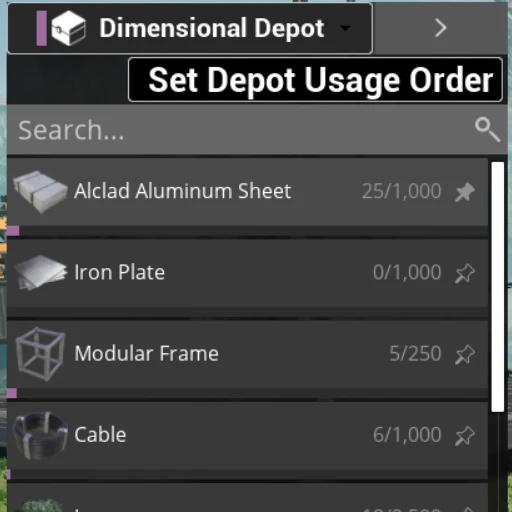
Additional Depots
This mod allows other mod authors to add Additional sources if items to their players, similar to the Dimensional Depot.
Description
Additional Depots
This mod allows other mod authors to add Additional sources if items to their players, in the form of depots, similar to the dimensional depot. The mod author will have full control over what items are available in the depot and how it behaves for the player.


Creating Depot Definition
In order to implement your own depots with the Additional Depots mod, you should get the code from github and place it inside a folder named `AdditionalDepots` inside your `SatisfactoryModLoader\Mods\` folder, then re-generate the visual studio project files and build the your modding projects developer-editor cpp side. once that is done open the edit and create a new resource of the type `AdditionDepotDefinition` and fill in the details as described below. Depot definition files do not need to registered, they are picked up automatically.
#
Depot Definition settings
The setting work as follows:
##
Identifier:
`Identifier`: an unique FName that is used to reference your specific depot by code (not visible to the user).##
Presentation:
`Name`: This display name of your depot.`Color`: The color corresponding to this depot, it wil be used to visually represent the depot in for example build costs.
`Icon`: An Icon that is displayed in player inventory menu for your depot.
##
Configuration:
`Max Type`: Controlls how many of a single item can be stored in the depot (can be changed at runtime)`Number of Stacks`: `Max Amount` will be the number of stacks that can be added.
`Total amout of items (shows current/max)`: `Max Amount` is an numeric hard cap, items in depot will show (current/max) and a progress bar of how full the entry is.
`Total amout of items only shows current`: `Max Amount` is an numeric hard cap, entries will show current amount and a progress bar of how filled the entry is.
`None (no progress bar)`: the numeric hard cap is the INT32_MAX (`2.147.483.647`), entries will show current amount but no progress bar will be shown.
`Max Amount`: works with `Max Type` (can be changed at runtime).
`Can Drag Items To Inventory`: Controls whether or not a player can drag a stack into his own personal inventory (can be changed at runtime).
`Can Be Used When Building`: Controls whether or not this depot can be directly used when crafting or building (can be changed at runtime, player can also turn this off for themself).
`Is Player Specific`: If checked, each player will have its own specific contents for this depot.
NOTE: if both `Can Drag Items To Inventory` and `Can Be Used When Building` are unchecked, then the depot will be read-only for the player, they can see it but cannot take anything out.
NOTE: Its currently not posable to Drag & Drop items from your inventory into a custom depot, they will instead go to the Dimensional Depot if its available, but this functionality can be added later if there is enough desire for it.
##
Savegame:
`Persist In Save Game`: If checked, contents of this depot will be persisted in the same game, otherwise the content is lost.Manipulating the Depot
This mod exposes the Additional Depots Server Subsystem, that can be obtained in blueprint as shown below, or in cpp like `AAdditionalDepotsClientSubsystem::Get(world)` or `AAditionalDepotsServerSubsystem::Get(world)`. The client subsystem is mostly used by the ui to display the depots and correctly take them into account when constructing things. To actually alter the contents of a depot the Server Subsystem should be used only.
#
Server subsystem
The server subsystem exposes the follow methods, and should be accessed from server code only. This ensures the replication is properly taken care off.##
Methods:
`SetDepotContent`: overrides the current content of a depot with the specified items/amounts.`SetItem`: set the amount for a specific item in a specific depot.
`Add/RemoveItem(s)`: Increments and decrements the amounts for specific item(s).
`GetItems`: the current item/amounts in a specific list.
`UpdateCanDragToInventory`: allow or disallow dragging to inventory.
`UpdateCanBeUsedForBuildingAndCrafting`: allow or disallow this depot to be used for building.
`UpdateMaxAmount`: Allows the maximum stored amount to be changed at runtime (does not truncate item amounts over the maximum).
##
Events:
`OnItemRemoved`: Fired when Add/RemoveItem(s) is called, will also fire in response to a client dragging items to their inventory`OnItemAdded`: Fired when Add/RemoveItem(s) is called, will also fire in response to a client dragging items to their inventory
`OnItemAmountUpdated`: Fixed when any item has its amount changed, used by replication system to replicate the new amounts
`OnConfigurationUpdated`: Fixed when a depot configuration is updated, used by replication system to replicate the new configuration
Versions
How to Install Additional Depots on Your Server
Order Satisfactory Server
Order a Satisfactory server with at least 4 GB RAM (6 GB recommended). For multiplayer: per 4 players.
Install Mod
Open the mod manager in the dashboard and search for "Additional Depots". Installation dependencies are installed automatically.
Restart Server
Restart the server so the mod is loaded. Players need to have the mod installed locally as well.
Frequently Asked Questions
Additional Depots not working after update – what to do?
After a Satisfactory update, mods need to be updated. Check ficsit.app whether Additional Depots has been updated for the new game version. With Mado Hosting: open the mod manager and click "Update All". If the mod hasn't been updated yet, temporarily remove it so the server starts.
Additional Depots causing crashes in multiplayer – solution
Most common cause: all players must have exactly the same mod version installed. Check server logs for "ModMismatch" or "Version Conflict". Ensure all players use Additional Depots v1.1.4 and the same SML. With Mado Hosting, Satisfactory servers run with 6 GB RAM for stable multiplayer performance.
Is Additional Depots compatible with other Satisfactory mods?
Additional Depots uses the Satisfactory Mod Loader (SML). Generally, SML-based mods are cross-compatible, but mods modifying the same game systems can cause conflicts. Test new mod combinations on a backup save. The Mado dashboard automatically detects known conflicts and warns you.
Rent Additional Depots Server
Play Additional Depots on your own Satisfactory server with mod support.
Mod Information
- Author
- Jarno458
- Latest Version
- v1.1.4
- Created
- April 3, 2026
- Last Updated
- July 7, 2026
- Source Code
- GitHub →