In Game Calculator Mod
Adds a real calculator and Sticky Notes
Description
SF Calculator & Sticky Notes: Your In-Game Math Wizard
Tired of juggling numbers and forgetting important notes in Satisfactory? Fear not, for the SF Calculator & Sticky Notes mod is here to save the day!
#
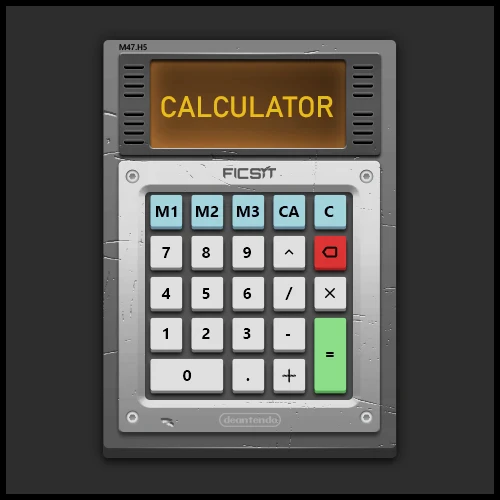
Ficsit Calculator
#
Sticky Notes
Key Features:
- Calculator: Perform complex calculations without leaving the game.
- Sticky Notes: Jot down important information, recipes, or reminders.
- Customizable: Adjust key bindings, sticky note transparency, and more.
- User-Friendly: Intuitive interface and easy-to-use controls.
How to Use:
- Open Calculator: Press F9 to summon your trusty calculator.
- Calculate Away: Use the buttons or number pad to perform calculations.
- Create Sticky Notes: Press F8 to create a new note.
- Customize Notes: Change colours, resize, and drag them around.
Additional Features:
- Toggle Mouse Cursor: Press F6 to switch between the game and the calculator.
- Hide/Show Notes: Use F7 and Shift+F7 to manage note visibility.
- Remap Key Bindings: Customize shortcuts to your liking.
Important Note: Key bindings only work when you're not actively using the calculator.
Known Limitations:
While the mod is stable, minor bugs may still exist. Please report any issues on the GitHub repository.
Not all original features from the previous version have been ported yet.
Contributing:
- Report Issues: Share bugs or suggestions on the GitHub issues page.
- Request Features: Suggest new functionalities for future updates.
- Provide Feedback: Let us know your thoughts and experiences with the mod.
Credits:
- Rusketh/Marcess: Primary developer and creator.
- Deantendo: Designer of the mod's graphics.
- SML Mod Team: Essential contributors to the Satisfactory modding community.
Versions
How to Install In Game Calculator Mod on Your Server
Order Satisfactory Server
Order a Satisfactory server with at least 4 GB RAM (6 GB recommended). For multiplayer: per 4 players.
Install Mod
Open the mod manager in the dashboard and search for "In Game Calculator Mod". Installation dependencies are installed automatically.
Restart Server
Restart the server so the mod is loaded. Players need to have the mod installed locally as well.
Frequently Asked Questions
In Game Calculator Mod not working after update – what to do?
After a Satisfactory update, mods need to be updated. Check ficsit.app whether In Game Calculator Mod has been updated for the new game version. With Mado Hosting: open the mod manager and click "Update All". If the mod hasn't been updated yet, temporarily remove it so the server starts.
In Game Calculator Mod causing crashes in multiplayer – solution
Most common cause: all players must have exactly the same mod version installed. Check server logs for "ModMismatch" or "Version Conflict". Ensure all players use In Game Calculator Mod v1.0.1 and the same SML. With Mado Hosting, Satisfactory servers run with 6 GB RAM for stable multiplayer performance.
Is In Game Calculator Mod compatible with other Satisfactory mods?
In Game Calculator Mod uses the Satisfactory Mod Loader (SML). Generally, SML-based mods are cross-compatible, but mods modifying the same game systems can cause conflicts. Test new mod combinations on a backup save. The Mado dashboard automatically detects known conflicts and warns you.
Rent In Game Calculator Mod Server
Play In Game Calculator Mod on your own Satisfactory server with mod support.
Mod Information
- Author
- Rusketh
- Latest Version
- v1.0.1
- Created
- September 20, 2024
- Last Updated
- July 8, 2026
- Source Code
- GitHub →