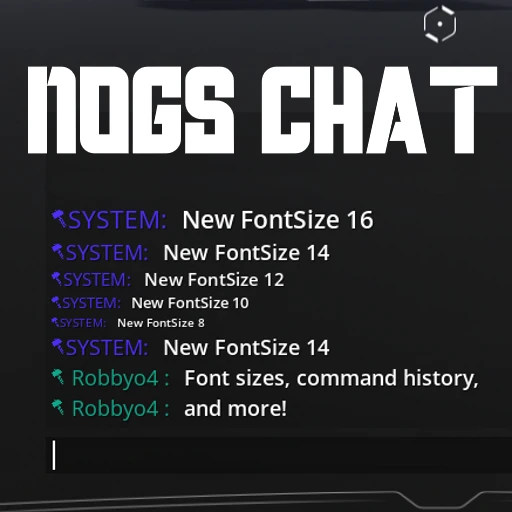
Nog's Chat
Chat font resizing, command autocomplete, sent message history
Description
This mod is not currently planned to be updated, use https://ficsit.app/mod/NewChat instead!
This mod currently maintained by Robb#6731
This mod works in multiplayer - host and client can have separate settings.
See the mod icon for an example screenshot.
This mod enhances the in-game Chat and lets you...
- Adjust the font size (8, 10, 12, 14, 16 accepted)
- Fit more messages on screen at once, or make the chat window take up less space
- Clients must use the Mod Configs screen (not the chat commands) to change the configs for the client side.
- Store history of your past entered commands, stored per-game save file.
- Use the Up and Down arrow keys to navigate command history while chat is open
- 100 items saved by default, configurable from the Mod Configs screen.
- Press TAB to autocomplete the slash command you're typing
- See it in action here: <https://streamable.com/ry33nz> (HUD flashing in the video due to a graphics issue with my recording software, it doesn't do that in-game)
Configure these settings via chat commands (explained by a help tooltip in-game) or from the Mod Configs screen.
Questions? Suggestions? Join the [Nog's Mods Discord server](https://discord.gg/CPeJJrXpth)
Known Bugs
- Saved command history only works correctly for the host
These two base-game bugs currently affect the chat window and are not due to Nog's Chat:
- [Pressing escape to close chat requires pressing enter twice to open it next time](https://questions.satisfactorygame.com/post/64c4673e87a1e63b6cee92c3)
- [Clicking in the chat history scrollbox locks you into the chat widget](https://questions.satisfactorygame.com/post/64c4686487a1e63b6cee92c5)
Versions
How to Install Nog's Chat on Your Server
Order Satisfactory Server
Order a Satisfactory server with at least 4 GB RAM (6 GB recommended). For multiplayer: per 4 players.
Install Mod
Open the mod manager in the dashboard and search for "Nog's Chat". Installation dependencies are installed automatically.
Restart Server
Restart the server so the mod is loaded. Players need to have the mod installed locally as well.
Frequently Asked Questions
Nog's Chat not working after update – what to do?
After a Satisfactory update, mods need to be updated. Check ficsit.app whether Nog's Chat has been updated for the new game version. With Mado Hosting: open the mod manager and click "Update All". If the mod hasn't been updated yet, temporarily remove it so the server starts.
Nog's Chat causing crashes in multiplayer – solution
Most common cause: all players must have exactly the same mod version installed. Check server logs for "ModMismatch" or "Version Conflict". Ensure all players use Nog's Chat v1.0.1 and the same SML. With Mado Hosting, Satisfactory servers run with 6 GB RAM for stable multiplayer performance.
Is Nog's Chat compatible with other Satisfactory mods?
Nog's Chat uses the Satisfactory Mod Loader (SML). Generally, SML-based mods are cross-compatible, but mods modifying the same game systems can cause conflicts. Test new mod combinations on a backup save. The Mado dashboard automatically detects known conflicts and warns you.
Rent Nog's Chat Server
Play Nog's Chat on your own Satisfactory server with mod support.
Mod Information
- Author
- Nogg-aholic, Robb
- Latest Version
- v1.0.1
- Created
- June 8, 2021
- Last Updated
- July 8, 2026
- Source Code
- GitHub →