SatisManager
Check all aspects of your factories from anywhere! HUD Ping, Map Ping, Teleport to Machine included!
Description
<span style="color:#1BA300;">You can open the mod interface by pressing 'G' (can be changed in game setting menu).</span>
<br>
Features:
Quick Building Access
Every building icon has 4 small icons on top</u>.> Ping - HUD ping at location(same as regular alt+click ping visual)
> Show on map- Open map and places a temporarily orange dot in place of building.
> Teleport - Teleports player to that building.
> Start/Stop - Put building on pause or start it.
<br>
Quality of Life
> Auto-Open HUB/MAM - Will open interface on ship return/research completion. <br><span style="color:#FF0000;">(If no other window is opened and no hostile creatures nearby)</span>
<span style="color:#FFA500;">
>
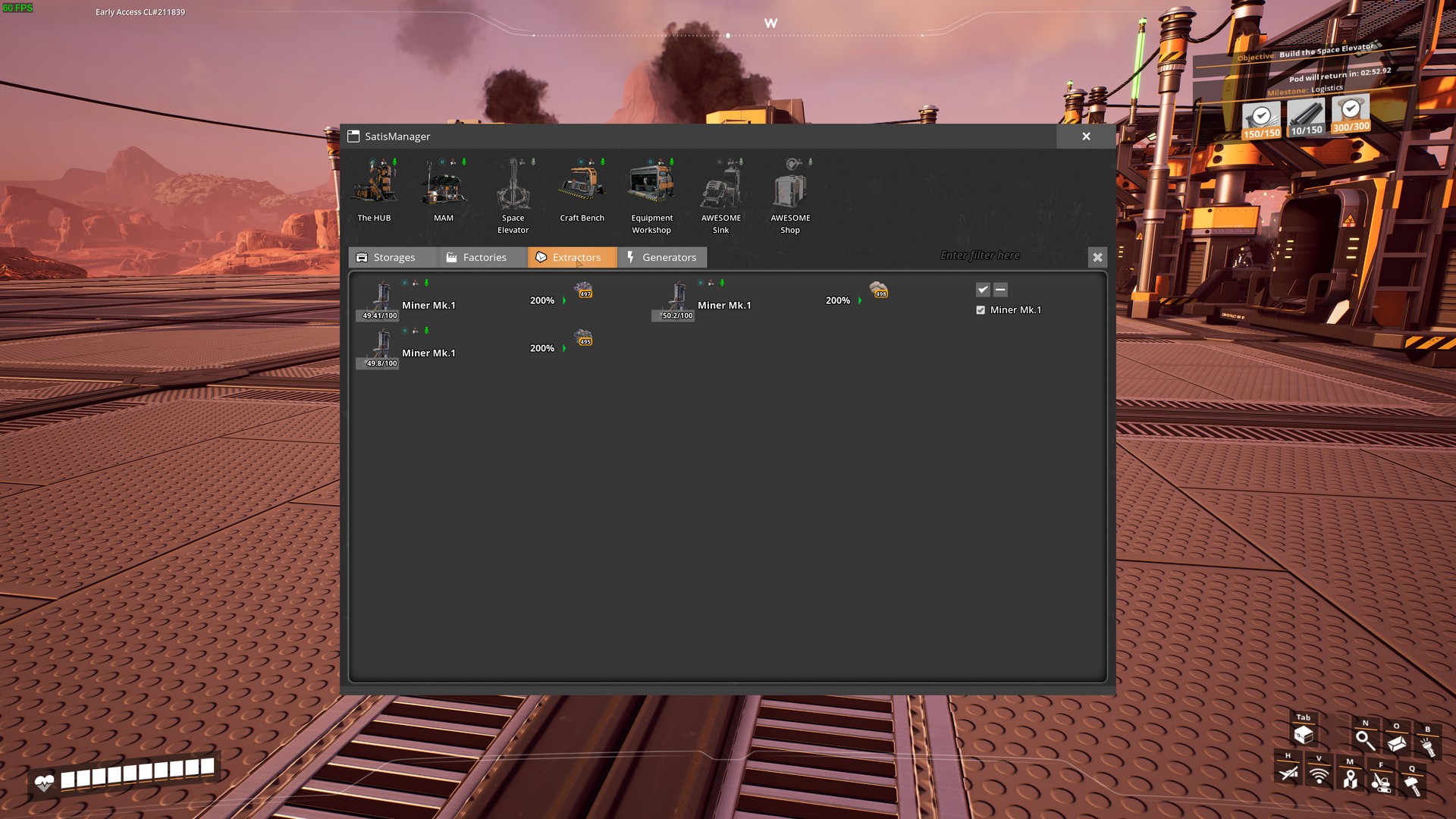
Highlight nearby pickupable items - Press "L" to highlight items. <br> <span style="color:#009EE3;">(Can be changed in game settings menu)</span>> Area with buttons to access game-significant buildings anywhere. Greyed out is not built. (HUB/MAM/Space Elevator/Workbench/Equipment Workshop/AWESOME Sink/AWESOME Shop/<span style="color:#FFD700;">PowerSuit Fabrication Station</span><span style="color:#FF0000;"><a href="https://ficsit.app/mod/ArmorModules__Modpack_All" >[Requires PowerSuit mod]</a>
4 Tabs with Different Building Categories.
StorageProduction
Extractors
Generators
#
Tab Options
Main Filter field - if anything is entered in this field, tabs will be filtered by name and content. <br><span style="color:#FF0000;">(MP Compatibility<sup>1</sup>)</span>
Building Type filter on every tab - Only those buildings of checked type will be shown. <br>
<span style="color:#009EE3;">(Stacks with main filter)</span>
><span style="color:#FFA500;"><i>For example</i> :</span> If you select coal, than only buildings with coal in name/inventory<span style="color:#009EE3;">(for storages)</span>, or in recipe<span style="color:#009EE3;">(for factories)</span> ,or in fuel<span style="color:#009EE3;">(for generators)</span>,or in resource<span style="color:#009EE3;">(for extractors)</span> will be shown. Click on building icon - Will open its interaction interface.
* Click on building name - Will let you enter a custom name for that building.
Factories, extractors and generators will sometimes have a <span style="color:#FF0000;">red</span>/<span style="color:#ddee00;">yellow</span> border around some of their contents. </span>
<span style="color:#FF0000;">Red</span> means that there is not enough of that resource to start production cycle/produce power. <span style="color:#ddee00;">Yellow</span> means the stack is full.
>> <span style="color:#FF0000;"><sup>1</sup>MP Compatibility</span> - if you're not the host, then there is no live updates on building contents, and filtering is performed only by building's names.
Screenshots:




You can leave any issue, suggestions on [My github](https://github.com/DeadMor0z/SatisfactoryMods/issues) page.
Or contact me (DeadMoroz#9600) on [Discord](https://discord.com/invite/xkVJ73E)
Big thanks [xXdrewbaccaXx](https://ficsit.app/user/12NfPnFLRcnmRP/) for mod icon!
Versions
How to Install SatisManager on Your Server
Order Satisfactory Server
Order a Satisfactory server with at least 4 GB RAM (6 GB recommended). For multiplayer: per 3 players.
Install Mod
Open the mod manager in the dashboard and search for "SatisManager". Installation dependencies are installed automatically.
Restart Server
Restart the server so the mod is loaded. Players need to have the mod installed locally as well.
Frequently Asked Questions
SatisManager not working after update – what to do?
After a Satisfactory update, mods need to be updated. Check ficsit.app whether SatisManager has been updated for the new game version. With Mado Hosting: open the mod manager and click "Update All". If the mod hasn't been updated yet, temporarily remove it so the server starts.
SatisManager causing crashes in multiplayer – solution
Most common cause: all players must have exactly the same mod version installed. Check server logs for "ModMismatch" or "Version Conflict". Ensure all players use SatisManager v1.1.4 and the same SML. With Mado Hosting, Satisfactory servers run with 6 GB RAM for stable multiplayer performance.
Is SatisManager compatible with other Satisfactory mods?
SatisManager uses the Satisfactory Mod Loader (SML). Generally, SML-based mods are cross-compatible, but mods modifying the same game systems can cause conflicts. Test new mod combinations on a backup save. The Mado dashboard automatically detects known conflicts and warns you.
Rent SatisManager Server
Play SatisManager on your own Satisfactory server with mod support.
Mod Information
- Author
- xXdrewbaccaXx, DeadMoroz
- Latest Version
- v1.1.4
- Created
- May 27, 2023
- Last Updated
- July 8, 2026