
сборка OV3RN
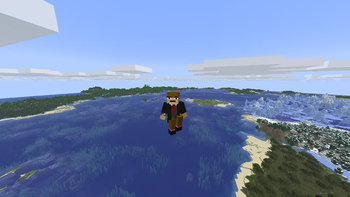
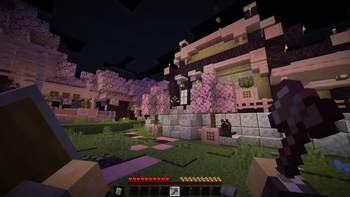
[EN] A highly optimized client-side modpack focusing on FPS boost, visual enhancements, and powerful tools for builders & creators (Axiom, Litematica, Flashback). [RU] Оптимизированная клиентская сборка с улучшенным визуалом и инструментами для строителей.
Screenshots
About this Modpack
🇬🇧 English Description
Welcome to the OV3RN Modpack! This is a carefully curated, client-side modpack designed to drastically improve game performance, enhance the vanilla visual experience, and provide powerful tools for builders and content creators.
❓ Why download this modpack?
If you want to play Minecraft with incredibly high FPS, enjoy beautiful shaders without lag, and use advanced tools to build or record videos, this pack is for you. It maintains the vanilla feel while adding massive quality-of-life (QoL) improvements. You can even easily play with your friends without buying a server!
✨ Key Features:
- ⚡ Ultimate Performance: Powered by the full Sodium ecosystem (Sodium, Lithium, EntityCulling, FerriteCore). Expect massive FPS boosts, faster chunk loading, and reduced RAM usage.
- 🎨 Visual Enhancements: Includes Iris for shaders support, Continuity for connected textures, and Entity Texture/Model Features for full OptiFine resource pack parity. Enjoy dynamic lights and a better UI.
- 🛠️ Builder & Creator Tools: Packed with essential tools like Axiom (advanced world editing), Litematica (schematics), and Flashback (replay recording). Perfect for building huge structures and making videos.
- 🗺️ Navigation & QoL: Features Xaero's Minimap & World Map, Inventory Profiles Next for easy sorting, AppleSkin, and e4mc (open your single-player world to friends via a simple link).
Note: This modpack was originally created for private use but is shared here for anyone who wants a solid, performance-heavy creator client!
🇷🇺 Русское описание
Добро пожаловать в OV3RN Modpack! Это тщательно настроенная клиентская сборка, созданная для значительного повышения производительности, улучшения ванильного визуала и предоставления мощных инструментов для строителей и контент-мейкеров.
❓ Зачем скачивать эту сборку?
Если вы хотите играть в Minecraft с невероятно высоким FPS, наслаждаться красивыми шейдерами без лагов и использовать продвинутые инструменты для строительства или записи видео — эта сборка для вас. Она сохраняет ванильную атмосферу, добавляя при этом массу удобств. Вы даже сможете легко играть с друзьями без покупки сервера!
✨ Главные особенности:
- ⚡ Максимальная производительность: Базируется на экосистеме Sodium (Sodium, Lithium, EntityCulling, FerriteCore). Ожидайте огромный прирост FPS, быструю прогрузку чанков и снижение потребления ОЗУ.
- 🎨 Улучшенный визуал: Включает Iris для шейдеров, Continuity для соединенных текстур и Entity Texture/Model Features для полной поддержки ресурспаков от OptiFine. Наслаждайтесь динамическим освещением и приятным интерфейсом.
- 🛠️ Инструменты для творчества: Содержит незаменимые моды: Axiom (продвинутый редактор мира), Litematica (схемы построек) и Flashback (запись реплеев). Идеально для масштабных проектов и съемок.
- 🗺️ Навигация и удобство: Включает мини-карту и карту мира Xaero, удобную сортировку инвентаря (Inventory Profiles Next), AppleSkin и мод e4mc (позволяет открыть одиночный мир для друзей по ссылке).
Available Versions
How to Set Up a сборка OV3RN Server
Order Server
Choose at least 4 GB RAM (6 GB recommended for сборка OV3RN). Based on player count: per 8 players.
Install Modpack in Dashboard
Open the modpack browser in the dashboard, search for "сборка OV3RN" and click "Install". The fabric loader and Minecraft 1.21.11 are configured automatically.
Start Server & Play
Start the server – all mods are loaded automatically. Share the server IP with friends and play together!
Frequently Asked Questions
сборка OV3RN server crashes or won't start – what to do?
Most common causes: insufficient RAM or wrong fabric loader. Check latest.log for "OutOfMemoryError" → increase RAM to at least 6 GB. For "Mixin" or "ClassNotFoundException" errors: modpack version and loader don't match. With Mado Hosting, loader and Minecraft version are auto-configured on modpack install – preventing most startup issues.
How much RAM does a сборка OV3RN server really need?
Minimum 4 GB, recommended 6 GB for stable performance. per 8 players. Important: Minecraft modpacks need more RAM than vanilla – plan extra per additional player. With Mado Hosting, you can scale RAM up live at any time without data loss (from €8/month).
Can I add custom mods to сборка OV3RN without conflicts?
Yes, but check compatibility: only use mods for the same loader (fabric) and same Minecraft version (1.21.11). Common issues: ID conflicts with recipe mods and incompatible coremod versions. The Mado dashboard mod browser only shows compatible mods and warns about known conflicts.
сборка OV3RN server lagging – performance tips
1) Increase RAM to 6 GB+. 2) Reduce server view-distance to 8 (server.properties). 3) Pre-generate chunks with the "Chunky" plugin. 4) Use /spark profiler to check which mods consume the most tick time. With Mado Hosting, all servers run on NVMe SSDs with dedicated CPU cores – eliminating hardware as a bottleneck.
Similar Modpacks


![Cobblemon Official Modpack [Fabric]](https://cdn.modrinth.com/data/5FFgwNNP/e7f9ee2e9d361623847853fe2ddce42f519ee64f.png)
![COBBLEVERSE - Pokemon Adventure [Cobblemon]](https://cdn.modrinth.com/data/Jkb29YJU/581ecf54530972afb18a04660afd820f2f24f6c7.png)
![Better MC [FABRIC] - BMC2](https://cdn.modrinth.com/data/shFhR8Vx/a19c2bcb51d38f32f138d3607e91cb2b7b8e387f_96.webp)

Rent сборка OV3RN Server
Start your own server with automatic modpack installation.
Supported Versions
Start your сборка OV3RN Server now
From €8.00/month with 6 GB RAM for the best performance.
Configure Server →