
2Old4Pack
Modpack for 2ol4stream community
Screenshots
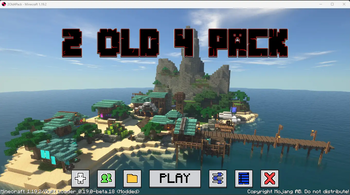
About this Modpack

Description
This mod pack is create for the 2old4stream community. It include all about utilities to make the game opti, with more exploration and mechanisms.
How to install
Use MultiMc to manage the game instance.
The modpack is publish on https://modrinth.com (see doc)
Mods
Mods List
Ad Astra
AppleSkin
Architectury API
Audio Extension for FancyMenu
Auudio
Balm
BanHammer
BetterF3
Botarium
Cloth Config API
Continuity
Create Fabric
Croptopia
Dynamic FPS
Emotecraft
FancyMenu
FerriteCore
Fish of Thieves
Get Off My Lawn ReServed
Indium
Inspecio
Iris Shaders
Jade 🔍
JourneyMap
Konkrete
LambDynamicLights
LazyDFU
Lexicon
Light Overlay
Litematica
Lithium
Lootr (Fabric)
MaLiLib
Malum (Quilt)
Memory Leak Fix
Mining Dimensions [FABRIC]
Mod Menu
Moonlight Lib
Nature's Compass
No Telemetry
Patchouli
Purpeille
Quilted Fabric API (QFAPI) / Quilt Standard Libraries (QSL)
Roughly Enough Items (REI)
Resourceful Config
Resourceful Lib
Simple Voice Chat
Sky Villages
Sodium
Starlight (Fabric)
Supplementaries
Textile Backup
Traveler's Backpack
Trinkets
Ultris: Boss Expansion
Universal Graves
Vinery
Waystone Towers
Waystones
WorldEdit
YUNG's API
YUNG's Better Dungeons
YUNG's Better Mineshafts
YUNG's Better Nether Fortresses
YUNG's Better Ocean Monuments
YUNG's Better Strongholds
YUNG's Better Witch Huts
YUNG's Bridges
YUNG's Extras
Available Versions
How to Set Up a 2Old4Pack Server
Order Server
Choose at least 6 GB RAM (8 GB recommended for 2Old4Pack). Based on player count: per 5 players.
Install Modpack in Dashboard
Open the modpack browser in the dashboard, search for "2Old4Pack" and click "Install". The quilt loader and Minecraft 1.19.2 are configured automatically.
Start Server & Play
Start the server – all mods are loaded automatically. Share the server IP with friends and play together!
Frequently Asked Questions
2Old4Pack server crashes or won't start – what to do?
Most common causes: insufficient RAM or wrong quilt loader. Check latest.log for "OutOfMemoryError" → increase RAM to at least 8 GB. For "Mixin" or "ClassNotFoundException" errors: modpack version and loader don't match. With Mado Hosting, loader and Minecraft version are auto-configured on modpack install – preventing most startup issues.
How much RAM does a 2Old4Pack server really need?
Minimum 6 GB, recommended 8 GB for stable performance. per 5 players. Important: Minecraft modpacks need more RAM than vanilla – plan extra per additional player. With Mado Hosting, you can scale RAM up live at any time without data loss (from €12/month).
Can I add custom mods to 2Old4Pack without conflicts?
Yes, but check compatibility: only use mods for the same loader (quilt) and same Minecraft version (1.19.2). Common issues: ID conflicts with recipe mods and incompatible coremod versions. The Mado dashboard mod browser only shows compatible mods and warns about known conflicts.
2Old4Pack server lagging – performance tips
1) Increase RAM to 8 GB+. 2) Reduce server view-distance to 8 (server.properties). 3) Pre-generate chunks with the "Chunky" plugin. 4) Use /spark profiler to check which mods consume the most tick time. With Mado Hosting, all servers run on NVMe SSDs with dedicated CPU cores – eliminating hardware as a bottleneck.
Similar Modpacks
![Cobblemon Official Modpack [Fabric]](https://cdn.modrinth.com/data/5FFgwNNP/e7f9ee2e9d361623847853fe2ddce42f519ee64f.png)
![COBBLEVERSE - Pokemon Adventure [Cobblemon]](https://cdn.modrinth.com/data/Jkb29YJU/581ecf54530972afb18a04660afd820f2f24f6c7.png)
![Better MC [FABRIC] - BMC2](https://cdn.modrinth.com/data/shFhR8Vx/a19c2bcb51d38f32f138d3607e91cb2b7b8e387f_96.webp)


![Better MC [FORGE] - BMC4](https://cdn.modrinth.com/data/4BV47HRn/7f5ef7cc61b2593609aabef3ed07a866a4f11b73_96.webp)
Rent 2Old4Pack Server
Start your own server with automatic modpack installation.
Supported Versions
Start your 2Old4Pack Server now
From €12.00/month with 8 GB RAM for the best performance.
Configure Server →