
A Cube Sugar
Just as putting a cube of sugar into your game🍵
Screenshots
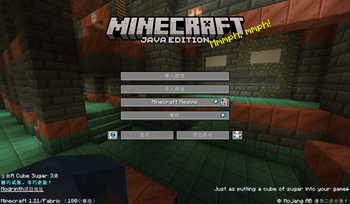

About this Modpack
A Cube Sugar
方糖整合包,给你的MC加块糖
介绍
A Cube Sugar 3.0, 棘巧试炼,奇巧更新!
在较高版本,配置低的电脑在游玩时会出现较为严重的卡顿(这归功于mojang的劣质优化)
此整合包应运而生
它能让你的MC更加丝滑
由新兴渲染canvas(部分版本为sodium) lithium c2me等强劲驱动,游戏体验超级加倍
同时增加了许多附属功能
如3D皮肤显示,左上角迷你F3,安全挂机,小地图等
若需使用Chat Tools的toast通知,请手动在命令框输入/chattools download
预配置键位(部分生效)如图所示:
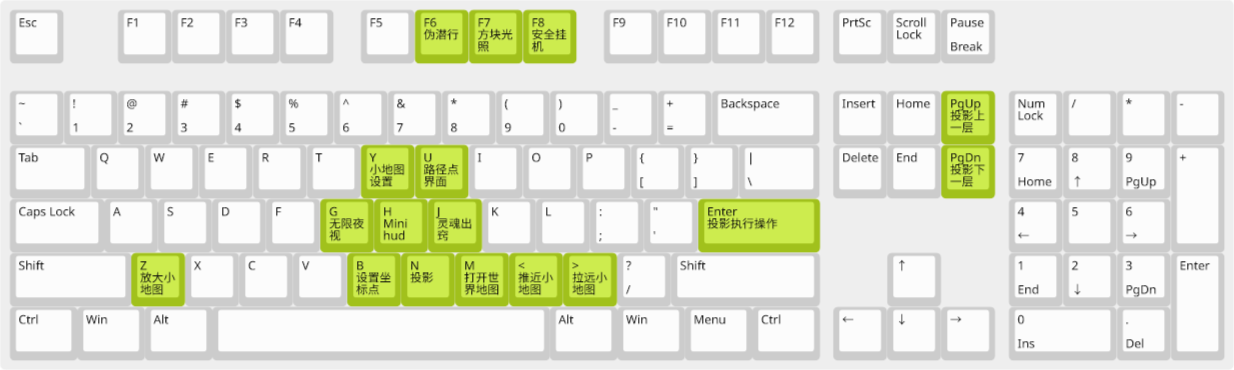
也附带了一些好看的材质包:XKSP及其附属(夹带私货)
打包
使用ATLauncher打包
使用方法
使用主流启动器:
- ATLauncher
- MultiMC及其衍生版
- HMCL及其衍生版
- BakaXL
- PCL
将整合包按照启动器作者的教程导入即可启动
如果你在使用BakaXL,可在笨蛋广场搜索整合包名称并添加
如果你在使用ATLauncher,可在"Packs"界面搜索整合包名称并添加
注意:
——中文Minecraft Wiki

使用Azul Zulu JDK以达到最佳性能
Azul Zulu JDK : https://www.azul.com/downloads
材质包列表
- Squareful
- ......
LICENSE

本作品采用知识共享署名-非商业性使用-相同方式共享 4.0 国际许可协议进行许可。
Available Versions
How to Set Up a A Cube Sugar Server
Order Server
Choose at least 4 GB RAM (6 GB recommended for A Cube Sugar). Based on player count: per 8 players.
Install Modpack in Dashboard
Open the modpack browser in the dashboard, search for "A Cube Sugar" and click "Install". The fabric loader and Minecraft 1.21 are configured automatically.
Start Server & Play
Start the server – all mods are loaded automatically. Share the server IP with friends and play together!
Frequently Asked Questions
A Cube Sugar server crashes or won't start – what to do?
Most common causes: insufficient RAM or wrong fabric loader. Check latest.log for "OutOfMemoryError" → increase RAM to at least 6 GB. For "Mixin" or "ClassNotFoundException" errors: modpack version and loader don't match. With Mado Hosting, loader and Minecraft version are auto-configured on modpack install – preventing most startup issues.
How much RAM does a A Cube Sugar server really need?
Minimum 4 GB, recommended 6 GB for stable performance. per 8 players. Important: Minecraft modpacks need more RAM than vanilla – plan extra per additional player. With Mado Hosting, you can scale RAM up live at any time without data loss (from €8/month).
Can I add custom mods to A Cube Sugar without conflicts?
Yes, but check compatibility: only use mods for the same loader (fabric) and same Minecraft version (1.21). Common issues: ID conflicts with recipe mods and incompatible coremod versions. The Mado dashboard mod browser only shows compatible mods and warns about known conflicts.
A Cube Sugar server lagging – performance tips
1) Increase RAM to 6 GB+. 2) Reduce server view-distance to 8 (server.properties). 3) Pre-generate chunks with the "Chunky" plugin. 4) Use /spark profiler to check which mods consume the most tick time. With Mado Hosting, all servers run on NVMe SSDs with dedicated CPU cores – eliminating hardware as a bottleneck.
Rent A Cube Sugar Server
Start your own server with automatic modpack installation.
Details
- License
- Creative Commons Attribution Non Commercial Share Alike 4.0 International
- Server-side
- Unsupported
- Client-side
- Required
Supported Versions
Start your A Cube Sugar Server now
From €8.00/month with 6 GB RAM for the best performance.
Configure Server →