
A Little More Survival
Heavily opinionated changes to survival.
Screenshots
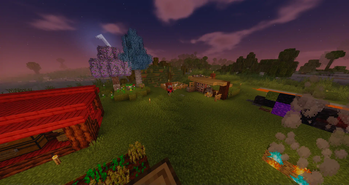
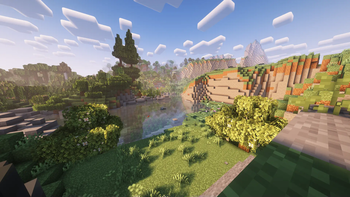
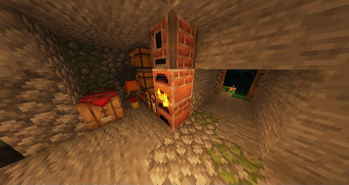
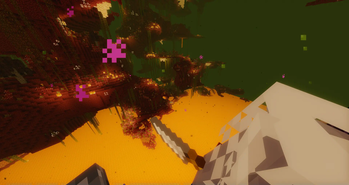
About this Modpack
What it says on the tin.
Rebalancing survival to do a few things:
Damage taken hurts
Regeneration is not disabled per se, it is instead extremely slow. At the same time, it still drains hunger/thirst. Fights end quickly, since immediate, fast regeneration is hard to obtain without multiple caveats.
Doing something new should be rewarded
Full protection netherite gear is now only one way to set yourself up, no longer the only viable way. More protective armor slows you down more, at the same time, each piece of armor grants a different bonus to some attribute, allowing for mixing and matching to strengthen a playstyle. The way armor reduces damage has been changed, too, meaning that little armor is still better than no armor, and that high defense does not turn fights into 20 minute slap fights.
Survival is tough, but not unfair
There's no random events or sudden attacks that can kill you out of nowhere. Dealing with hunger and body temperature is challenging but predictable, and can be handled with a bit of work.
Mods Used (135)
Enchantato (Enchantment Table)
Spice of Life: Valheim Edition
Resource Packs Used (10)
Things to know:
- There's 5 choices of weapon: swords, knives, axes, spears, and machetes. Each grant a different attribute increase, except for spears, instead having very long range and able to be thrown.
- To make a crafting table, you'll need iron and copper. To make a brick furnace, place a block of bricks and right-click it with a pickaxe.
- Throw down 1 log and 3 sticks, then light it with a fire starter. This makes a campfire.
- Standing around a campfire (soul or regular) gives regeneration.
- Brewing stands are disabled. You can make potions at a campfire or cauldron. The type of campfire matters. Check recipes in JEI using bottles to see available potions.
- Enchanting tables are disabled. Currently, enchanting is only done through books. Pay attention to an item's enchantment points, as it will determine the level and type of enchantments you can attach to it.
- The day cycle is 20% slower, giving you about 12 minutes of day and night each.
- You'll need to find some way to mitigate the extreme temperatures of the nether before progressing. The end is similarly cold.
This modpack was tested entirely in solo play and up to 4 player co-op. It works in multiplayer, but I can't say it's balanced for large group play.
Available Versions
How to Set Up a A Little More Survival Server
Order Server
Choose at least 6 GB RAM (8 GB recommended for A Little More Survival). Based on player count: per 5 players.
Install Modpack in Dashboard
Open the modpack browser in the dashboard, search for "A Little More Survival" and click "Install". The forge loader and Minecraft 1.20.1 are configured automatically.
Start Server & Play
Start the server – all mods are loaded automatically. Share the server IP with friends and play together!
Frequently Asked Questions
A Little More Survival server crashes or won't start – what to do?
Most common causes: insufficient RAM or wrong forge loader. Check latest.log for "OutOfMemoryError" → increase RAM to at least 8 GB. For "Mixin" or "ClassNotFoundException" errors: modpack version and loader don't match. With Mado Hosting, loader and Minecraft version are auto-configured on modpack install – preventing most startup issues.
How much RAM does a A Little More Survival server really need?
Minimum 6 GB, recommended 8 GB for stable performance. per 5 players. Important: Minecraft modpacks need more RAM than vanilla – plan extra per additional player. With Mado Hosting, you can scale RAM up live at any time without data loss (from €12/month).
Can I add custom mods to A Little More Survival without conflicts?
Yes, but check compatibility: only use mods for the same loader (forge) and same Minecraft version (1.20.1). Common issues: ID conflicts with recipe mods and incompatible coremod versions. The Mado dashboard mod browser only shows compatible mods and warns about known conflicts.
A Little More Survival server lagging – performance tips
1) Increase RAM to 8 GB+. 2) Reduce server view-distance to 8 (server.properties). 3) Pre-generate chunks with the "Chunky" plugin. 4) Use /spark profiler to check which mods consume the most tick time. With Mado Hosting, all servers run on NVMe SSDs with dedicated CPU cores – eliminating hardware as a bottleneck.
Similar Modpacks
![Cobblemon Official Modpack [Fabric]](https://cdn.modrinth.com/data/5FFgwNNP/e7f9ee2e9d361623847853fe2ddce42f519ee64f.png)
![COBBLEVERSE - Pokemon Adventure [Cobblemon]](https://cdn.modrinth.com/data/Jkb29YJU/581ecf54530972afb18a04660afd820f2f24f6c7.png)
![Better MC [FABRIC] - BMC2](https://cdn.modrinth.com/data/shFhR8Vx/a19c2bcb51d38f32f138d3607e91cb2b7b8e387f_96.webp)


![Better MC [FORGE] - BMC4](https://cdn.modrinth.com/data/4BV47HRn/7f5ef7cc61b2593609aabef3ed07a866a4f11b73_96.webp)
Rent A Little More Survival Server
Start your own server with automatic modpack installation.
Supported Versions
Start your A Little More Survival Server now
From €12.00/month with 8 GB RAM for the best performance.
Configure Server →