
aBTV Modpack
A medieval modpack, made for detailed medieval graphics.
Screenshots
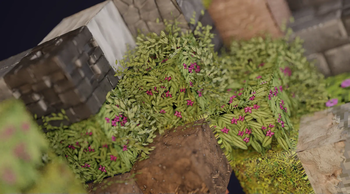
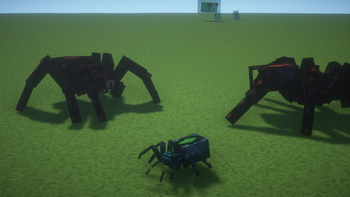
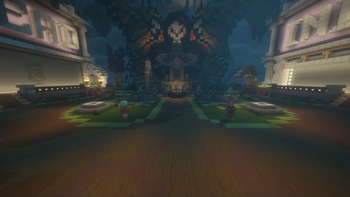
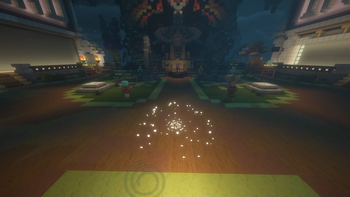
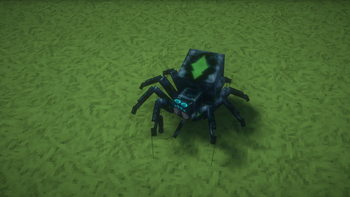
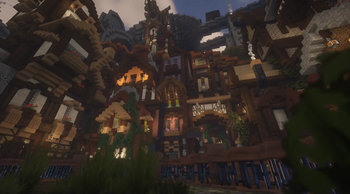
About this Modpack
Improve your Minecraft gameplay with aBTV, a texture pack designed to bring a medieval theme to your world. aBTV combines detailed medieval textures with modern features like RTX ray tracing and Parallax Occlusion Mapping (POM) to create realistic gameplay. Whether you enjoy building castles or exploring villages, aBTV offers a simple way to add historical charm and visual quality to your game.
Features
Medieval Theme
aBTV provides textures inspired by history, recreating the look of the medieval period in Minecraft. This makes it perfect for players who want to build castles, villages, or other historical settings.
RTX Support
With RTX support, aBTV enhances your game’s lighting to make it look more natural. You’ll see effects like sunlight shining through leaves or torches casting lifelike shadows. These improvements add depth and make your Minecraft world feel more alive.
POM with Shaders
aBTV uses Parallax Occlusion Mapping (POM) to give textures a 3D appearance without slowing down your game. Surfaces like stone, wood, and cobblestone gain extra detail and realism. Using aBTV with shaders like BSL or Complementary Shaders creates a smooth and clean experience.
Easy Installation
aBTV comes as a Fabric modpack with shaders already set up, so you can start playing quickly. No extra steps are needed—just download and launch. This straightforward process lets you focus on enjoying the game.
Why Choose a Medieval Theme?
A medieval theme mixes historical detail with creative options, appealing to many Minecraft players. It’s great for building forts, acting out knightly adventures, or designing kingdoms. With aBTV, your projects look real and stand out, thanks to modern visual effects that highlight every detail.
User Testimonials
Here’s feedback from players:
- “The aBTV texture pack has greatly improved my Minecraft gameplay. The medieval textures are clear and immersive, and RTX makes everything more realistic.”
- “Installation was very easy, and the POM effect with shaders looks amazing.”
Comparison with Other Packs
Many medieval texture packs exist, but aBTV stands out with RTX support and POM. Unlike packs that only use detailed images, aBTV uses shader technology to create a realistic feel while keeping your game running smoothly. This balance of beauty and performance makes it a strong choice for players.
FAQ
Does aBTV work with other mods?
aBTV works with most Fabric mods, though results may differ based on the mod. Test it to check for texture issues.
Can I use aBTV without shaders?
Yes, but we suggest using the included shaders to get the full effect of POM and RTX.
Conclusion
Try aBTV to enjoy better visuals and a historical feel in Minecraft. With its medieval textures, modern features like RTX and POM, and easy setup, aBTV is perfect for players wanting to improve their game.
Available Versions
How to Set Up a aBTV Modpack Server
Order Server
Choose at least 6 GB RAM (8 GB recommended for aBTV Modpack). Based on player count: per 5 players.
Install Modpack in Dashboard
Open the modpack browser in the dashboard, search for "aBTV Modpack" and click "Install". The fabric loader and Minecraft 1.21.5 are configured automatically.
Start Server & Play
Start the server – all mods are loaded automatically. Share the server IP with friends and play together!
Frequently Asked Questions
aBTV Modpack server crashes or won't start – what to do?
Most common causes: insufficient RAM or wrong fabric loader. Check latest.log for "OutOfMemoryError" → increase RAM to at least 8 GB. For "Mixin" or "ClassNotFoundException" errors: modpack version and loader don't match. With Mado Hosting, loader and Minecraft version are auto-configured on modpack install – preventing most startup issues.
How much RAM does a aBTV Modpack server really need?
Minimum 6 GB, recommended 8 GB for stable performance. per 5 players. Important: Minecraft modpacks need more RAM than vanilla – plan extra per additional player. With Mado Hosting, you can scale RAM up live at any time without data loss (from €12/month).
Can I add custom mods to aBTV Modpack without conflicts?
Yes, but check compatibility: only use mods for the same loader (fabric) and same Minecraft version (1.21.5). Common issues: ID conflicts with recipe mods and incompatible coremod versions. The Mado dashboard mod browser only shows compatible mods and warns about known conflicts.
aBTV Modpack server lagging – performance tips
1) Increase RAM to 8 GB+. 2) Reduce server view-distance to 8 (server.properties). 3) Pre-generate chunks with the "Chunky" plugin. 4) Use /spark profiler to check which mods consume the most tick time. With Mado Hosting, all servers run on NVMe SSDs with dedicated CPU cores – eliminating hardware as a bottleneck.
Similar Modpacks
![Cobblemon Official Modpack [Fabric]](https://cdn.modrinth.com/data/5FFgwNNP/e7f9ee2e9d361623847853fe2ddce42f519ee64f.png)
![COBBLEVERSE - Pokemon Adventure [Cobblemon]](https://cdn.modrinth.com/data/Jkb29YJU/581ecf54530972afb18a04660afd820f2f24f6c7.png)
![Better MC [FABRIC] - BMC2](https://cdn.modrinth.com/data/shFhR8Vx/a19c2bcb51d38f32f138d3607e91cb2b7b8e387f_96.webp)


![Better MC [FORGE] - BMC4](https://cdn.modrinth.com/data/4BV47HRn/7f5ef7cc61b2593609aabef3ed07a866a4f11b73_96.webp)
Rent aBTV Modpack Server
Start your own server with automatic modpack installation.
Supported Versions
Start your aBTV Modpack Server now
From €12.00/month with 8 GB RAM for the best performance.
Configure Server →