
Adventuria
Adventuria is a pack of modifications that will enrich your Minecraft experience with elements of adventure and strategy. Embark on a great journey, acquire treasures, develop your character and create your own legend in this fascinating world.
Screenshots
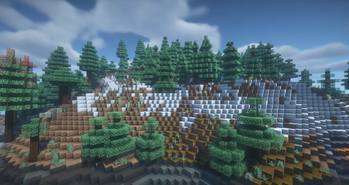
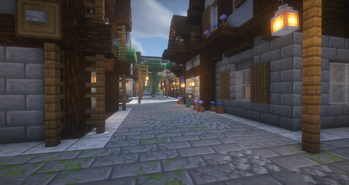
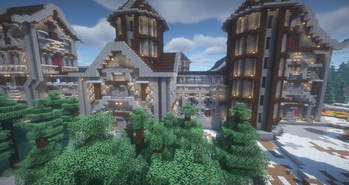
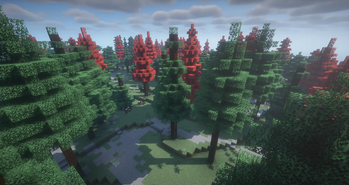
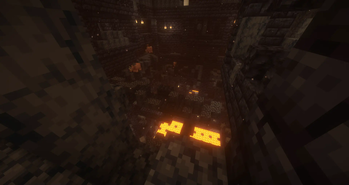
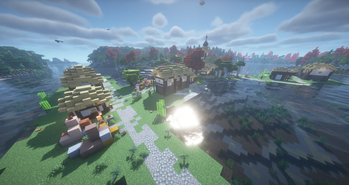
About this Modpack
Adventuria
Welcome, travelers! Get ready for an unforgettable adventure in a magical world full of mysterious dungeons, powerful character classes and amazing challenges. Adventuria is a unique modification pack created especially for adventure lovers who want to expand their experience in the Minecraft world and step into the unknown.
Dungeons and Dungeons
Adventuria introduces fascinating randomly generated dungeons and dungeons to the game, which hide a wealth of treasures, but also dangers. Each dungeon has its own unique design, and exploring inside them is a real adventure.
New Enemies
Discover new monsters and hostile factions that inhabit these dark dungeons. You'll have to be ready to fight powerful bosses and countless enemies to earn valuable rewards and achieve fame as a brave hero.
New Character Classes
Choose your path and select one of the many character classes available. Are you a brave warrior, a wise wizard or perhaps a clever rogue? Each class has its own skills, abilities and gameplay style, so you can tailor your hero to your favorite style of play.
Magic Spells
Discover mysterious and powerful spells that you can use in combat and exploration. Wizards will have access to a variety of powers that will make them invincible, while warriors will be able to increase their strength and defense.
Expanded World
Adventuria introduces many new biomes, places to explore and secrets to discover. The world of Minecraft becomes even bigger and more fascinating.
New Items and Armor
Acquire unique items, armor and weapons to help you survive in the dangerous world of Adventuria. Each item has its own unique properties, adding depth to the gameplay.
Multiplayer
Play with friends and face challenges together, exploring the unknown corners of the world of Adventuria and fighting powerful enemies.
Mod List
- 3D Skin Layers
- Advancement Plaques
- AmbientSounds
- Amplified Nether
- Axes Are Weapons
- Bartering Station
- Better Ping Display - [Fabric]
- Better Tridents
- Bookshelf
- Botania
- Building Wands
- Companion 🐕
- CorgiLib
- Craftify
- CreativeCore
- Detail Armor Bar
- Easy Anvils
- Easy Magic
- Enchanting Infuser
- Enhanced Celestials
- Forge Config API Port
- Galosphere
- Horse Expert
- Iceberg
- Inventory Sorting
- Jade 🔍
- Jade Addons (Fabric)
- Jewelry (RPG Series)
- Leave My Bars Alone
- Leaves Be Gone
- Legendary Tooltips
- Mob Plaques
- Mutant Monsters
- Origins
- Patchouli
- Pehkui
- Pick Up Notifier
- Ping Wheel
- Player Health Indicators
- Prism
- Puzzles Lib
- Sky Villages
- Create: Steam 'n' Rails
- Terralith
- Tips
- Towns and Towers
- Trading Post
- HT's TreeChop
- Universal Bone Meal
- Visual Workbench
- Xaero's World Map
- Xaero's Minimap
- YetAnotherConfigLib
- YUNG's API
- YUNG's Better Desert Temples
- YUNG's Better Dungeons
- YUNG's Better Mineshafts
- YUNG's Better Nether Fortresses
- YUNG's Better Ocean Monuments
- YUNG's Better Strongholds
- Additional Lanterns
- Advanced Netherite
- AdventureZ
- AppleSkin
- Architectury API
- Axolotl Buckets
- BCLib
- Better Combat
- Better Than Mending
- Blur (Fabric)
- Cardinal Components API
- Carry On
- Castle Dungeons
- Chat Heads
- Chisel Reborn
- Cloth Config API
- Collective
- Combat Roll
- Connected Glass
- Continuity
- Convenient Name Tags
- Cooldown Coordinator
- Cosmetica
- Crawl
- Create Fabric
- Critters and Companions
- Culinaire
- Cull Clouds
- Dark Loading Screen
- DashLoader
- Dawn API
- Deeper and Darker
- Double Doors
- Dungeons and Taverns
- Eating Animation
- Ender Dragon Fight Remastered
- Elytra Slot
- Emoji Type
- Explorify
- Fabric API
- End Remastered
- Fabric Language Kotlin
- Fabric Seasons
- Fabric Seasons: Extras
- The Lost Castle
- Falling Leaves
- First-person Model
- Fish of Thieves
- Gazebos (RPG Series)
- Geckolib
- Gilded Armor
- Grind Enchantments
- Immersive Aircraft
- Immersive Paintings
- Indium
- Inventory Management
- Iris Shaders
- Iron Chests: Restocked
- JamLib
- Just Enough Items
- LambDynamicLights
- Lanterns Belong on Walls
- LibZ
- Lithium
- More Axolotl Variants API
- More Axolotl Variants Mod
- Enchanted Vertical Slabs
- Memory Leak Fix
- MidnightLib
- Mod Menu
- Moonlight Lib
- Mooshroom Tweaks
- More Mob Variants
- Mo' Structures
- MVS - Moog's Voyager Structures
- Mythic Upgrades
- Naturalist
- Better Nether Map
- Nicer Skies
- Not Enough Animations
- Omni-Hopper
- Create Support for Open Parties and Claims
- Open Parties and Claims
- Origins++
- oωo (owo-lib)
- Paladin's Furniture Mod
- Paladins & Priests (RPG Series)
- Paradise Lost
- Plasmo Voice
- playerAnimator
- Plushie-Mod
- Polymorph
- Projectile Damage Attribute
- Reinforced Barrels
- Reinforced Chests
- Reinforced Shulker Boxes
- RightClickHarvest
- Rotten Creatures
- Runes
- Shulker Box Tooltip
- Simply Swords
- Smooth Boot (Fabric)
- Sodium
- Marium's Soulslike Weaponry
- Sound Physics Remastered
- Spell Engine
- Spell Power Attributes
- Staaaaaaaaaaaack (Stxck)
- Stack Refill
- Starlight (Fabric)
- Status Effect Bars
- SuperMartijn642's Core Lib
- Tectonic
- The Bumblezone - Quilt/Fabric
- Transparent
- Traveler's Backpack
- Trinkets
- Twigs
- Universal Ores
- Vein Mining
- Void Totem
- Wizards (RPG Series)
- Fabric Waystones
Available Versions
How to Set Up a Adventuria Server
Order Server
Choose at least 6 GB RAM (8 GB recommended for Adventuria). Based on player count: per 5 players.
Install Modpack in Dashboard
Open the modpack browser in the dashboard, search for "Adventuria" and click "Install". The fabric loader and Minecraft 1.19.2 are configured automatically.
Start Server & Play
Start the server – all mods are loaded automatically. Share the server IP with friends and play together!
Frequently Asked Questions
Adventuria server crashes or won't start – what to do?
Most common causes: insufficient RAM or wrong fabric loader. Check latest.log for "OutOfMemoryError" → increase RAM to at least 8 GB. For "Mixin" or "ClassNotFoundException" errors: modpack version and loader don't match. With Mado Hosting, loader and Minecraft version are auto-configured on modpack install – preventing most startup issues.
How much RAM does a Adventuria server really need?
Minimum 6 GB, recommended 8 GB for stable performance. per 5 players. Important: Minecraft modpacks need more RAM than vanilla – plan extra per additional player. With Mado Hosting, you can scale RAM up live at any time without data loss (from €12/month).
Can I add custom mods to Adventuria without conflicts?
Yes, but check compatibility: only use mods for the same loader (fabric) and same Minecraft version (1.19.2). Common issues: ID conflicts with recipe mods and incompatible coremod versions. The Mado dashboard mod browser only shows compatible mods and warns about known conflicts.
Adventuria server lagging – performance tips
1) Increase RAM to 8 GB+. 2) Reduce server view-distance to 8 (server.properties). 3) Pre-generate chunks with the "Chunky" plugin. 4) Use /spark profiler to check which mods consume the most tick time. With Mado Hosting, all servers run on NVMe SSDs with dedicated CPU cores – eliminating hardware as a bottleneck.
Similar Modpacks
![Cobblemon Official Modpack [Fabric]](https://cdn.modrinth.com/data/5FFgwNNP/e7f9ee2e9d361623847853fe2ddce42f519ee64f.png)
![COBBLEVERSE - Pokemon Adventure [Cobblemon]](https://cdn.modrinth.com/data/Jkb29YJU/581ecf54530972afb18a04660afd820f2f24f6c7.png)
![Better MC [FABRIC] - BMC2](https://cdn.modrinth.com/data/shFhR8Vx/a19c2bcb51d38f32f138d3607e91cb2b7b8e387f_96.webp)


![Better MC [FORGE] - BMC4](https://cdn.modrinth.com/data/4BV47HRn/7f5ef7cc61b2593609aabef3ed07a866a4f11b73_96.webp)
Rent Adventuria Server
Start your own server with automatic modpack installation.
Supported Versions
Start your Adventuria Server now
From €12.00/month with 8 GB RAM for the best performance.
Configure Server →