
Aeolitus
A Vanilla-inspired modpack designed for both FPS performance and Amazing graphics.
Screenshots

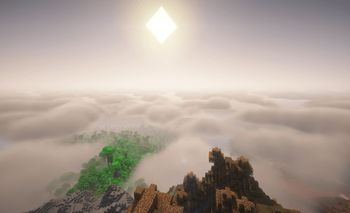

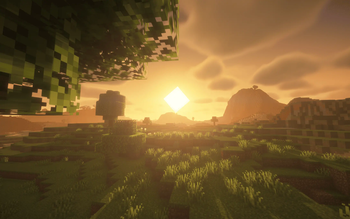
About this Modpack
About:
Aeolitus is a Fabric based modpack that works towards giving the best expertise without adding new items or changing vanilla too much with full opimization. This was originally to a simple modpack for a friend and quickly led to a full publication. This modpack has been DISCONTINUED. If you wish to contact me, go to my profile :P
The Quality of Life Update!
I'm excited to bring you a host of fantastic Quality of Life mods to Aeolitus! This update introduces a range of new mods. Highlights include Better Mending, which allows you to use xp from your XP bar to fix your tools, Connected Glass, and Enchant Icons to help you easily identify enchanted items.
In addition, I've also added more snow mods to make Tundra and Snow biomes more realistic. This update comes with a new Icon as well (Still working on a permanent icon)!
Also, I've been working on a port to 1.21.4 and forge however a lot of the mods are yet to be supported, Forge will most likely be more different than the current modpack. However, 1.21.4 will be going to beta!
The next update will hopefully be community focused so make sure to check up from time to time! Thanks to listening to this update and hope you see you again soon! :D
Differences from Vanilla:
Mods
- Sterowalker's Reforged: A mod that gives small randomized buffs to your armor and tools but still giving that vanilla feel.
- Tree Harvistor: One click and a tree will be chopped down fully.
- AppleSkin: Adds a visualization of hunger restorted from eating food.

- Mouse Tweaks:Enhances inventory management by adding various functions to the mouse buttons.
- Distant Horizons: Arguably one of the best mods out currently, allowes for chunk rendering much farther due to using level of detail.
- BetterF3: Makes F3 easier to read and understand.
- Zoomify: Adds zoom by hitting c.
- Essential: Allowes for multiplayer worlds without having to create a server.
- E4MC: Creates a LAN server that anyone can join even without the mod and makes it easier to make and join a multiplayer server.
- Advancement Plaques: Changes then normal advancement badges with more stylised plaques.
- Legendary Tooltips: Adds 3d view models to the inventory and special outlines of the tooltip menu. !!NEW!!
- Snow! Real Magic!: Adds snow to lots of other blocks and changes how snow works. !!NEW!!
- Snow Under Trees: Allows for snow to be under trees. !!NEW!!
- Better Than Mending: Allows you to use your stored XP to fix your tools. !!NEW!!
- Cherished Worlds: Lets you favorite worlds. !!NEW!!
- Clean Connected Glass: Allows for connected glass. !!NEW!!
- Data Loader: Automatically puts in datapacks into your worlds. !!NEW!!
- Enchant Icons: Adds specialized icons for each enchant in tooltips. !!NEW!!
Opimizations:
Opimizers
- Sodium: Current fastest rendering engine.
- Sodium Extra: Adds extra settings to Sodium. !!NEW!!
- Dynamic FPS: Changes your FPS based on what you are currently doing to reduce the load on your PC or laptop, Such as changing to another window.
- Lithium: A all general-purpose optimization mod made by the same person who made Sodium.
- Entity Culling: Hides entitys such as mobs if not on screen.
- ImmediatelyFast: Another general-purpose optimization mod that opimizes Entities, Block entities, Particles, Text rendering, And GUI/HUD.
- Noisium: Opimizies world generation.
- FerriteCore: Memory usage optimizor.
- Exordium (1.20.6 ONLY): Renders the GUI and screens at a lower framerate to focus on the games actual framerate, can be changed in settings.
- ModernFix: General optimization mod.
- MoreCulling: Increased culling for better performance.
- ThreadTweak: Improves CPU scheduling. !!NEW!!
- FerriteCore: Improves RAM usage. !!NEW!!
Shaders
Shaders
- Iris Shaders: Loader for all shaders used below.
- BSL: My Personal recommendation and what i use for all of the screenshots in the Gallery
- Bliss: Widely regaurded as the best shader currently at the cost of perforance. (Does NOT work with Distant Horizons.) !!NEW!!
- MakeUp Ultra Fast: A performance based shader that changes light and reflections.
- Shrimple:A simple Minecraft Java shader that attempts to maintain the vanilla aesthetic.
- Complementary Unbound: One of the best looking shaders currently.
- Rethinking Voxels: Yet another widely renouned shader for its graphics.
- Lux V1: A good looking shader pack that is based on BSL.
- Photon Shaders: A superisingly good looking shader for the low performance hit.
- Super Duper Vanilla: More based game focused shader pack.
- Miniature Shader: A lightweight shader that works on shadows and reflections
- Opal Shaders: A mix of BSL and BSL classic with that vanilla look.
Available Versions
How to Set Up a Aeolitus Server
Order Server
Choose at least 6 GB RAM (8 GB recommended for Aeolitus). Based on player count: per 5 players.
Install Modpack in Dashboard
Open the modpack browser in the dashboard, search for "Aeolitus" and click "Install". The fabric loader and Minecraft 1.21.4 are configured automatically.
Start Server & Play
Start the server – all mods are loaded automatically. Share the server IP with friends and play together!
Frequently Asked Questions
Aeolitus server crashes or won't start – what to do?
Most common causes: insufficient RAM or wrong fabric loader. Check latest.log for "OutOfMemoryError" → increase RAM to at least 8 GB. For "Mixin" or "ClassNotFoundException" errors: modpack version and loader don't match. With Mado Hosting, loader and Minecraft version are auto-configured on modpack install – preventing most startup issues.
How much RAM does a Aeolitus server really need?
Minimum 6 GB, recommended 8 GB for stable performance. per 5 players. Important: Minecraft modpacks need more RAM than vanilla – plan extra per additional player. With Mado Hosting, you can scale RAM up live at any time without data loss (from €12/month).
Can I add custom mods to Aeolitus without conflicts?
Yes, but check compatibility: only use mods for the same loader (fabric) and same Minecraft version (1.21.4). Common issues: ID conflicts with recipe mods and incompatible coremod versions. The Mado dashboard mod browser only shows compatible mods and warns about known conflicts.
Aeolitus server lagging – performance tips
1) Increase RAM to 8 GB+. 2) Reduce server view-distance to 8 (server.properties). 3) Pre-generate chunks with the "Chunky" plugin. 4) Use /spark profiler to check which mods consume the most tick time. With Mado Hosting, all servers run on NVMe SSDs with dedicated CPU cores – eliminating hardware as a bottleneck.
Rent Aeolitus Server
Start your own server with automatic modpack installation.
Supported Versions
Start your Aeolitus Server now
From €12.00/month with 8 GB RAM for the best performance.
Configure Server →