
AeroMechanica
A high-performance Create and Aeronautics modpack. Fly custom steam-and-jet powered airships, build power grids, automate weapons, and enjoy a cozy immersive sky-exploration experience on 1.21.1 NeoForge!
Screenshots
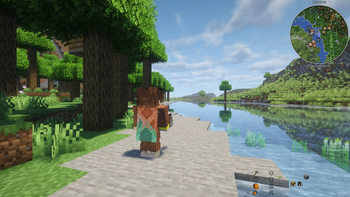
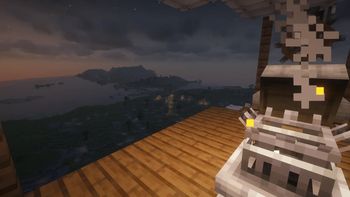
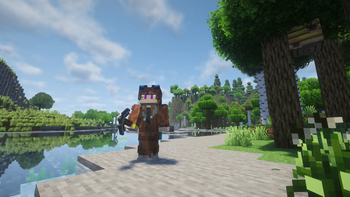
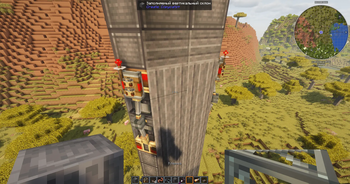
About this Modpack
AeroMechanica ⚙️💨
AeroMechanica is a modpack centered around airship building, heavy industry, jet propulsion, and... incredibly cozy sky traveling.
I put this pack together because I was tired of flying arcade, "cardboard-like" planes in vanilla. I wanted to build a massive flying factory using Create, equip it with actual jet thrusters, mount heavy cannons for defense, and brew craft beer while flying through storm clouds. And I actually did it!
🔥 Key Features:
Physics-Based Flight: Forget about arcade flying. Thanks to the combination of Create Aeronautics and the Sable engine, your airships and planes can be built out of ANY block. They have real weight, inertia, aerodynamics, and center of mass.
Jet Engines & Cannons:
Attach compact jet thrusters (Create Propulsion) for supersonic speeds and defend your sky fortress with a battery of massive cannons (Big Cannons).
Power Grids & Wiring:
Lay power lines, manage electricity on your ship, and power your factories using Create: Power Grid and diesel generators.
Breweries & Wineries:
Grow grapes and hops directly on the deck of your flying ship, stomp them with your feet, brew ale/beer, and age wine in barrels directly in the cargo hold. You can fully automate your kitchen using conveyors!
Complete Polish:
A smart dynamic crosshair and a clean screen without useless vanilla clutter make flying cinematic, while the over-the-shoulder view (Shoulder Surfing) turns the game into an awesome third-person action experience.
Other Stuff:
There are no heavy bloated dungeons or extra biomes that lag world generation. The entire pack is heavily polished and optimized to the smallest details:
- Stable Sodium 0.6.13 is installed (all other graphics mods are configured to match it).
- Background processes are optimized using ModernFix, FerriteCore, BadOptimizations, and the C2ME multi-threaded chunk generation engine.
⚠️ Crucial Technical Settings:
- Allocate RAM: Make sure to allocate between 6 to 8 GB of RAM in your launcher. Due to Sable's complex physics calculations, 4 GB will cause crashes.
- For Maximum FPS: Right after entering the world, type the command
/flywheel backend indirectin the chat. This offloads the rendering of spinning gears from your CPU directly to your graphics card. - For Playing with Distant Horizons: Go to DH settings -> Advanced Options -> Graphics -> Quality, and make sure to change Vanilla Fade Mode to None. Otherwise, your airships will go invisible when zooming the camera out.
RU/Русский
AeroMechanica ⚙️💨
AeroMechanica — это сборка про дирижаблестроение, тяжёлую индустрию, реактивную тягу и... очень уютные воздушные путешествия.
Я собрал этот пак, потому что мне надоело летать на ванильных «картонных» самолетиках. Хотелось построить огромный летающий завод из Create, поставить на него реактивные турбины, обвесить пушками для обороны,
варить крафтовое пиво, летя сквозь грозовые тучи. И у меня получилось!
🔥 Что здесь можно делать:
Летать на настоящей физике: Забудьте про аркадные полеты. Благодаря связке Create Aeronautics и движка Sable, ваши дирижабли и самолеты строятся из ЛЮБЫХ блоков. У них есть реальный вес, инерция, аэродинамика и центр тяжести.
Реактивные двигатели и пушки:
Ставьте компактные реактивные трастеры (Create Propulsion) для сверхзвуковых скоростей и защищайте свой летучий корабль батареей огромных пушек (Big Cannons).
Энергия и провода:
Прокладывайте ЛЭП, распределяйте электричество по кораблю и питайте заводы с помощью Create: Power Grid и дизельных генераторов.
Пивоварня и винодельня:
Выращивайте виноград и хмель прямо на палубе летящего корабля, давите его ногами, варите эль, пиво и выдерживайте вино в бочках прямо в трюме. Вы можете автоматизировать всю кухню с помощью конвейеров!
Полный лоск:
Умный динамический прицел и чистый экран без лишних ванильных значков сделают полет кинематографичным, а вид из-за плеча (Shoulder Surfing) превратит игру в сочный экшен от третьего лица.
другоее:
В сборке нет тяжелого мусора, лишних данжей и биомов, которые ломают генерацию. Весь пак отлажен и вылизан до мелочей:
Установлен стабильный Sodium 0.6.13 (все остальные моды на графику настроены под него).
Фоновые процессы оптимизированы через ModernFix, FerriteCore, BadOptimizations и многопоточный движок C2ME.
⚠️Важные технические настройки:
Выделите ОЗУ: Обязательно выделите в лаунчере от 6 до 8 ГБ оперативной памяти. Из-за сложной физики Sable на 4 ГБ игра будет вылетать.
Для максимального FPS: Сразу после захода в мир пропишите в чат команду /flywheel backend indirect. Это перенесет всю отрисовку крутящихся шестеренок с вашего процессора на видеокарту.
Для игры с Distant Horizons: Зайдите в настройки DH -> Advanced Options -> Graphics -> Quality и обязательно переключите Vanilla Fade Mode на None. Иначе ваши дирижабли будут становиться невидимыми при удалении камеры.
Available Versions
How to Set Up a AeroMechanica Server
Order Server
Choose at least 6 GB RAM (8 GB recommended for AeroMechanica). Based on player count: per 5 players.
Install Modpack in Dashboard
Open the modpack browser in the dashboard, search for "AeroMechanica" and click "Install". The neoforge loader and Minecraft 1.21.1 are configured automatically.
Start Server & Play
Start the server – all mods are loaded automatically. Share the server IP with friends and play together!
Frequently Asked Questions
AeroMechanica server crashes or won't start – what to do?
Most common causes: insufficient RAM or wrong neoforge loader. Check latest.log for "OutOfMemoryError" → increase RAM to at least 8 GB. For "Mixin" or "ClassNotFoundException" errors: modpack version and loader don't match. With Mado Hosting, loader and Minecraft version are auto-configured on modpack install – preventing most startup issues.
How much RAM does a AeroMechanica server really need?
Minimum 6 GB, recommended 8 GB for stable performance. per 5 players. Important: Minecraft modpacks need more RAM than vanilla – plan extra per additional player. With Mado Hosting, you can scale RAM up live at any time without data loss (from €12/month).
Can I add custom mods to AeroMechanica without conflicts?
Yes, but check compatibility: only use mods for the same loader (neoforge) and same Minecraft version (1.21.1). Common issues: ID conflicts with recipe mods and incompatible coremod versions. The Mado dashboard mod browser only shows compatible mods and warns about known conflicts.
AeroMechanica server lagging – performance tips
1) Increase RAM to 8 GB+. 2) Reduce server view-distance to 8 (server.properties). 3) Pre-generate chunks with the "Chunky" plugin. 4) Use /spark profiler to check which mods consume the most tick time. With Mado Hosting, all servers run on NVMe SSDs with dedicated CPU cores – eliminating hardware as a bottleneck.
Similar Modpacks
![Cobblemon Official Modpack [Fabric]](https://cdn.modrinth.com/data/5FFgwNNP/e7f9ee2e9d361623847853fe2ddce42f519ee64f.png)
![COBBLEVERSE - Pokemon Adventure [Cobblemon]](https://cdn.modrinth.com/data/Jkb29YJU/581ecf54530972afb18a04660afd820f2f24f6c7.png)
![Better MC [FABRIC] - BMC2](https://cdn.modrinth.com/data/shFhR8Vx/a19c2bcb51d38f32f138d3607e91cb2b7b8e387f_96.webp)


![Better MC [FORGE] - BMC4](https://cdn.modrinth.com/data/4BV47HRn/7f5ef7cc61b2593609aabef3ed07a866a4f11b73_96.webp)
Rent AeroMechanica Server
Start your own server with automatic modpack installation.
Supported Versions
Start your AeroMechanica Server now
From €12.00/month with 8 GB RAM for the best performance.
Configure Server →