
Aeroworks
A Create: Aeronautics centered modpack with complementary mods added. Server included.
Screenshots
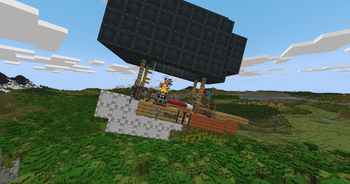
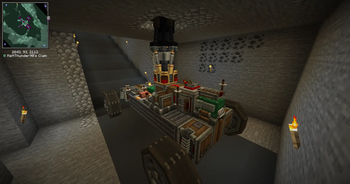
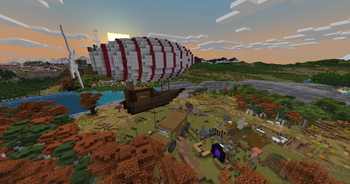
About this Modpack
Make sure you allocate at least 6GB of RAM
Aeroworks is a NeoForge 1.21.1 server pack built for multiplayer worlds looking for maximum Aeronautics interaction. Server Included
The pack is centered on Create: Aeronautics, with the rest of the mod list chosen to support player built infrastructure, trade routes, airships, rail systems, factories, and large scale engineering projects. The best parts of the pack are meant to develop over time. Building an airship, setting up logistics, defending routes, moving goods, or connecting settlements should feel like part of the server’s history.
Aeronautics is backed up by a growing ecosystem of complementary mods, including Create: Big Cannons, Create: Propulsion, Create: Radars, CC: Sable, and Vista. Together, they push the pack toward mobile industry, ship mounted systems, air travel, navigation, automation, and larger multiplayer projects.
There is also enough tech depth to keep factories interesting. Mekanism and Oritech add more advanced machinery, power systems, and production chains, with plenty of room for strange interactions once players start putting factories on ships.
The world keeps a familiar Minecraft feel while giving exploration more weight. Tectonic & WWOO expand terrain generation, while the YUNG’s Better suite overhauls vanilla structures like dungeons, mineshafts, strongholds, ocean monuments, nether fortresses, temples, and more. Exploration should feel recognizable, but much more worth doing. End Remastered also gives the server a shared long-term goal and slows down the usual rush to the End.
The multiplayer side is built around player-driven systems. Trading, claims, transport networks, towns, alliances, rivalries, and infrastructure all come from what players choose to build. Voice chat, mapping tools, claims, and social mods are included to make cooperation easier without requiring strict roleplay or heavy server rules.
Aeroworks is for players who want an Aeronautics server that develops its own economy, landmarks, routes, factions, projects, and stories over time.
Available Versions
How to Set Up a Aeroworks Server
Order Server
Choose at least 6 GB RAM (8 GB recommended for Aeroworks). Based on player count: per 5 players.
Install Modpack in Dashboard
Open the modpack browser in the dashboard, search for "Aeroworks" and click "Install". The neoforge loader and Minecraft 1.21.1 are configured automatically.
Start Server & Play
Start the server – all mods are loaded automatically. Share the server IP with friends and play together!
Frequently Asked Questions
Aeroworks server crashes or won't start – what to do?
Most common causes: insufficient RAM or wrong neoforge loader. Check latest.log for "OutOfMemoryError" → increase RAM to at least 8 GB. For "Mixin" or "ClassNotFoundException" errors: modpack version and loader don't match. With Mado Hosting, loader and Minecraft version are auto-configured on modpack install – preventing most startup issues.
How much RAM does a Aeroworks server really need?
Minimum 6 GB, recommended 8 GB for stable performance. per 5 players. Important: Minecraft modpacks need more RAM than vanilla – plan extra per additional player. With Mado Hosting, you can scale RAM up live at any time without data loss (from €12/month).
Can I add custom mods to Aeroworks without conflicts?
Yes, but check compatibility: only use mods for the same loader (neoforge) and same Minecraft version (1.21.1). Common issues: ID conflicts with recipe mods and incompatible coremod versions. The Mado dashboard mod browser only shows compatible mods and warns about known conflicts.
Aeroworks server lagging – performance tips
1) Increase RAM to 8 GB+. 2) Reduce server view-distance to 8 (server.properties). 3) Pre-generate chunks with the "Chunky" plugin. 4) Use /spark profiler to check which mods consume the most tick time. With Mado Hosting, all servers run on NVMe SSDs with dedicated CPU cores – eliminating hardware as a bottleneck.
Similar Modpacks
![Cobblemon Official Modpack [Fabric]](https://cdn.modrinth.com/data/5FFgwNNP/e7f9ee2e9d361623847853fe2ddce42f519ee64f.png)
![COBBLEVERSE - Pokemon Adventure [Cobblemon]](https://cdn.modrinth.com/data/Jkb29YJU/581ecf54530972afb18a04660afd820f2f24f6c7.png)
![Better MC [FABRIC] - BMC2](https://cdn.modrinth.com/data/shFhR8Vx/a19c2bcb51d38f32f138d3607e91cb2b7b8e387f_96.webp)


![Better MC [FORGE] - BMC4](https://cdn.modrinth.com/data/4BV47HRn/7f5ef7cc61b2593609aabef3ed07a866a4f11b73_96.webp)
Rent Aeroworks Server
Start your own server with automatic modpack installation.
Supported Versions
Start your Aeroworks Server now
From €12.00/month with 8 GB RAM for the best performance.
Configure Server →