IE Aether & Create
Light-weight modpack based primarily on Aether and its addons, Create mod & expansions, Immersive Engineering and many other useful mods
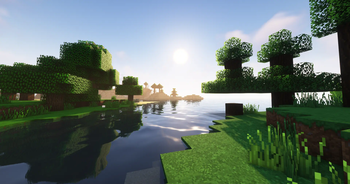
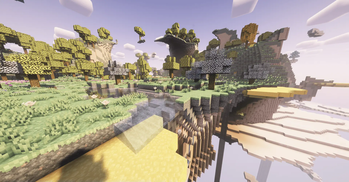
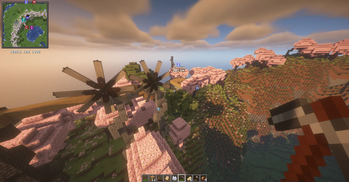
Screenshots
About this Modpack
The Ultimate Minecraft Vanilla++ Technological experience, designed for players looking for a cohesive and expansive and incredibly beautiful yet non-bloated Minecraft modded experience.
Highly optimized for lower-end PCs and high-end PCs alike! and includes a server pack for users looking to play multiplayer right away with Friends.
Create + Immersive Engineering are balanced through scripts and compatability mods to be fair for the player and work seamlessly with each other (all changes listed below)
Highlight mods are
- Create + Addons
- Immersive Engineering
- Embers Rekindled
- Simple Tombstones
- Aether + it's addons
- Quark (modified config)
- Quark Oddities (Matrix Enchanting, item pipes, magnets)
- Wearable Backpacks
- Immersive Aircraft + Intergration with Create mod
- Farmer's Delight (CurseForge) + Aquaculture 2 (CurseForge) + Aquaculture Delight (CurseForge) + Ocean's Delight
YUNG's mods are included (excluding Better Dungeons but can be added by the user if desired) to enchance the Minecraft experience greatly.
Simple Gravestones mod is included for player deaths and to make the MC experience a little less frustrating.
Changes:
-IE's VBOs are disabled to ensure shaders work properly with machines
-IE's Crates are disabled for balance
-Ember's Ore Generation of silver/lead replaced with IE's ore gen
-Leather can be converted/crafted from IE's Erstaz leather
-Ore doubling via Immersive Engineering is back (for both Crusher and Arc Furnace)!
-Grit smelted in the furnace yields is changed to yield XP (by default IE's ore grits/dust don't yield XP)
-Each ore smelted in Arc Furnace yields 2 ingots per ore, along with Nuggets of Experience to ensure that the player does not miss out on XP that otherwise only be acquired by smelting ores or using Create's Crusher
-Chances of yielding a nugget of experience (3.0 XP each) in the Arc Furnace are based off the experience gained when smelting said ores in the Furnace and are as follows:
- Aluminum 10.00%
- Copper 23.33%
- Gold 33.33%
- Iron 23.33%
- Lead 23.33%
- Nickel 33.33%
- Silver 23.33%
- Uranium 33.33%
- Zinc 23.33%
-Enchanting system is highly enhanced with Matrix Enchanting from Quark Oddities
-Easy Anvil mod for more forgiving Anvils and decreased costs
-Visual Workbench mod allows beautiful and seamless crafting
-Create Jetpacks intergrated as Curios baubles
Please feel free to join to server to find a community to play with, make suggestions, or report bugs!
Additional notes:
Create Immersive Aircrafts
Aether Delight mod by nocubeyt recommended but is not included in modpack due to licensing issues.
Faithful 32x - Immersive Aircraft
Create Immersive Aircrafts resources packs all recommended for the best experience.
Available Versions
How to Set Up a IE Aether & Create Server
Order Server
Choose at least 4 GB RAM (6 GB recommended for IE Aether & Create). Based on player count: per 5 players.
Install Modpack in Dashboard
Open the modpack browser in the dashboard, search for "IE Aether & Create" and click "Install". The neoforge loader and Minecraft 1.20.1 are configured automatically.
Start Server & Play
Start the server – all mods are loaded automatically. Share the server IP with friends and play together!
Frequently Asked Questions
IE Aether & Create server crashes or won't start – what to do?
Most common causes: insufficient RAM or wrong neoforge loader. Check latest.log for "OutOfMemoryError" → increase RAM to at least 6 GB. For "Mixin" or "ClassNotFoundException" errors: modpack version and loader don't match. With Mado Hosting, loader and Minecraft version are auto-configured on modpack install – preventing most startup issues.
How much RAM does a IE Aether & Create server really need?
Minimum 4 GB, recommended 6 GB for stable performance. per 5 players. Important: Minecraft modpacks need more RAM than vanilla – plan extra per additional player. With Mado Hosting, you can scale RAM up live at any time without data loss (from €8/month).
Can I add custom mods to IE Aether & Create without conflicts?
Yes, but check compatibility: only use mods for the same loader (neoforge) and same Minecraft version (1.20.1). Common issues: ID conflicts with recipe mods and incompatible coremod versions. The Mado dashboard mod browser only shows compatible mods and warns about known conflicts.
IE Aether & Create server lagging – performance tips
1) Increase RAM to 6 GB+. 2) Reduce server view-distance to 8 (server.properties). 3) Pre-generate chunks with the "Chunky" plugin. 4) Use /spark profiler to check which mods consume the most tick time. With Mado Hosting, all servers run on NVMe SSDs with dedicated CPU cores – eliminating hardware as a bottleneck.
Similar Modpacks

![COBBLEVERSE - Pokemon Adventure [Cobblemon]](https://cdn.modrinth.com/data/Jkb29YJU/581ecf54530972afb18a04660afd820f2f24f6c7.png)




Rent IE Aether & Create Server
Start your own server with automatic modpack installation.
Details
- License
- GNU Affero General Public License v3.0 only
- Server-side
- Optional
- Client-side
- Optional
Supported Versions
Start your IE Aether & Create Server now
From €8.00/month with 6 GB RAM for the best performance.
Configure Server →