
Affogato
Would you like your Minecraft with a shot of hot espresso? [A highly opinionated vanilla overhaul]
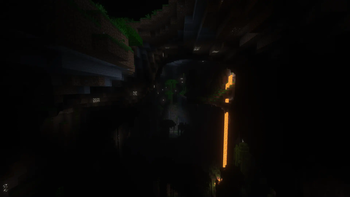
Screenshots
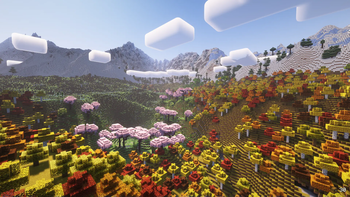
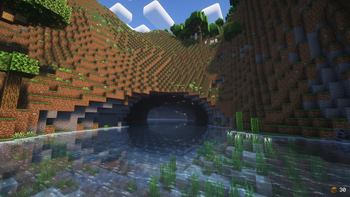
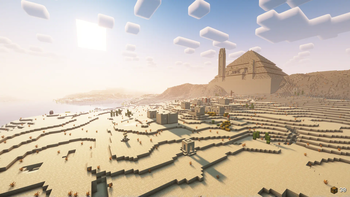

About this Modpack
An affogato, more traditionally known as "affogato al caffè", is an Italian coffee-based dessert. It usually takes the form of a scoop of plain milk-flavored or vanilla gelato or ice cream topped or "drowned" with a shot of hot espresso.
About the modpack
Affogato is a modpack that represents my ideal version of Minecraft. It's a culmination of all the thoughts and ideas I had for the game over the years put into one neat, meticulously handcrafted package. It consists of all of my mods, a selection of quality mods from other authors, which help me in achieving my vision for this modpack, and Affogato Core, which adds features and tweaks I could not find in other mods, provides custom mod configs and data, and fixes mod incompatibilities and bugs.
The main goals of the modpack are the following:
- Change game progression to be more difficult, but feel more rewarding at the same time.
- Rework or improve underutilized and/or underwhelming game mechanics and incorporate them into the game's progression.
- Add new, meaningful content to the game that fits vanilla both functionally and aesthetically without compromising core gameplay.
- Put a way stronger emphasis on exploration and other core game mechanics.
- Add convenience features and mechanics, where it makes sense to do so.
Affogato targets the latest Minecraft version and will always try to update as soon as possible.
Installing the modpack
Install the modpack through the Modrinth app or your favorite launcher.
You can play with your friends by either using e4mc (included in the modpack) or setting up a dedicated server with the server installer, which uses mrpack4server.
Playing the modpack
Gameplay
Refer to in-game tutorials, advancements and the recipe book for progression guidance. There are no guide books, quest trees or anything like that.
Without going into specifics, the modpack is generally more difficult than vanilla Minecraft, especially early in the game. My advice is to stick to the surface until you get a food stash and at least full copper gear and a shield before throwing yourself into combat. Sneaking will make it harder for hostile mobs to detect you (moreso compared to vanilla) so try taking advantage of it to avoid getting into bad encounters.
Visuals
The modpack comes preconfigured with shader presets using Euphoria Patches. These presets are configured to achieve the intended look for the modpack. You can change the shader preset in the video settings under the Affogato page.
By default, no shaders are used, and the intended look for the modpack is achieved using Delight-map and dimension-specific brightness settings.
Recommendations
- For the intended visual experience, don't use shaders packs other than the ones provided in the modpack, and don't disable Delight-map or change the brightness settings.
- Keep the game difficulty on Hard for the intended gameplay experience.
- Change the maximum allocated memory to at least 4GB, but not more than 8GB.
Feedback
Either join the Discord server and use the #affogato channel, or open an issue on the GitHub repo of the modpack. Both are linked on the sidebar to the right.
Available Versions
How to Set Up a Affogato Server
Order Server
Choose at least 4 GB RAM (6 GB recommended for Affogato). Based on player count: per 8 players.
Install Modpack in Dashboard
Open the modpack browser in the dashboard, search for "Affogato" and click "Install". The fabric loader and Minecraft 26.1.2 are configured automatically.
Start Server & Play
Start the server – all mods are loaded automatically. Share the server IP with friends and play together!
Frequently Asked Questions
Affogato server crashes or won't start – what to do?
Most common causes: insufficient RAM or wrong fabric loader. Check latest.log for "OutOfMemoryError" → increase RAM to at least 6 GB. For "Mixin" or "ClassNotFoundException" errors: modpack version and loader don't match. With Mado Hosting, loader and Minecraft version are auto-configured on modpack install – preventing most startup issues.
How much RAM does a Affogato server really need?
Minimum 4 GB, recommended 6 GB for stable performance. per 8 players. Important: Minecraft modpacks need more RAM than vanilla – plan extra per additional player. With Mado Hosting, you can scale RAM up live at any time without data loss (from €8/month).
Can I add custom mods to Affogato without conflicts?
Yes, but check compatibility: only use mods for the same loader (fabric) and same Minecraft version (26.1.2). Common issues: ID conflicts with recipe mods and incompatible coremod versions. The Mado dashboard mod browser only shows compatible mods and warns about known conflicts.
Affogato server lagging – performance tips
1) Increase RAM to 6 GB+. 2) Reduce server view-distance to 8 (server.properties). 3) Pre-generate chunks with the "Chunky" plugin. 4) Use /spark profiler to check which mods consume the most tick time. With Mado Hosting, all servers run on NVMe SSDs with dedicated CPU cores – eliminating hardware as a bottleneck.
Similar Modpacks

![COBBLEVERSE - Pokemon Adventure [Cobblemon]](https://cdn.modrinth.com/data/Jkb29YJU/581ecf54530972afb18a04660afd820f2f24f6c7.png)




Rent Affogato Server
Start your own server with automatic modpack installation.
Details
- License
- Creative Commons Attribution Share Alike 4.0 International
- Server-side
- Required
- Client-side
- Required
Supported Versions
Start your Affogato Server now
From €8.00/month with 6 GB RAM for the best performance.
Configure Server →