
Aksu's Peaceful Gameplay Pack
Aksu's Peaceful Gameplay Pack transforms your Minecraft experience into a serene and harmonious adventure.
Screenshots
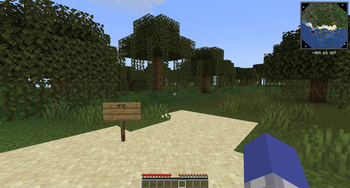
About this Modpack
Aksu's Peaceful Gameplay Pack
Please select version 1.0.2 for a stable gameplay.
Alpha 0.55.x versions are bleeding edge and buggy, also may occasionally crash. They are not recommended.
About version 1.0.2
This modpack enhances gameplay by integrating various mods that improve visual aesthetics, optimize performance, and expand gameplay mechanics. Experience enriched farming and cooking with Farmer's Delight, enjoy dynamic lighting through LambDynamicLights, and benefit from performance boosts provided by Sodium and FerriteCore. Additionally, mods like Clumps streamline experience collection, while 3D Skin Layers adds depth to character appearances. Together, these and other carefully selected mods create a more immersive and efficient adventure. Whether you're crafting intricate structures or exploring serene landscapes, Aksu's Peaceful Gameplay Pack creates the perfect environment for a calm and enjoyable Minecraft journey.
About version 1.0.0
This modpack delivers a seamlessly optimized and tranquil Minecraft experience, perfect for players who cherish building, exploration, and relaxation. This pack integrates performance-enhancing mods like Lithium and Sodium, alongside visual and auditory enhancements such as AmbientSounds and LambDynamicLights, ensuring smooth and immersive gameplay. Enjoy streamlined interactions with tools like Tree Harvester and Just Enough Items, while navigational ease is provided by Xaero's Minimap and World Map. Privacy is prioritized with mods like No Telemetry and No Chat Reports, and customization options abound with 3D Skin Layers and Simple Voice Chat. Additionally, experience a harmonious world free from combat through Vegan Hostile Mob Drops and No XP Anvils. Whether you're crafting intricate structures or exploring serene landscapes, Aksu's Peaceful Gameplay Pack creates the perfect environment for a calm and enjoyable Minecraft journey.
How to Play (Version 1.0.1 and newer)
First: Start the Game
- Launch the game and click on "Single Player".
- Set the difficulty to Peaceful Mode. (Optional)
- Select "Create New World".
Second: Enjoy the Game
- Relax and focus on building, exploring, etc.
- Change few settings for you liking
- Enjoy the game!
How to Play (Version 1.0.0)
First: Start the Game
- Launch the game and click on "Single Player".
- Set the difficulty to Peaceful Mode.
- Select "Create New World".
Second: Confirm Peaceful Mode
- In the settings, ensure "Peaceful" difficulty is selected.
- Click the lock icon and confirm by pressing "Yes".
Third: Enjoy the Game
- Relax and focus on building, exploring, etc.
- Change few settings for you liking
- Enjoy the game!
About alpha 0.55.x versions
0.55.x are "forever alpha" development versions of modpack. Alpha 0.55.x versions are up-to-date and buggy, also may occasionally updated actively than the beta and release versions
How to Play (Alpha 0.55.x versions)
Playing alpha 0.55.x versions is not recommended, try at your own risk.
First: Start the Game
- Launch the game and click on "Single Player".
- Set the difficulty to Peaceful Mode. (Optional)
- Select "Create New World".
Second: Enjoy the Game
- Relax and focus on building, exploring, etc.
- Change few settings for you liking
- Enjoy the game!
Available Versions
How to Set Up a Aksu's Peaceful Gameplay Pack Server
Order Server
Choose at least 6 GB RAM (8 GB recommended for Aksu's Peaceful Gameplay Pack). Based on player count: per 5 players.
Install Modpack in Dashboard
Open the modpack browser in the dashboard, search for "Aksu's Peaceful Gameplay Pack" and click "Install". The fabric loader and Minecraft 1.21.1 are configured automatically.
Start Server & Play
Start the server – all mods are loaded automatically. Share the server IP with friends and play together!
Frequently Asked Questions
Aksu's Peaceful Gameplay Pack server crashes or won't start – what to do?
Most common causes: insufficient RAM or wrong fabric loader. Check latest.log for "OutOfMemoryError" → increase RAM to at least 8 GB. For "Mixin" or "ClassNotFoundException" errors: modpack version and loader don't match. With Mado Hosting, loader and Minecraft version are auto-configured on modpack install – preventing most startup issues.
How much RAM does a Aksu's Peaceful Gameplay Pack server really need?
Minimum 6 GB, recommended 8 GB for stable performance. per 5 players. Important: Minecraft modpacks need more RAM than vanilla – plan extra per additional player. With Mado Hosting, you can scale RAM up live at any time without data loss (from €12/month).
Can I add custom mods to Aksu's Peaceful Gameplay Pack without conflicts?
Yes, but check compatibility: only use mods for the same loader (fabric) and same Minecraft version (1.21.1). Common issues: ID conflicts with recipe mods and incompatible coremod versions. The Mado dashboard mod browser only shows compatible mods and warns about known conflicts.
Aksu's Peaceful Gameplay Pack server lagging – performance tips
1) Increase RAM to 8 GB+. 2) Reduce server view-distance to 8 (server.properties). 3) Pre-generate chunks with the "Chunky" plugin. 4) Use /spark profiler to check which mods consume the most tick time. With Mado Hosting, all servers run on NVMe SSDs with dedicated CPU cores – eliminating hardware as a bottleneck.
Similar Modpacks
![Cobblemon Official Modpack [Fabric]](https://cdn.modrinth.com/data/5FFgwNNP/e7f9ee2e9d361623847853fe2ddce42f519ee64f.png)
![COBBLEVERSE - Pokemon Adventure [Cobblemon]](https://cdn.modrinth.com/data/Jkb29YJU/581ecf54530972afb18a04660afd820f2f24f6c7.png)
![Better MC [FABRIC] - BMC2](https://cdn.modrinth.com/data/shFhR8Vx/a19c2bcb51d38f32f138d3607e91cb2b7b8e387f_96.webp)


![Better MC [FORGE] - BMC4](https://cdn.modrinth.com/data/4BV47HRn/7f5ef7cc61b2593609aabef3ed07a866a4f11b73_96.webp)
Rent Aksu's Peaceful Gameplay Pack Server
Start your own server with automatic modpack installation.
Supported Versions
Start your Aksu's Peaceful Gameplay Pack Server now
From €12.00/month with 8 GB RAM for the best performance.
Configure Server →