
Almost Vanilla
A pack adding QOL mods as well as some features which should be in Vanilla or expand upon the existing game.
Screenshots
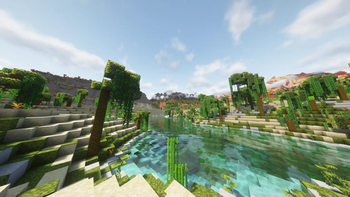
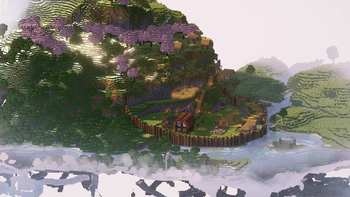
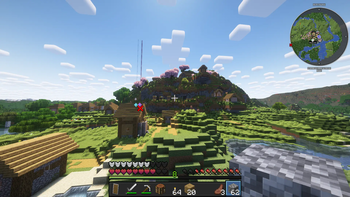

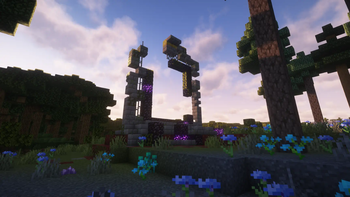
About this Modpack
Almost Vanilla is a modpack aiming to improve the minecraft experience through performance optimisations, quality of life changes and additions, shaders support, world hosting support, and more. The pack attempts to add features which should be in the vanilla game without making it feel too modded.
In order to improve the builder’s lives, the pack adds:
- Better third person cameras, to allow greater views of the landscape as well as zooming capabilities for those larger projects
- Improved visuals through shaders, better texture packs for the environment, and connected block textures (configurable)
- Carry on, chest sorting, and stacking to nearby chests, to improve organization for those extra large projects
- Better block placement option for getting blocks in those pesky areas.
Connectable chains, placeable ores, and more - More blocks and varients
In order to improve the adventurers and miners lives the pack adds:
- Distant Horizons for a more immersive and grand experience (note that solas, and rethinking voxels shaders are not compatible/buggy with distant horizons)
- Item borders to help show the rarity of items.
- Extra Animations, particles, plants, and animal variants
- Graves in case you die on your journey (configurable)
- Ore borders (resource pack)
- Sound physics to make caves even more immersive
- Improved ambient sounds which transport you into the game
- Journeymap to track your adventures
General quality of life improvements:
- Jade for information and stats on what you are looking at
- Tree Harvester to reduce the pain of getting masses of wood
- 3d skin layers, Better ladders
- Better Hud, F3, world organization, and searchable controls
- Heads of mobs and players
- Trade Cycling for Villagers
- Better chunk management, culling, thread priorities, and other performance optimisations
Notable Features
- Ortho Camera for wide zoomed-out shots
- Improved elytra flying mechanics and customisable elytra
- Bedrock-like placing system
Performance Requirements:
With the right settings the pack should run stabily on low-mid tier PCs
At least 6-10gb of ram available (varies depending on number of players joining game through essential, graphics settings, and the number of shader packs/resource packs you have installed)
Whilst this is a Vanilla-like pack, a large portion of the mods are incompatible on servers or essential 'servers' which are not running on the modpack (so the pack won't work on Vanilla Servers)
Available Versions
How to Set Up a Almost Vanilla Server
Order Server
Choose at least 4 GB RAM (6 GB recommended for Almost Vanilla). Based on player count: per 8 players.
Install Modpack in Dashboard
Open the modpack browser in the dashboard, search for "Almost Vanilla" and click "Install". The fabric loader and Minecraft 1.21.4 are configured automatically.
Start Server & Play
Start the server – all mods are loaded automatically. Share the server IP with friends and play together!
Frequently Asked Questions
Almost Vanilla server crashes or won't start – what to do?
Most common causes: insufficient RAM or wrong fabric loader. Check latest.log for "OutOfMemoryError" → increase RAM to at least 6 GB. For "Mixin" or "ClassNotFoundException" errors: modpack version and loader don't match. With Mado Hosting, loader and Minecraft version are auto-configured on modpack install – preventing most startup issues.
How much RAM does a Almost Vanilla server really need?
Minimum 4 GB, recommended 6 GB for stable performance. per 8 players. Important: Minecraft modpacks need more RAM than vanilla – plan extra per additional player. With Mado Hosting, you can scale RAM up live at any time without data loss (from €8/month).
Can I add custom mods to Almost Vanilla without conflicts?
Yes, but check compatibility: only use mods for the same loader (fabric) and same Minecraft version (1.21.4). Common issues: ID conflicts with recipe mods and incompatible coremod versions. The Mado dashboard mod browser only shows compatible mods and warns about known conflicts.
Almost Vanilla server lagging – performance tips
1) Increase RAM to 6 GB+. 2) Reduce server view-distance to 8 (server.properties). 3) Pre-generate chunks with the "Chunky" plugin. 4) Use /spark profiler to check which mods consume the most tick time. With Mado Hosting, all servers run on NVMe SSDs with dedicated CPU cores – eliminating hardware as a bottleneck.
Similar Modpacks

![Cobblemon Official Modpack [Fabric]](https://cdn.modrinth.com/data/5FFgwNNP/e7f9ee2e9d361623847853fe2ddce42f519ee64f.png)
![COBBLEVERSE - Pokemon Adventure [Cobblemon]](https://cdn.modrinth.com/data/Jkb29YJU/581ecf54530972afb18a04660afd820f2f24f6c7.png)
![Better MC [FABRIC] - BMC2](https://cdn.modrinth.com/data/shFhR8Vx/a19c2bcb51d38f32f138d3607e91cb2b7b8e387f_96.webp)


Rent Almost Vanilla Server
Start your own server with automatic modpack installation.
Supported Versions
Start your Almost Vanilla Server now
From €8.00/month with 6 GB RAM for the best performance.
Configure Server →