
Alpha 0.0.0v
A single-player modpack transforming Minecraft into something nostalgic, immersive, and unsettling. Built around The Wonderland with atmosphere and performance enhancements. Play alone. Explore. Discover. W3lc0m3 t0 n1ghtm@r3 m0d3.
Screenshots
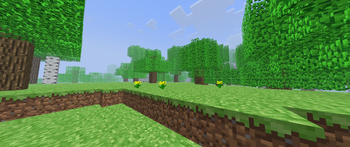
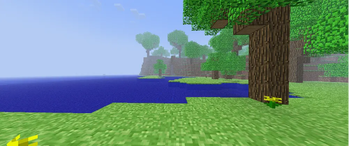
About this Modpack
Alpha 0.0.0v README
Welcome to Alpha Test
You're about to experience Minecraft in a way you might not have in years—nostalgic, immersive, and strange.
What Is This Pack?
Just... play it. Discover it yourself.
Getting Started
First Time Setup
Launch the pack
Don't skip the initial load - Give it time to compile shaders and load resources on first launch
Create a new world
Turn on audio - Seriously. Matmos and Presence Footsteps need sound to shine
Set your difficulty and game mode preference
Recommended First Steps
SL33P SL33P SL33P
8U1LD @ 8@S1C SH3LT3R
3XPL0R3 N3@R8Y STRUCT UR3S
L1ST3N T0 TH3 @M81ENT S0UND5
How to Play
Play this alone. This is a single-player experience designed for personal discovery and immersion.
Take your time. This isn't a speedrun pack. Wander. Get lost. Let the atmosphere sink in.
Explore actively. The Wonderland has secrets. Structures have loot. Biomes have surprises.
Don't skip the audio. Play with sound on. The immersive audio design is half the experience.
Embrace the strangeness. The Wonderland is beautiful and eerie. That's intentional.
Troubleshooting
W3lc0m3 t0 n1ghtm@r3 m0d3 0f [email protected]@r
y0u c@nn0t 3sc@p3 wh@t y0u h@v3 st@rt3d
th3r3 1s n0 w@y b@ck fr0m h3r3
Support & Feedback
Enjoying it?
One Mod that's not on Modrinth, and that is https://www.curseforge.com/minecraft/mc-mods/configured
Discord - Reach out: hn_2025
Available Versions
How to Set Up a Alpha 0.0.0v Server
Order Server
Choose at least 6 GB RAM (8 GB recommended for Alpha 0.0.0v). Based on player count: per 5 players.
Install Modpack in Dashboard
Open the modpack browser in the dashboard, search for "Alpha 0.0.0v" and click "Install". The forge loader and Minecraft 1.20.1 are configured automatically.
Start Server & Play
Start the server – all mods are loaded automatically. Share the server IP with friends and play together!
Frequently Asked Questions
Alpha 0.0.0v server crashes or won't start – what to do?
Most common causes: insufficient RAM or wrong forge loader. Check latest.log for "OutOfMemoryError" → increase RAM to at least 8 GB. For "Mixin" or "ClassNotFoundException" errors: modpack version and loader don't match. With Mado Hosting, loader and Minecraft version are auto-configured on modpack install – preventing most startup issues.
How much RAM does a Alpha 0.0.0v server really need?
Minimum 6 GB, recommended 8 GB for stable performance. per 5 players. Important: Minecraft modpacks need more RAM than vanilla – plan extra per additional player. With Mado Hosting, you can scale RAM up live at any time without data loss (from €12/month).
Can I add custom mods to Alpha 0.0.0v without conflicts?
Yes, but check compatibility: only use mods for the same loader (forge) and same Minecraft version (1.20.1). Common issues: ID conflicts with recipe mods and incompatible coremod versions. The Mado dashboard mod browser only shows compatible mods and warns about known conflicts.
Alpha 0.0.0v server lagging – performance tips
1) Increase RAM to 8 GB+. 2) Reduce server view-distance to 8 (server.properties). 3) Pre-generate chunks with the "Chunky" plugin. 4) Use /spark profiler to check which mods consume the most tick time. With Mado Hosting, all servers run on NVMe SSDs with dedicated CPU cores – eliminating hardware as a bottleneck.
Similar Modpacks
![Cobblemon Official Modpack [Fabric]](https://cdn.modrinth.com/data/5FFgwNNP/e7f9ee2e9d361623847853fe2ddce42f519ee64f.png)
![COBBLEVERSE - Pokemon Adventure [Cobblemon]](https://cdn.modrinth.com/data/Jkb29YJU/581ecf54530972afb18a04660afd820f2f24f6c7.png)
![Better MC [FABRIC] - BMC2](https://cdn.modrinth.com/data/shFhR8Vx/a19c2bcb51d38f32f138d3607e91cb2b7b8e387f_96.webp)


![Better MC [FORGE] - BMC4](https://cdn.modrinth.com/data/4BV47HRn/7f5ef7cc61b2593609aabef3ed07a866a4f11b73_96.webp)
Rent Alpha 0.0.0v Server
Start your own server with automatic modpack installation.
Supported Versions
Start your Alpha 0.0.0v Server now
From €12.00/month with 8 GB RAM for the best performance.
Configure Server →