
Aquarius
A lightweight Fabric modpack focused on performance, visuals, and quality-of-life improvements. Designed to enhance the vanilla experience with better FPS and subtle tweaks—perfect for players who want a smoother, cleaner game without changing gameplay.
Screenshots
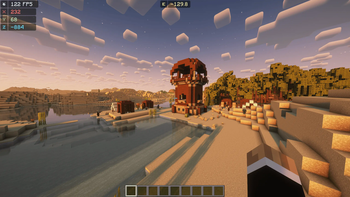
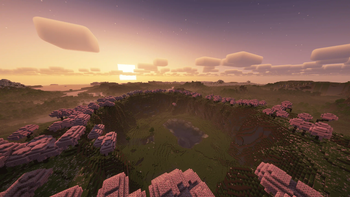
About this Modpack
🌿 Vanilla Refined: A Lightweight Performance & QoL Modpack
Summary:
A meticulously curated Fabric modpack focused on enhancing performance, visual quality, and quality-of-life—all while staying true to the vanilla Minecraft experience. Perfect for players who want a smoother, cleaner game without sacrificing the core charm of Minecraft.
🧩 What Does This Modpack Add?
This modpack is built for players who want Minecraft to run better, look cleaner, and feel smoother, without altering core mechanics or overwhelming the experience with unnecessary features. Ideal for both single-player and multiplayer use.
🚀 Performance Enhancements:
- Sodium + Lithium + FerriteCore – Drastically improve FPS and performance through rendering, physics, and memory optimizations.
- Distant Horizons – Extend your view distance with level-of-detail rendering.
- EntityCulling, Dynamic FPS, Krypton, ImmediatelyFast – Remove lag and increase responsiveness in all scenarios.
✨ Visual & Aesthetic Enhancements:
- Iris + Reese’s Sodium Options – Add shader support with an easy-to-navigate settings menu.
- Zoomify + BetterF3 + OrthoCamera + StarHUD – Modernize your HUD and camera controls.
- 3D Skin Layers + Particle Rain + Smooth Scroll – Subtle visual upgrades that preserve the vanilla aesthetic.
🔧 Quality-of-Life Improvements:
Mod Menu + Mouse Tweaks + Model Gap Fix + Pick Up Notifier – Interface and interaction enhancements for smoother gameplay.
- Capes + No Chat Reports + Packet Fixer – Safe multiplayer tweaks and visual features.
- Very Many Players + Placeholder API – Optimize gameplay in high-player environments.
📦 Client-side & Server-safe:
This modpack is intended to be client-side (unless a specific mod notes otherwise), making it safe for use on most servers, including vanilla multiplayer. No content-altering gameplay changes—just pure optimizations and aesthetic improvements.
🔗 External Resources:
All mods are sourced from reputable platforms like Modrinth. Here are some examples:
- Sodium
- Reese's Sodium Options
- Lithium
✅ Why Use This Pack?
✨ Keeps Minecraft vanilla-feeling while making it look and run better
💻 Works great on low-end systems
🕹️ Ideal for PvP, survival, creative, and multiplayer
🎮 Built for casual players, streamers, and builders who want quality without clutter
Available Versions
How to Set Up a Aquarius Server
Order Server
Choose at least 4 GB RAM (6 GB recommended for Aquarius). Based on player count: per 8 players.
Install Modpack in Dashboard
Open the modpack browser in the dashboard, search for "Aquarius" and click "Install". The fabric loader and Minecraft 1.21.5 are configured automatically.
Start Server & Play
Start the server – all mods are loaded automatically. Share the server IP with friends and play together!
Frequently Asked Questions
Aquarius server crashes or won't start – what to do?
Most common causes: insufficient RAM or wrong fabric loader. Check latest.log for "OutOfMemoryError" → increase RAM to at least 6 GB. For "Mixin" or "ClassNotFoundException" errors: modpack version and loader don't match. With Mado Hosting, loader and Minecraft version are auto-configured on modpack install – preventing most startup issues.
How much RAM does a Aquarius server really need?
Minimum 4 GB, recommended 6 GB for stable performance. per 8 players. Important: Minecraft modpacks need more RAM than vanilla – plan extra per additional player. With Mado Hosting, you can scale RAM up live at any time without data loss (from €8/month).
Can I add custom mods to Aquarius without conflicts?
Yes, but check compatibility: only use mods for the same loader (fabric) and same Minecraft version (1.21.5). Common issues: ID conflicts with recipe mods and incompatible coremod versions. The Mado dashboard mod browser only shows compatible mods and warns about known conflicts.
Aquarius server lagging – performance tips
1) Increase RAM to 6 GB+. 2) Reduce server view-distance to 8 (server.properties). 3) Pre-generate chunks with the "Chunky" plugin. 4) Use /spark profiler to check which mods consume the most tick time. With Mado Hosting, all servers run on NVMe SSDs with dedicated CPU cores – eliminating hardware as a bottleneck.
Similar Modpacks

![Cobblemon Official Modpack [Fabric]](https://cdn.modrinth.com/data/5FFgwNNP/e7f9ee2e9d361623847853fe2ddce42f519ee64f.png)
![COBBLEVERSE - Pokemon Adventure [Cobblemon]](https://cdn.modrinth.com/data/Jkb29YJU/581ecf54530972afb18a04660afd820f2f24f6c7.png)
![Better MC [FABRIC] - BMC2](https://cdn.modrinth.com/data/shFhR8Vx/a19c2bcb51d38f32f138d3607e91cb2b7b8e387f_96.webp)


Rent Aquarius Server
Start your own server with automatic modpack installation.
Details
- License
- LicenseRef-All-Rights-Reserved
- Server-side
- Unsupported
- Client-side
- Required
Supported Versions
Start your Aquarius Server now
From €8.00/month with 6 GB RAM for the best performance.
Configure Server →