
Asai Integrated Modpack
A free license modpack that optimizes game performance and adds a few improvements to the game's mechanics.
Screenshots
About this Modpack
📢 Introduce
Asai Integrated Modpack is a free license modpack that optimizes game performance and adds a few improvements to the game's mechanics.
This is a modpack that you can use freely, you can use to make things like a server client, or a new modpack, and you can build your ideas on top of this modpack without the authorization of the modpack author.
🔧 What functions does have?
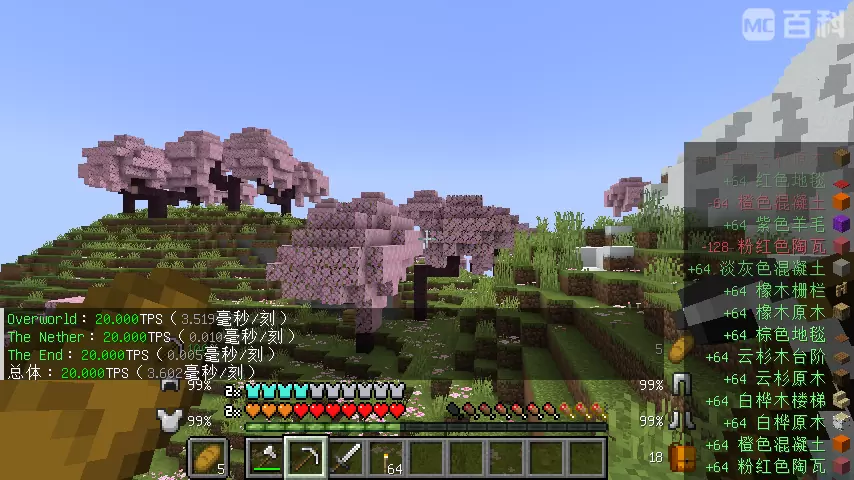
- Avoid unnecessary UI displays, provide a clean and simple layout.
- While providing performance optimizations, it also offers some gameplay improvements.
- Added Packet Fixer to fix issues where NBT tags and oversized packets prevent gameplay.
- Optimize the performance of item drops through Stxck, improve game performance, and slightly reduce the annoyance caused to players by scattered items.
※Notes on Stxck: If you are playing with Create, this mod may break the Create machines that implement the "distribution" feature. Please avoid letting items become physical entities during processing. Also, when drops exceeding the normal stack size enter Create's crusher wheels, only the normal stack quantity will be output (the excess will be lost). If you find this troublesome, you may uninstall the Stxck mod. - Adding NERB removes the recipe book, greatly improving the performance of CrT/KJS or other mods in reading player data, and speeding up data synchronization between the server and client as well as the time it takes for players to enter the saved world.
Game Mechanics Improvement Section
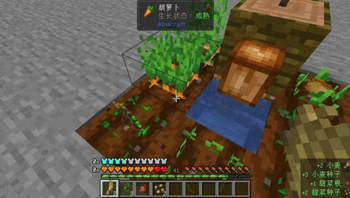
- Added Actually Harvest, just right-click on crops to harvest them. New plants will be left automatically, compatible with most MOD crops;
- Added Inventory Spam, allowing you to see which items you picked up or dropped in the bottom right corner of the screen, and it can be configured manually.
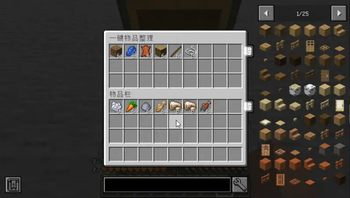
- Added Inventory Tweaks-Refoxed, a one-click organization port, with additional features;
- Added Silence Mobs, suitable for scenarios that require many creatures but where their sounds should not be too loud.
- Added Clean swing through grass, it allows you to attack creatures directly through blocks like grass and rails.
※This mod has a friendly-fire issue, but it is a client-side only mod. If you think the trouble it brings outweighs its convenience, you can delete it. - Added In-game NBTEdit and WorldEdit(1.21.1) provides convenience for advanced players, such as creators;
- Added Pro Placer, completely revamped the block placement logic, making it a whole lot easier and faster to use.
🖐 Precautions
- This modpack does not include any minimap-type mods. If needed, you can add your preferred minimap mods yourself.
- This modpack does not include shader loader mod, you can add Iris(1.21.1) or Oculus(1.20.1) yourself.
- You can join our discord server to discuss this modpack, or chat with other players: [Invite]
📝 Java arguments
This modpack have dedicated arguments, used to further optimize game performance:
1.20.1 for Client:
-XX:+UnlockExperimentalVMOptions -XX:+UseG1GC -XX:MaxGCPauseMillis=37 -XX:+UseCompressedOops -XX:+UseCompressedClassPointers -XX:+PerfDisableSharedMem -XX:+ExplicitGCInvokesConcurrent -XX:-UseAdaptiveSizePolicy -XX:+OmitStackTraceInFastThrow -XX:+UseFastUnorderedTimeStamps -XX:-DontCompileHugeMethods -XX:+OptimizeStringConcat -XX:+UseStringDeduplication -XX:G1HeapRegionSize=16M -XX:G1NewSizePercent=23 -XX:G1ReservePercent=20 -XX:SurvivorRatio=32 -XX:G1MixedGCCountTarget=3 -XX:G1HeapWastePercent=20 -XX:InitiatingHeapOccupancyPercent=10 -XX:G1RSetUpdatingPauseTimePercent=0 -XX:MaxTenuringThreshold=1 -XX:G1SATBBufferEnqueueingThresholdPercent=30 -XX:G1ConcMarkStepDurationMillis=5.0 -XX:G1ConcRSHotCardLimit=16 -XX:G1ConcRefinementServiceIntervalMillis=150 -XX:GCTimeRatio=99 -Dfml.ignoreInvalidMinecraftCertificates=true -Dfml.ignorePatchDiscrepancies=true -Dlog4j2.formatMsgNoLookups=true -Dfile.encoding=UTF-8 -Dconsole.encoding=UTF-8 -Djdk.lang.Process.allowAmbiguousCommands=true
For server, when use Java 17 booted:
-XX:+UseG1GC -XX:MaxGCPauseMillis=130 -XX:+UnlockExperimentalVMOptions -XX:+AlwaysActAsServerClassMachine -XX:+AlwaysPreTouch -XX:+ExplicitGCInvokesConcurrent -XX:+OptimizeStringConcat -XX:+UseCompressedOops -XX:+UseCompressedClassPointers -XX:+UseStringDeduplication -XX:-DontCompileHugeMethods -XX:-UseAdaptiveSizePolicy -XX:+UseVectorCmov -XX:+PerfDisableSharedMem -XX:+UseFastUnorderedTimeStamps -XX:+OmitStackTraceInFastThrow -XX:+UseNUMA -XX:G1NewSizePercent=28 -XX:G1HeapRegionSize=16M -XX:G1ReservePercent=20 -XX:G1MixedGCCountTarget=3 -XX:InitiatingHeapOccupancyPercent=10 -XX:G1MixedGCLiveThresholdPercent=90 -XX:G1RSetUpdatingPauseTimePercent=0 -XX:SurvivorRatio=32 -XX:MaxTenuringThreshold=1 -XX:G1SATBBufferEnqueueingThresholdPercent=30 -XX:G1ConcMarkStepDurationMillis=5 -XX:G1ConcRSHotCardLimit=16 -XX:G1ConcRefinementServiceIntervalMillis=150 -Dfile.encoding=UTF-8 -Dconsole.encoding=UTF-8 -Djdk.lang.Process.allowAmbiguousCommands=true -Dlog4j2.formatMsgNoLookups=true -Dfml.ignorePatchDiscrepancies=true -Dfml.ignoreInvalidMinecraftCertificates=true -Xlog:async -Djava.security.egd=file:/dev/urandom --add-modules jdk.incubator.vector
1.21.1 for Client:
-XX:+UnlockExperimentalVMOptions -XX:+UseG1GC -XX:MaxGCPauseMillis=37 -XX:+UseCompressedOops -XX:+UseCompressedClassPointers -XX:+PerfDisableSharedMem -XX:+ExplicitGCInvokesConcurrent -XX:-UseAdaptiveSizePolicy -XX:+OmitStackTraceInFastThrow -XX:+UseFastUnorderedTimeStamps -XX:-DontCompileHugeMethods -XX:+OptimizeStringConcat -XX:+UseStringDeduplication -XX:G1HeapRegionSize=16M -XX:G1NewSizePercent=23 -XX:G1ReservePercent=20 -XX:SurvivorRatio=32 -XX:G1MixedGCCountTarget=3 -XX:G1HeapWastePercent=20 -XX:InitiatingHeapOccupancyPercent=10 -XX:G1RSetUpdatingPauseTimePercent=0 -XX:MaxTenuringThreshold=1 -XX:G1SATBBufferEnqueueingThresholdPercent=30 -XX:G1ConcMarkStepDurationMillis=5.0 -XX:GCTimeRatio=99 -Dlog4j2.formatMsgNoLookups=true -Djdk.lang.Process.allowAmbiguousCommands=true
For server, when use Java 21 booted:
-XX:+UseG1GC -XX:MaxGCPauseMillis=130 -XX:+UnlockExperimentalVMOptions -XX:+AlwaysActAsServerClassMachine -XX:+AlwaysPreTouch -XX:+ExplicitGCInvokesConcurrent -XX:+OptimizeStringConcat -XX:+UseCompressedOops -XX:+UseCompressedClassPointers -XX:+UseStringDeduplication -XX:-DontCompileHugeMethods -XX:-UseAdaptiveSizePolicy -XX:+UseVectorCmov -XX:+PerfDisableSharedMem -XX:+UseFastUnorderedTimeStamps -XX:+OmitStackTraceInFastThrow -XX:+UseNUMA -XX:G1NewSizePercent=28 -XX:G1HeapRegionSize=16M -XX:G1ReservePercent=20 -XX:G1MixedGCCountTarget=3 -XX:InitiatingHeapOccupancyPercent=10 -XX:G1MixedGCLiveThresholdPercent=90 -XX:G1RSetUpdatingPauseTimePercent=0 -XX:SurvivorRatio=32 -XX:MaxTenuringThreshold=1 -XX:G1SATBBufferEnqueueingThresholdPercent=30 -XX:G1ConcMarkStepDurationMillis=5 -Djdk.lang.Process.allowAmbiguousCommands=true -Dlog4j2.formatMsgNoLookups=true -Dfml.ignorePatchDiscrepancies=true -Dfml.ignoreInvalidMinecraftCertificates=true -Xlog:async -Djava.security.egd=file:/dev/urandom --add-modules jdk.incubator.vector
Available Versions
How to Set Up a Asai Integrated Modpack Server
Order Server
Choose at least 4 GB RAM (6 GB recommended for Asai Integrated Modpack). Based on player count: per 5 players.
Install Modpack in Dashboard
Open the modpack browser in the dashboard, search for "Asai Integrated Modpack" and click "Install". The forge loader and Minecraft 1.21.1 are configured automatically.
Start Server & Play
Start the server – all mods are loaded automatically. Share the server IP with friends and play together!
Frequently Asked Questions
Asai Integrated Modpack server crashes or won't start – what to do?
Most common causes: insufficient RAM or wrong forge loader. Check latest.log for "OutOfMemoryError" → increase RAM to at least 6 GB. For "Mixin" or "ClassNotFoundException" errors: modpack version and loader don't match. With Mado Hosting, loader and Minecraft version are auto-configured on modpack install – preventing most startup issues.
How much RAM does a Asai Integrated Modpack server really need?
Minimum 4 GB, recommended 6 GB for stable performance. per 5 players. Important: Minecraft modpacks need more RAM than vanilla – plan extra per additional player. With Mado Hosting, you can scale RAM up live at any time without data loss (from €8/month).
Can I add custom mods to Asai Integrated Modpack without conflicts?
Yes, but check compatibility: only use mods for the same loader (forge) and same Minecraft version (1.21.1). Common issues: ID conflicts with recipe mods and incompatible coremod versions. The Mado dashboard mod browser only shows compatible mods and warns about known conflicts.
Asai Integrated Modpack server lagging – performance tips
1) Increase RAM to 6 GB+. 2) Reduce server view-distance to 8 (server.properties). 3) Pre-generate chunks with the "Chunky" plugin. 4) Use /spark profiler to check which mods consume the most tick time. With Mado Hosting, all servers run on NVMe SSDs with dedicated CPU cores – eliminating hardware as a bottleneck.
Similar Modpacks

![Cobblemon Official Modpack [Fabric]](https://cdn.modrinth.com/data/5FFgwNNP/e7f9ee2e9d361623847853fe2ddce42f519ee64f.png)
![COBBLEVERSE - Pokemon Adventure [Cobblemon]](https://cdn.modrinth.com/data/Jkb29YJU/581ecf54530972afb18a04660afd820f2f24f6c7.png)
![Better MC [FABRIC] - BMC2](https://cdn.modrinth.com/data/shFhR8Vx/a19c2bcb51d38f32f138d3607e91cb2b7b8e387f_96.webp)


Rent Asai Integrated Modpack Server
Start your own server with automatic modpack installation.
Details
- License
- BSD 3-Clause "New" or "Revised" License
- Server-side
- Required
- Client-side
- Required
Supported Versions
Start your Asai Integrated Modpack Server now
From €8.00/month with 6 GB RAM for the best performance.
Configure Server →