
Atmosphere Extended
An experimental modpack that adds better world generation, structures, and more!
Screenshots
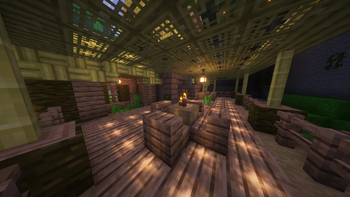
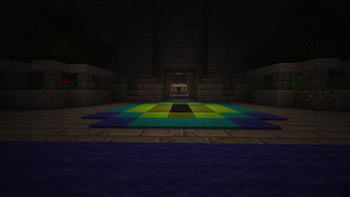
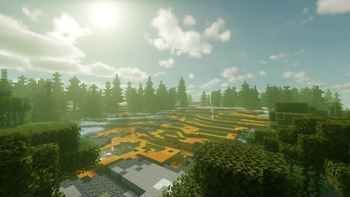
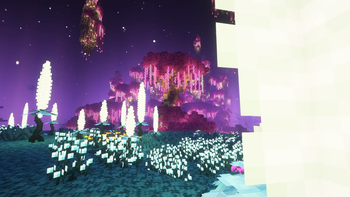
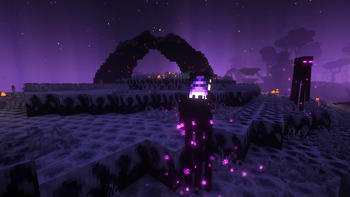
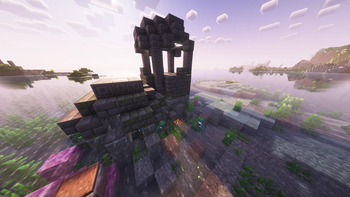
About this Modpack
Atmosphere Extended Minecraft Mod
Overview
"Atmosphere Extended" is an expansive Minecraft mod designed to enhance the world-building experience by introducing a wide array of new terrain, world generation, structures, and various elements to enrich the gameplay.
Key Features
New Terrain
- Biome Diversity: Discover a multitude of new biomes, each with its own distinct characteristics, landscapes, and resources.
- Enhanced Landscapes: Experience varied terrains, from towering mountains to lush valleys, dense forests to expansive deserts, and much more.
World Generation
- Unique Structures: Encounter new and intriguing structures scattered throughout the world, providing challenges and rewards for exploration.
- Cave Systems: Delve into extensive and intricate cave networks filled with valuable ores and hidden secrets.
- Underground Wonders: Uncover hidden underground treasures, including caverns, unique blocks, and mysterious subterranean landscapes.
Expanded Environment
- Flora and Fauna: Encounter new plants, trees, and structures unique to different biomes.
Gameplay Enhancements
- New Resources: Mine new ores and harvest unique materials that offer innovative crafting possibilities.
- Challenges and Quests: Engage in challenges and quests tied to the new structures and biomes, adding depth and purpose to exploration.
Immersive Experience
- Soundscapes: Enjoy immersive sound effects tailored to different biomes, enhancing the atmosphere.
- Visual Enhancements: Delight in improved visuals with attention to detail in landscapes, structures, and environmental elements.
Conclusion
"Atmosphere Extended" aims to enrich the Minecraft experience by broadening the world with new landscapes, structures, resources, and challenges, encouraging exploration and discovery in every corner of the game.
Check Out the Mod Creators
- Support the Developers: Be sure to check out each individual mod creators' page for updates, news, and ways to support their work.
Beta Version Caution
- Stability Caution: As this version is in Beta, please be aware that it might not be entirely stable and could lead to crashes or unexpected issues.
Dive into a more diverse and vibrant world with "Atmosphere Extended" and unearth the endless possibilities waiting to be discovered within the blocky realms of Minecraft.
Available Versions
How to Set Up a Atmosphere Extended Server
Order Server
Choose at least 8 GB RAM (12 GB recommended for Atmosphere Extended). Based on player count: per 3 players.
Install Modpack in Dashboard
Open the modpack browser in the dashboard, search for "Atmosphere Extended" and click "Install". The fabric loader and Minecraft 1.20.2 are configured automatically.
Start Server & Play
Start the server – all mods are loaded automatically. Share the server IP with friends and play together!
Frequently Asked Questions
Atmosphere Extended server crashes or won't start – what to do?
Most common causes: insufficient RAM or wrong fabric loader. Check latest.log for "OutOfMemoryError" → increase RAM to at least 12 GB. For "Mixin" or "ClassNotFoundException" errors: modpack version and loader don't match. With Mado Hosting, loader and Minecraft version are auto-configured on modpack install – preventing most startup issues.
How much RAM does a Atmosphere Extended server really need?
Minimum 8 GB, recommended 12 GB for stable performance. per 3 players. Important: Minecraft modpacks need more RAM than vanilla – plan extra per additional player. With Mado Hosting, you can scale RAM up live at any time without data loss (from €16/month).
Can I add custom mods to Atmosphere Extended without conflicts?
Yes, but check compatibility: only use mods for the same loader (fabric) and same Minecraft version (1.20.2). Common issues: ID conflicts with recipe mods and incompatible coremod versions. The Mado dashboard mod browser only shows compatible mods and warns about known conflicts.
Atmosphere Extended server lagging – performance tips
1) Increase RAM to 12 GB+. 2) Reduce server view-distance to 8 (server.properties). 3) Pre-generate chunks with the "Chunky" plugin. 4) Use /spark profiler to check which mods consume the most tick time. With Mado Hosting, all servers run on NVMe SSDs with dedicated CPU cores – eliminating hardware as a bottleneck.
Similar Modpacks
![Cobblemon Official Modpack [Fabric]](https://cdn.modrinth.com/data/5FFgwNNP/e7f9ee2e9d361623847853fe2ddce42f519ee64f.png)
![COBBLEVERSE - Pokemon Adventure [Cobblemon]](https://cdn.modrinth.com/data/Jkb29YJU/581ecf54530972afb18a04660afd820f2f24f6c7.png)
![Better MC [FABRIC] - BMC2](https://cdn.modrinth.com/data/shFhR8Vx/a19c2bcb51d38f32f138d3607e91cb2b7b8e387f_96.webp)


![Better MC [FORGE] - BMC4](https://cdn.modrinth.com/data/4BV47HRn/7f5ef7cc61b2593609aabef3ed07a866a4f11b73_96.webp)
Rent Atmosphere Extended Server
Start your own server with automatic modpack installation.
Supported Versions
Start your Atmosphere Extended Server now
From €16.00/month with 12 GB RAM for the best performance.
Configure Server →