
AttilaCraft 3
Create machines, make them more efficient, upgrade, and take over the world! This is a modpack focused on technology and efficiency.
Screenshots

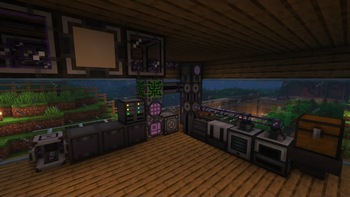

About this Modpack

Create machines, make them more efficient, upgrade, and take over the world!
⚙️ Features:
- 🔧 Play with your favorite tech mods such as : AE2, Create, The Thermal Series and Immersive Engineering
- 🏰 Explore the tons of new structures added by Yung's mods, Repurposed Structures
- 🧟♂️ Fight the powerful monsters from Mutant Monsters and Mutant More
- 🌕 Experience the cool new lunar events with Enhanced Celestials
- 🚀 Explore new planets with Ad Astra!
- 🍃 Generate mana with natural technologies in Botania
- 🔗 Compatibility mods for a more seamless experience (Applied Botanics, Applied Mekanistics, etc... )
- 📦 Enjoy the small useful features added by Quark, Supplementaries and Fuzs's mods
- 🤨 And 500% more Attila
❓FAQ
3️⃣ Why 3?
Because there was a v1 and v2 on curseforge. I want the project to be successor and not a continuation of the modpack.
 |
|

|
🔄 Verisoning :
The modpack uses this version system: Major.Minor.Patch
- Major : A new version of minecraft or a big modpack change, these updates are not backwards compatible.
- Minor : New mods might have been added or removed, these updates might be backwards compatible.
- Patch : Updated mods, safe to update worlds.
💻 Server files :
Server files are usually available as additional files at the download page.
(Server files might be uploaded later then the full modpack)
🔥 Mods from Curseforge :
|
Shutup Experimental Settings! | GPLv3 |

|
Catalogue | GPLv3 |

|
Framework | GPLv3 |

|
Configured | GPLv3 |
|
MrCrayfish's Gun Mod | GPLv3 |
|
kiwi boi | LGPLv3 |

|
Citadel | LGPLv3 |

|
Alex's Mobs | LGPLv3 |

|
Ender Storage 1.8.+ | MIT |

|
CodeChicken Lib 1.8.+ | LGPLv3 |

|
AE2 Things | MIT |

|
Titanium | LGPLv3 |
|
Industrial Foregoing | MIT |
|
Create Big Cannons | MIT |
Only in older versions:
|
Domestication Innovation | LGPLv3 |
Available Versions
How to Set Up a AttilaCraft 3 Server
Order Server
Choose at least 6 GB RAM (8 GB recommended for AttilaCraft 3). Based on player count: per 5 players.
Install Modpack in Dashboard
Open the modpack browser in the dashboard, search for "AttilaCraft 3" and click "Install". The forge loader and Minecraft 1.19.2 are configured automatically.
Start Server & Play
Start the server – all mods are loaded automatically. Share the server IP with friends and play together!
Frequently Asked Questions
AttilaCraft 3 server crashes or won't start – what to do?
Most common causes: insufficient RAM or wrong forge loader. Check latest.log for "OutOfMemoryError" → increase RAM to at least 8 GB. For "Mixin" or "ClassNotFoundException" errors: modpack version and loader don't match. With Mado Hosting, loader and Minecraft version are auto-configured on modpack install – preventing most startup issues.
How much RAM does a AttilaCraft 3 server really need?
Minimum 6 GB, recommended 8 GB for stable performance. per 5 players. Important: Minecraft modpacks need more RAM than vanilla – plan extra per additional player. With Mado Hosting, you can scale RAM up live at any time without data loss (from €12/month).
Can I add custom mods to AttilaCraft 3 without conflicts?
Yes, but check compatibility: only use mods for the same loader (forge) and same Minecraft version (1.19.2). Common issues: ID conflicts with recipe mods and incompatible coremod versions. The Mado dashboard mod browser only shows compatible mods and warns about known conflicts.
AttilaCraft 3 server lagging – performance tips
1) Increase RAM to 8 GB+. 2) Reduce server view-distance to 8 (server.properties). 3) Pre-generate chunks with the "Chunky" plugin. 4) Use /spark profiler to check which mods consume the most tick time. With Mado Hosting, all servers run on NVMe SSDs with dedicated CPU cores – eliminating hardware as a bottleneck.
Similar Modpacks

![COBBLEVERSE - Pokemon Adventure [Cobblemon]](https://cdn.modrinth.com/data/Jkb29YJU/581ecf54530972afb18a04660afd820f2f24f6c7.png)




Rent AttilaCraft 3 Server
Start your own server with automatic modpack installation.
Supported Versions
Start your AttilaCraft 3 Server now
From €12.00/month with 8 GB RAM for the best performance.
Configure Server →