
AX's QOL pack
A modpack created to share my vision of the perfect Minecraft experience here on Modrinth.
Screenshots





About this Modpack
<-- DM me for support/questions
<-- Tips/Update Posts
About
AX's QOL PACK is a lightweight Minecraft modpack created to share my vision of the perfect Minecraft experience here on Modrinth. This pack combines some mods that enhance performance and improve quality of life (QOL) in the game, to give you a smoother and more enjoyable experience without compromising stability or compatibility.
By using AX'S QOL pack, you agree to the following disclaimers.
Features
Performance, Performance, Performance!!!
AX's QOL PACK includes modern performance mods like Sodium, Lithium, and many others, that I have handpicked to optimize your game and reduce lag and stutter on many devices.
Quality of Life Improvements
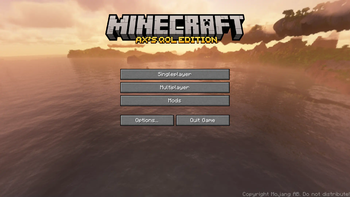
From custom menus and better animations to useful utilities and UI tweaks, this pack adds lots of QOL features that make Minecraft more enjoyable without changing the core gameplay.
Compatibility and Flexibility
Built on Fabric, AX's QOL PACK supports a lot of mods and resource packs. It works well with vanilla servers and can be customized by adding your favorite mods on top.
FAQ
Q: How do I install or update the modpack?
A: Just download the version you prefer in the .mrpack file format or install it easily with the Modrinth App!
To update the pack, you can either re-download it from this page or simply update it through the built-in “Update Modpack” function in the Modrinth app.
Q: I have a suggestion for something you could change. How can I share it?
A: Reach out to me on Discord @SonoAX, I’d love to hear your ideas.
Q: Does this modpack require server-side mods?
A: No, AX's QOL PACK works perfectly on any vanilla server. However, please be aware that future updates of some mods included in the pack may alter game behavior in ways that certain server anti-cheat systems could flag as suspicious. I am NOT responsible for any bans or penalties that may result from using this modpack on servers with strict anti-cheat measures. Always check server rules and permissions before playing with mods.
Q: Can I add my own mods to this pack?
A: Absolutely! Since it’s built on Fabric, you can easily add mods you like to further customize your experience.
Q: Where can I get support? I’ve more questions to ask!
A: Just hit me up on Discord @SonoAX .
Credits:
Projects used in this modpack
- ViaFabricPlus
- Resourcify
- ImmersiveThunder
- Terralith
- Fast IP Ping
- Reese's Sodium Options
- No Chat Reports
- UniLib
- Zoomify
- Chat Heads
- Collective
- Architectury API
- Presence Footsteps
- Debugify
- rethinking-voxels_r0.1-beta9.zip.txt
- Default Dark Mode
- Fabrishot
- Drippy Loading Screen
- ToadLib
- BadOptimizations
- Status Effect Bars
- Shut Up GL Error
- Forge Config API Port
- M.R.U
- YetAnotherConfigLib (YACL)
- Iris Shaders
- Angel's Weather
- Auth Me
- 3D Skin Layers
- Photon Shaders
- Chunky
- Ambient Environment
- Remove Terralith Intro Message
- Model Gap Fix
- SPBR-GrassParallax
- superDuperVanilla.zip.txt
- Continuity
- Round Trees
- Lithium
- Melody
- Falling Leaves
- AppleSkin
- Smooth Scrolling
- ComplementaryUnbound_r5.2.2.zip.txt
- Sound Physics Remastered
- FastQuit
- ClearGlassPack1.20.zip
- Ksyxis
- Complementary Shaders - Reimagined
- CreativeCore
- Lithostitched
- Krypton
- Cloth Config API
- Particle Rain
- SPBR-GlowingOre
- GlitchCore
- VanillaPlus_v3.2.zip.txt
- Controlling
- Entity Culling
- Searchables
- Sodium
- Tectonic
- More Culling
- Fabric API
- Distant Horizons
- Boat Item View
- ComplementaryUnbound_r5.5.1.zip.txt
- BSL Shaders
- Fabric Language Kotlin
- Language Reload
- Polytone
- Konkrete
- LambDynamicLights - Dynamic Lights
- GPUBooster
- FerriteCore
- Simple Voice Chat
- Double Doors
- Complementary Shaders - Unbound
- Mouse Tweaks
- Visuality
- Tiny Item Animations
- Mellow Shader v2.2.zip.txt
- Raised
- ComplementaryReimagined_r5.6.1.zip.txt
- Dynamic FPS
- ScalableLux
- Drip Sounds
- Disable Custom Worlds Advice
- ServerCore
- Mod Menu
- ModMenu Badges Lib
- Concurrent Chunk Management Engine (Fabric)
- Super Duper Vanilla
- Sodium Extra
- Very Many Players (Fabric)
- Noisium
- AcryliCraft
- No Telemetry
- photon_v1.2a.zip.txt
- ImmediatelyFast
- Rethinking Voxels
- FancyMenu
- ComplementaryUnbound_r5.4.zip.txt
- JamLib
- Mellow
- Cubes Without Borders
- BSL_v10.0.zip.txt
- SPBR
- Respackopts
- Immersive UI
- Default Options
- Controlify (Controller support)
- Fresh End Crystal x Punchy!
- Hyper Punchy
- Punchy!
- Weskerson's Torches
- Fresh Animations: Player Extension
- Fresh Animations
Thank you for downloading and/or checking out AX's QOL PACK!
Cya
Available Versions
How to Set Up a AX's QOL pack Server
Order Server
Choose at least 4 GB RAM (6 GB recommended for AX's QOL pack). Based on player count: per 8 players.
Install Modpack in Dashboard
Open the modpack browser in the dashboard, search for "AX's QOL pack" and click "Install". The fabric loader and Minecraft 1.21.11 are configured automatically.
Start Server & Play
Start the server – all mods are loaded automatically. Share the server IP with friends and play together!
Frequently Asked Questions
AX's QOL pack server crashes or won't start – what to do?
Most common causes: insufficient RAM or wrong fabric loader. Check latest.log for "OutOfMemoryError" → increase RAM to at least 6 GB. For "Mixin" or "ClassNotFoundException" errors: modpack version and loader don't match. With Mado Hosting, loader and Minecraft version are auto-configured on modpack install – preventing most startup issues.
How much RAM does a AX's QOL pack server really need?
Minimum 4 GB, recommended 6 GB for stable performance. per 8 players. Important: Minecraft modpacks need more RAM than vanilla – plan extra per additional player. With Mado Hosting, you can scale RAM up live at any time without data loss (from €8/month).
Can I add custom mods to AX's QOL pack without conflicts?
Yes, but check compatibility: only use mods for the same loader (fabric) and same Minecraft version (1.21.11). Common issues: ID conflicts with recipe mods and incompatible coremod versions. The Mado dashboard mod browser only shows compatible mods and warns about known conflicts.
AX's QOL pack server lagging – performance tips
1) Increase RAM to 6 GB+. 2) Reduce server view-distance to 8 (server.properties). 3) Pre-generate chunks with the "Chunky" plugin. 4) Use /spark profiler to check which mods consume the most tick time. With Mado Hosting, all servers run on NVMe SSDs with dedicated CPU cores – eliminating hardware as a bottleneck.
Rent AX's QOL pack Server
Start your own server with automatic modpack installation.
Details
- License
- LicenseRef-All-Rights-Reserved
- Server-side
- Optional
- Client-side
- Required
Supported Versions
Start your AX's QOL pack Server now
From €8.00/month with 6 GB RAM for the best performance.
Configure Server →