
Back to Blocks 2.0
It’s still Minecraft — just way better.
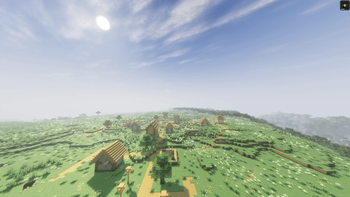
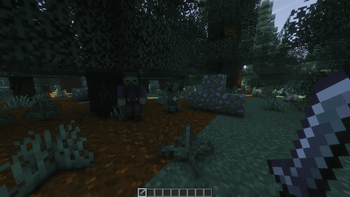
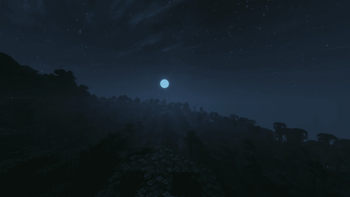
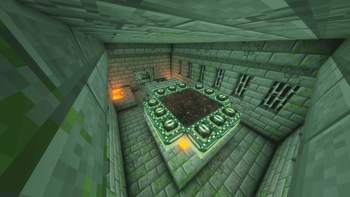
Screenshots
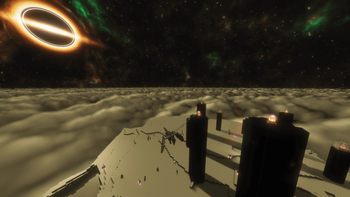
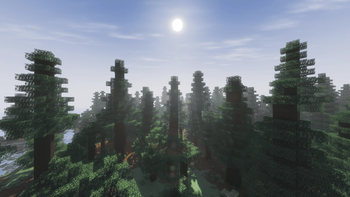
About this Modpack

Back To Blocks – Modpack Description
🧠 Back to Blocks 2.0 — Just Smarter Vanilla
Back to Blocks is the definitive Vanilla+ experience for Minecraft 1.21.11. Forget bloated tech mods or confusing magic. This pack enhances the core essence of Minecraft with the best optimization and visual upgrades available in 2026.
✅ PERFORMANCE-FIRST
Built with the "Holy Trinity" of performance mods to ensure high FPS even on modest hardware:
Graphics Engine: Sodium 0.8.6 and Iris 1.10.6 for industry-leading shader support.
Optimization: BBE, Lithium, C2ME (multi-threading), and FerriteCore (8.2.0).
Zero Lag: Includes BadOptimizations (2.4.1) and ModernFix for a smooth, stutter-free experience.
This modpack has been manually optimized to ensure a smooth experience even on low-end configurations, even while running shaders. Every mod has been carefully configured to balance visual fidelity and high FPS.
🖼️ TOTAL IMMERSION
The world finally feels "alive" thanks to a meticulous selection of assets:
Living Mobs: Featuring Fresh Animations (1.10.4) paired with the full AL's Overhaul series (Zombies, Skeletons, Creepers, and more).
3D Details: Items, books, torches, and armor trims now feature detailed 3D models for added depth.
Atmospheric Audio: A breathtaking soundscape powered by Sound Physics Remastered, AmbientSounds, and Presence Footsteps.
🌱 ATMOSPHERIC IMMERSION
Majestic World Gen: Explore a vertical and imposing Nether with Amplified Nether and beautiful landscapes via Tectonic.
Visual Polish: Improved rain effects, better particles, and immersive dynamic lighting.
🧭 QUALITY OF LIFE ADDITIONS
Improved HUD, zoom, tooltips, better item models, auto-sorting, inventory tweaks, and smart utilities like, Zoomify, Mouse Tweaks and Inventory Management make everything more fluid – without ruining vanilla balance.
👥 EASY MULTIPLAYER
Thanks to the Essential mod, you can join or host a world with your friends instantly – no server required, no IP needed. Just click, invite, and play.
🖼️ Pre-installed packs
This modpack includes resource packs carefully curated to enhance Minecraft’s visuals while preserving its Vanilla spirit.
"Back To Blocks" is the perfect modpack for players who love Minecraft just the way it is – but want it cooler.
📥 Ready to rediscover Minecraft?
DOWNLOAD
Known Issues & Fixes :
Lootr Chest Textures/Animations
If Lootr chests appear as standard vanilla chests and lack opening animations, this is caused by an optimization conflict with the BBE (Better Block Entities) mod.
If this bothers you, here's how to fix the problem.
How to fix:
Open the BBE menu (in minecraft graphics settings).
Uncheck "Optimize Chest" and apply.
If you encounter any bugs or performance issues, please don't hesitate to let me know! I will do my best to release a fix as soon as possible.
Available Versions
How to Set Up a Back to Blocks 2.0 Server
Order Server
Choose at least 6 GB RAM (8 GB recommended for Back to Blocks 2.0). Based on player count: per 5 players.
Install Modpack in Dashboard
Open the modpack browser in the dashboard, search for "Back to Blocks 2.0" and click "Install". The fabric loader and Minecraft 1.21.11 are configured automatically.
Start Server & Play
Start the server – all mods are loaded automatically. Share the server IP with friends and play together!
Frequently Asked Questions
Back to Blocks 2.0 server crashes or won't start – what to do?
Most common causes: insufficient RAM or wrong fabric loader. Check latest.log for "OutOfMemoryError" → increase RAM to at least 8 GB. For "Mixin" or "ClassNotFoundException" errors: modpack version and loader don't match. With Mado Hosting, loader and Minecraft version are auto-configured on modpack install – preventing most startup issues.
How much RAM does a Back to Blocks 2.0 server really need?
Minimum 6 GB, recommended 8 GB for stable performance. per 5 players. Important: Minecraft modpacks need more RAM than vanilla – plan extra per additional player. With Mado Hosting, you can scale RAM up live at any time without data loss (from €12/month).
Can I add custom mods to Back to Blocks 2.0 without conflicts?
Yes, but check compatibility: only use mods for the same loader (fabric) and same Minecraft version (1.21.11). Common issues: ID conflicts with recipe mods and incompatible coremod versions. The Mado dashboard mod browser only shows compatible mods and warns about known conflicts.
Back to Blocks 2.0 server lagging – performance tips
1) Increase RAM to 8 GB+. 2) Reduce server view-distance to 8 (server.properties). 3) Pre-generate chunks with the "Chunky" plugin. 4) Use /spark profiler to check which mods consume the most tick time. With Mado Hosting, all servers run on NVMe SSDs with dedicated CPU cores – eliminating hardware as a bottleneck.
Rent Back to Blocks 2.0 Server
Start your own server with automatic modpack installation.
Supported Versions
Start your Back to Blocks 2.0 Server now
From €12.00/month with 8 GB RAM for the best performance.
Configure Server →