
BadPC-MC
Vanilla Minecraft with Performance Optimations for bad PCs. (Potato PC/low end hardware)
About this Modpack
BadPCMC – The Ultimate Low End PC Minecraft Modpack for Smooth FPS & Lag-Free Gameplay
BadPCMC is a lightweight Minecraft modpack designed specifically for players with low-end hardware, often called potato PCs, old laptops, or struggling desktops. If you've ever experienced lag, stuttering, or low FPS while trying to run Vanilla Minecraft, this is the best performance modpack for you. I created BadPCMC to make Minecraft playable on my own underpowered laptop – a machine that couldn't even run Vanilla Minecraft properly. Now, with this Fabric-based optimization pack, it runs smoothly and efficiently.
Stay up‑to‑date without losing performance: BadPCMC is typically updated to the latest Minecraft version within a few weeks after a new release, and we also occasionally refresh older versions – so you can stick with your favorite update or move forward without waiting.
Features – The Best Minecraft Performance Mods Pre-Configured for Weak PCs
This FPS boost modpack comes pre-configured for weak PCs, so you don’t need to tweak any settings. Just install and play. We’ve carefully selected the top optimization mods to balance visual quality and performance:
- Sodium + Sodium Extra + Lithium – Core performance enhancing mods that massively improve FPS on old computers and low-end laptops.
- Dynamic FPS + CullLeaves + EntityCulling + More Culling – Reduce unnecessary rendering to fix Minecraft lag spikes and boost frame rates.
- FerriteCore + ImmediatelyFast + ScalableLux – Additional RAM-saving tweaks and faster load times for potato PC gameplay.
- Better Biome Reblend + Continuity + 3D Skin Layers – Visual upgrades that won’t kill your FPS.
- CraftPresence + Fullbright + LambDynamicLights – Quality-of-life improvements without performance loss.
And many more utility mods like Cloth Config v20, Fabric API, Forge Config API Port, Language Reload, MidnightLib, Mod Menu, Placeholder API, Reese's Sodium Options, Remove Reloading Screen, UniLib, Visuality, YetAnotherConfigLib, Alternate Current – giving you full control over your lightweight Minecraft experience.
Why Use BadPCMC? – The Ideal Minecraft Lag Fix for Old Laptops
- Optimized for low-end PCs and potato laptops
- Pre-configured for weak hardware – no manual tuning needed
- Enjoy a smooth, stutter-free Minecraft experience on machines that struggle with Vanilla
- Carefully balanced mods for maximum FPS while keeping the game looking good
- One of the best Fabric performance modpacks available for old computer Minecraft
- Regular updates: new Minecraft versions supported within weeks, plus occasional updates for older versions – you're never left behind
If your PC struggles to run Minecraft, BadPCMC is the ultimate lag fix and FPS booster – your solution to finally enjoy a smooth, playable game.
Comparison Screenshot
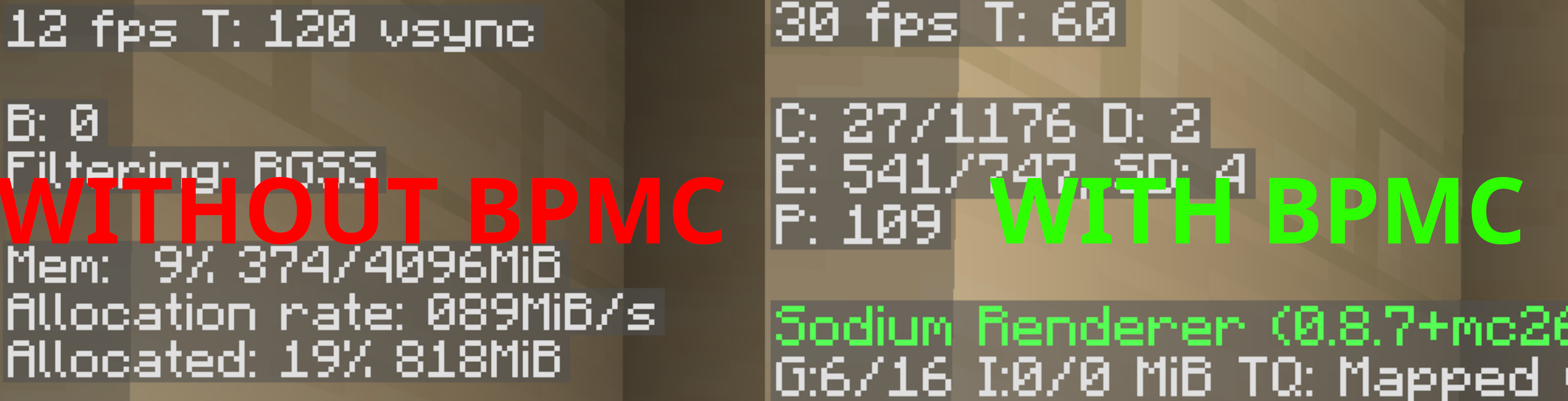 *
*Mod List:
- 3d-Skin-Layers [1.11.1] by tr7zw
- Alternate Current [1.9.0] by Space Walker
- BBE [1.3.1] by ceeden
- Cloth Config v26.1 [26.1.154] by shedaniel
- CraftPresence [2.7.1] by CDAGaming
- Cull Leaves [4.1.2] by Motschen, TeamMidnightDust
- Dynamic FPS [3.11.6] by juliand665, LostLuma
- EntityCulling [1.10.0] by tr7zw
- Fabric API [0.145.3+26.1.1] by FabricMC
- Fabric Language Kotlin [1.13.10+kotlin.2.3.20] by FabricMC
- FerriteCore [9.0.0] by malte0811
- Forge Config API Port [26.1.3] by Fuzs
- Fullbright [3.2.0-alpha.2] by Greenman999
- ImmediatelyFast [1.15.1+26.1.1] by RK_01
- LambDynamicLights [4.10.0+26.1] by LambdAurora
- Language Reload [1.7.6+26.1] by Jerozgen
- Lithium [0.22.1+mc26.1] by JellySquid, 2No2Name
- MidnightLib [1.9.2] by Motschen
- Mod Menu [18.0.0-alpha.8] by Prospector, haykam821, gniftygnome, TerraformersMC
- More Culling [1.7.0-beta.3] by FX - PR0CESS, 1Foxy2
- Placeholder API [3.0.0-beta.2+26.1] by Patbox
- Reese's Sodium Options [2.0.5+mc26.1.1] by FlashyReese
- Remove Reloading Screen [5.2.3+mc.26.1] by dima_dencep
- ScalableLux [0.2.0+fabric.2b63825] by Spottedleaf, ishland
- Sodium [0.8.9+mc26.1.1] by JellySquid (jellysquid3)
- Sodium Extra [0.8.6+mc26.1.1] by FlashyReese
- UniLib [1.2.1] by CDAGaming
- Visuality [0.7.13+26.1] by PinkGoosik
- YetAnotherConfigLib [3.9.2+26.1-fabric] by isXander
Created with love and personal experience – this modpack turned Minecraft into a playable low-end PC game for User404_'s underpowered laptop, and it can do the same for you!
SEO Tags:
minecraft performance modpack, fps boost minecraft, low end pc minecraft, bad pc minecraft, weak cpu minecraft, low ram minecraft, laptop minecraft, optimization modpack, lightweight minecraft modpack, vanilla performance minecraft, fabric performance modpack, reduce lag minecraft, entity optimization minecraft, smooth gameplay minecraft, fast minecraft, vanilla plus performance, better fps minecraft, high fps minecraft, minecraft lag fix, minecraft optimization pack
Available Versions
How to Set Up a BadPC-MC Server
Order Server
Choose at least 4 GB RAM (6 GB recommended for BadPC-MC). Based on player count: per 8 players.
Install Modpack in Dashboard
Open the modpack browser in the dashboard, search for "BadPC-MC" and click "Install". The fabric loader and Minecraft 26.1.2 are configured automatically.
Start Server & Play
Start the server – all mods are loaded automatically. Share the server IP with friends and play together!
Frequently Asked Questions
BadPC-MC server crashes or won't start – what to do?
Most common causes: insufficient RAM or wrong fabric loader. Check latest.log for "OutOfMemoryError" → increase RAM to at least 6 GB. For "Mixin" or "ClassNotFoundException" errors: modpack version and loader don't match. With Mado Hosting, loader and Minecraft version are auto-configured on modpack install – preventing most startup issues.
How much RAM does a BadPC-MC server really need?
Minimum 4 GB, recommended 6 GB for stable performance. per 8 players. Important: Minecraft modpacks need more RAM than vanilla – plan extra per additional player. With Mado Hosting, you can scale RAM up live at any time without data loss (from €8/month).
Can I add custom mods to BadPC-MC without conflicts?
Yes, but check compatibility: only use mods for the same loader (fabric) and same Minecraft version (26.1.2). Common issues: ID conflicts with recipe mods and incompatible coremod versions. The Mado dashboard mod browser only shows compatible mods and warns about known conflicts.
BadPC-MC server lagging – performance tips
1) Increase RAM to 6 GB+. 2) Reduce server view-distance to 8 (server.properties). 3) Pre-generate chunks with the "Chunky" plugin. 4) Use /spark profiler to check which mods consume the most tick time. With Mado Hosting, all servers run on NVMe SSDs with dedicated CPU cores – eliminating hardware as a bottleneck.
Similar Modpacks

![Cobblemon Official Modpack [Fabric]](https://cdn.modrinth.com/data/5FFgwNNP/e7f9ee2e9d361623847853fe2ddce42f519ee64f.png)
![COBBLEVERSE - Pokemon Adventure [Cobblemon]](https://cdn.modrinth.com/data/Jkb29YJU/581ecf54530972afb18a04660afd820f2f24f6c7.png)
![Better MC [FABRIC] - BMC2](https://cdn.modrinth.com/data/shFhR8Vx/a19c2bcb51d38f32f138d3607e91cb2b7b8e387f_96.webp)


Rent BadPC-MC Server
Start your own server with automatic modpack installation.
Supported Versions
Start your BadPC-MC Server now
From €8.00/month with 6 GB RAM for the best performance.
Configure Server →