BallsPack 2000
Experimental Modpack containing Mods ranging from Create to Minecraft Comes Alive.
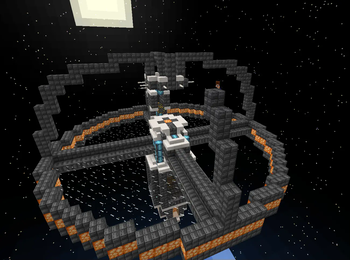
Screenshots
About this Modpack
Welcome to the "BallsPack 2000" Modpack!
This modpack is primarily intended for our official server but it can also be used in your server or singleplayer if you wish.
It doesn't have a specific topic, so it's more like a general purpose modpack.
Features:
Expansive World Generation: Say goodbye to mundane landscapes! "BallsPack 2000" introduces exciting new biomes, realistic terrain, and jaw-dropping vistas. Explore lush forests, treacherous mountains, and mysterious dimensions brimming with secrets and challenges.
Tech and Magic Integration: In this modpack, technology and magic are no longer exclusive domains. Engage in a seamless integration of tech and magic mods, offering diverse paths for progression. Power your machines with arcane energies or combine futuristic gadgets with ancient spells.
Extensive Mod Compatibility: We have worked to ensure that mods work together. Enjoy a stable and smooth gameplay experience, thanks to testing and mod compatibility optimization.
Automation: Automate your gathering, crafting, and processing with automation mods such as Create or Applied Energistics, allowing you to focus on exploration and creativity.
Computers: With the ComputerCraft mod you can create computers, develop, or even be the new Bill Gates of the server if you wish.
Multiplayer Compatibility: Invite your friends! Our modpack works with servers(we have one).
Important mods:
- Create Fabric: A mod that adds mechanical contraptions, machines, and automation to the game. It also has compatibility with other mods such as Applied Energistics 2 and Terralith.
- Applied Energistics 2: A mod that allows storing, managing, and automating items, fluids, and energy using a network of devices and terminals. It also has integration with other mods such as Create Fabric and Quilted Fabric API.
- Minecraft Transit Railway: A mod that adds realistic trains, stations, and tracks to the game. It also has compatibility with other mods such as Station Decoration and Nemo's Transit Expansion for more customization options.
- MCA Reborn: A mod that adds villagers with improved AI, interactions, and relationships to the game. It also has integration with other mods such as Emotecraft and Chat Heads for more immersive communication.
Official Discord Server:
We have an official server for this modpack!
You can join today! https://discord.gg/3agFE8fWg2
Available Versions
How to Set Up a BallsPack 2000 Server
Order Server
Choose at least 4 GB RAM (6 GB recommended for BallsPack 2000). Based on player count: per 8 players.
Install Modpack in Dashboard
Open the modpack browser in the dashboard, search for "BallsPack 2000" and click "Install". The quilt loader and Minecraft 1.19.2 are configured automatically.
Start Server & Play
Start the server – all mods are loaded automatically. Share the server IP with friends and play together!
Frequently Asked Questions
BallsPack 2000 server crashes or won't start – what to do?
Most common causes: insufficient RAM or wrong quilt loader. Check latest.log for "OutOfMemoryError" → increase RAM to at least 6 GB. For "Mixin" or "ClassNotFoundException" errors: modpack version and loader don't match. With Mado Hosting, loader and Minecraft version are auto-configured on modpack install – preventing most startup issues.
How much RAM does a BallsPack 2000 server really need?
Minimum 4 GB, recommended 6 GB for stable performance. per 8 players. Important: Minecraft modpacks need more RAM than vanilla – plan extra per additional player. With Mado Hosting, you can scale RAM up live at any time without data loss (from €8/month).
Can I add custom mods to BallsPack 2000 without conflicts?
Yes, but check compatibility: only use mods for the same loader (quilt) and same Minecraft version (1.19.2). Common issues: ID conflicts with recipe mods and incompatible coremod versions. The Mado dashboard mod browser only shows compatible mods and warns about known conflicts.
BallsPack 2000 server lagging – performance tips
1) Increase RAM to 6 GB+. 2) Reduce server view-distance to 8 (server.properties). 3) Pre-generate chunks with the "Chunky" plugin. 4) Use /spark profiler to check which mods consume the most tick time. With Mado Hosting, all servers run on NVMe SSDs with dedicated CPU cores – eliminating hardware as a bottleneck.
Similar Modpacks
![Better MC [FABRIC] - BMC2](https://cdn.modrinth.com/data/shFhR8Vx/a19c2bcb51d38f32f138d3607e91cb2b7b8e387f_96.webp)
![Better MC [FORGE] - BMC4](https://cdn.modrinth.com/data/4BV47HRn/7f5ef7cc61b2593609aabef3ed07a866a4f11b73_96.webp)


![Better MC [FABRIC] - BMC3](https://cdn.modrinth.com/data/NHUidpfR/327e0749bb6d160c41799fd77bf6d3d631569dc8_96.webp)

Rent BallsPack 2000 Server
Start your own server with automatic modpack installation.
Supported Versions
Start your BallsPack 2000 Server now
From €8.00/month with 6 GB RAM for the best performance.
Configure Server →