
BambixLand
This modpack is made to play on the server BambiLand. This amateur made modpack is centered around create and RP mods. The aim of the pack is to play with friends and to develop your own story!
Screenshots
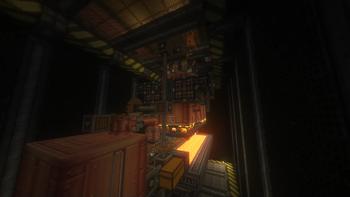
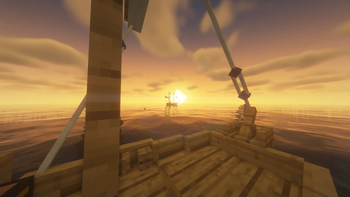


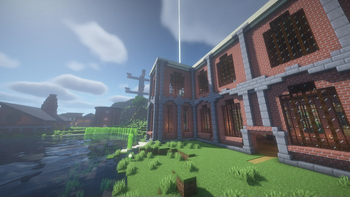
About this Modpack
THIS PROJECT IS STILL IN DEVELOPMENT
Minecraft: 1.18.2 | 1.20.1
Launcher: Fabric_v1.4.10
Our vision of the modpack:
This is a relatively small modpack, based around the CREATE mod. It features many ambiance mods to improve the environment of the world you'll be playing in (sounds physic, better sound for bloc interaction). Also has a few RolePlay mods such as small ship and Farmer's Delight, these are meant to give you a better experience while evolving in the world. Try to give yourself some challenge by keeping the food diversified and the transportation closer to reality.
We encourage you to play in a large biome world to increase the challenge of gathering specific ressources for your farms and exploring all the biomes !
Finally this modpack is meant to be enjoyed with friends or alone and have a balanced world between, builds, tech and exploration ! (but in the end you choose how you want to play).
Our story:
We created this modpack with one goal in mind, create a server that wouldn't close in a month after everybody did the classic minecraft adventure and got bored. In our world we emphasised the commerce between players and connection between every body's build and center city. The modpack will probably evolve with more and more advanced technologies, following the progress of people's industries and farm. So you can expect more tech mods in the future !
Mod list:
TECH:
Create - mechanical modpack to create assembly chain and trains
CC-restitched - computers in minecraft to develop and manage your factories
Build & RP:
Farmers Delight - new crops and food receipe
Chisel - new and variation of blocks for building
Macaw's suite (doors, fences, roofs, windows)
Small Ships - to improve ocean travelling and creating a bit of RP in the world
Credits:
Small Ships - https://www.curseforge.com/minecraft/mc-mods/small-ships
Macaw's Roof - https://www.curseforge.com/minecraft/mc-mods/macaws-roofs
Macaw's Furniture - https://www.curseforge.com/minecraft/mc-mods/macaws-furniture
Macaw's Windows - https://www.curseforge.com/minecraft/mc-mods/macaws-windows
Macaw's Doors - https://www.curseforge.com/minecraft/mc-mods/macaws-doors
We hope you will enjoy this modpack and it's evolution over the next versions.
We happily take recommendation to add new mods !
All the mods used in here were NOT made by me and all rights on the specific mods goes to their creators.
Available Versions
How to Set Up a BambixLand Server
Order Server
Choose at least 6 GB RAM (8 GB recommended for BambixLand). Based on player count: per 5 players.
Install Modpack in Dashboard
Open the modpack browser in the dashboard, search for "BambixLand" and click "Install". The fabric loader and Minecraft 1.20.1 are configured automatically.
Start Server & Play
Start the server – all mods are loaded automatically. Share the server IP with friends and play together!
Frequently Asked Questions
BambixLand server crashes or won't start – what to do?
Most common causes: insufficient RAM or wrong fabric loader. Check latest.log for "OutOfMemoryError" → increase RAM to at least 8 GB. For "Mixin" or "ClassNotFoundException" errors: modpack version and loader don't match. With Mado Hosting, loader and Minecraft version are auto-configured on modpack install – preventing most startup issues.
How much RAM does a BambixLand server really need?
Minimum 6 GB, recommended 8 GB for stable performance. per 5 players. Important: Minecraft modpacks need more RAM than vanilla – plan extra per additional player. With Mado Hosting, you can scale RAM up live at any time without data loss (from €12/month).
Can I add custom mods to BambixLand without conflicts?
Yes, but check compatibility: only use mods for the same loader (fabric) and same Minecraft version (1.20.1). Common issues: ID conflicts with recipe mods and incompatible coremod versions. The Mado dashboard mod browser only shows compatible mods and warns about known conflicts.
BambixLand server lagging – performance tips
1) Increase RAM to 8 GB+. 2) Reduce server view-distance to 8 (server.properties). 3) Pre-generate chunks with the "Chunky" plugin. 4) Use /spark profiler to check which mods consume the most tick time. With Mado Hosting, all servers run on NVMe SSDs with dedicated CPU cores – eliminating hardware as a bottleneck.
Similar Modpacks


![Cobblemon Official Modpack [Fabric]](https://cdn.modrinth.com/data/5FFgwNNP/e7f9ee2e9d361623847853fe2ddce42f519ee64f.png)
![COBBLEVERSE - Pokemon Adventure [Cobblemon]](https://cdn.modrinth.com/data/Jkb29YJU/581ecf54530972afb18a04660afd820f2f24f6c7.png)
![Better MC [FABRIC] - BMC2](https://cdn.modrinth.com/data/shFhR8Vx/a19c2bcb51d38f32f138d3607e91cb2b7b8e387f_96.webp)

Rent BambixLand Server
Start your own server with automatic modpack installation.
Supported Versions
Start your BambixLand Server now
From €12.00/month with 8 GB RAM for the best performance.
Configure Server →