
barelyoptimized
A very simple modpack that improves performance but tries to stay as vanilla as possible with very little QoL mods that don't affect gameplay.
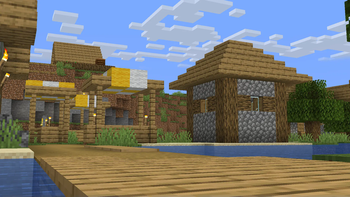
Screenshots
About this Modpack
barelyoptimized
A very simple modpack that improves performance but tries to stay as vanilla as possible with very little QoL mods that don't affect gameplay.
About
This modpack does not feature any eye candy features like shaders or support for advanced resource packs as the goal here is to provide an enhanced vanilla experience with improved performance and a small amount of hand-picked QoL mods that don't affect gameplay at all. All mods will use default configurations as after my own research I don't think it's necessary to change anything and you're free to configure them on your own either via the in-game Mod Menu or by directly altering the config files.
⚠️ Modpack versions for game versions older than 1.21 are currently not being considered! ⚠️
List of Included Mods
Do note you can add your own mods on top of this and use this modpack as a base!
Performance Optimization Mods
- BadOptimizations -> Small optimizations that improve the game's performance.
- Concurrent Chunk Management Engine (Fabric) -> Improves how chunks are handled for better performance.
- Dynamic FPS -> Decreases FPS when the game window is not active to save on computer resources.
- Entity Culling -> Stops entities from rendering if they are not visible to the player.
- FerriteCore -> Reduces the game's memory usage.
- ImmediatelyFast -> Improves the performance of immediate mode rendering.
- Lithium -> Improves the game's systems without sacrificing vanilla behavior.
- More Culling -> Modifies how culling is handled in order to improve performance.
- Sodium -> Improves the game's rendering performance and fixes some bugs.
QoL Mods
- Bobby -> Stores the chunks of a server's world locally on your computer to let you go beyond the server's render distance limit.
- Cubes Without Borders -> Lets you play the game in borderless fullscreen mode.
- e4mc -> Lets you host singleplayer worlds to let your friends join you without needing to set up a server or port forward.
- Fast IP Ping -> Makes it faster to ping servers with pure IP addresses in the server browser.
- Mod Menu -> Adds a menu to view all installed mods and configure them if supported.
- More Chat History -> Increases the amount of messages stored in the in-game chat.
- Sodium Shadowy Path Blocks -> Re-introduces shadows on non-full blocks which Sodium gets rid of.
Dependencies
- Cloth Config API -> API for configuration screens.
- Fabric API -> Official API for the Fabric mod loader.
- Text Placeholder API -> API for parsing placeholders in strings.
Available Versions
How to Set Up a barelyoptimized Server
Order Server
Choose at least 4 GB RAM (6 GB recommended for barelyoptimized). Based on player count: per 8 players.
Install Modpack in Dashboard
Open the modpack browser in the dashboard, search for "barelyoptimized" and click "Install". The fabric loader and Minecraft 26.1.2 are configured automatically.
Start Server & Play
Start the server – all mods are loaded automatically. Share the server IP with friends and play together!
Frequently Asked Questions
barelyoptimized server crashes or won't start – what to do?
Most common causes: insufficient RAM or wrong fabric loader. Check latest.log for "OutOfMemoryError" → increase RAM to at least 6 GB. For "Mixin" or "ClassNotFoundException" errors: modpack version and loader don't match. With Mado Hosting, loader and Minecraft version are auto-configured on modpack install – preventing most startup issues.
How much RAM does a barelyoptimized server really need?
Minimum 4 GB, recommended 6 GB for stable performance. per 8 players. Important: Minecraft modpacks need more RAM than vanilla – plan extra per additional player. With Mado Hosting, you can scale RAM up live at any time without data loss (from €8/month).
Can I add custom mods to barelyoptimized without conflicts?
Yes, but check compatibility: only use mods for the same loader (fabric) and same Minecraft version (26.1.2). Common issues: ID conflicts with recipe mods and incompatible coremod versions. The Mado dashboard mod browser only shows compatible mods and warns about known conflicts.
barelyoptimized server lagging – performance tips
1) Increase RAM to 6 GB+. 2) Reduce server view-distance to 8 (server.properties). 3) Pre-generate chunks with the "Chunky" plugin. 4) Use /spark profiler to check which mods consume the most tick time. With Mado Hosting, all servers run on NVMe SSDs with dedicated CPU cores – eliminating hardware as a bottleneck.
Similar Modpacks

![Cobblemon Official Modpack [Fabric]](https://cdn.modrinth.com/data/5FFgwNNP/e7f9ee2e9d361623847853fe2ddce42f519ee64f.png)
![COBBLEVERSE - Pokemon Adventure [Cobblemon]](https://cdn.modrinth.com/data/Jkb29YJU/581ecf54530972afb18a04660afd820f2f24f6c7.png)
![Better MC [FABRIC] - BMC2](https://cdn.modrinth.com/data/shFhR8Vx/a19c2bcb51d38f32f138d3607e91cb2b7b8e387f_96.webp)


Rent barelyoptimized Server
Start your own server with automatic modpack installation.
Supported Versions
Start your barelyoptimized Server now
From €8.00/month with 6 GB RAM for the best performance.
Configure Server →