
BassetBlocks: Creator
The BassetBlocks Creator modpack is a comprehensive collection of client-side mods and resource packs specifically curated for Minecraft content creators.
Screenshots

About this Modpack
The BassetBlocks Creator Modpack
The BassetBlocks Creator modpack is a comprehensive collection of client-side mods and resource packs specifically curated for Minecraft content creators. It is built to provide a stable, high-performance foundation using optimization mods like Sodium, Lithium, and FerriteCore, ensuring smooth gameplay for recording and streaming.
The pack features powerful cinematic tools such as ReplayMod, Flashback, and Camera Utils, allowing for sophisticated recording and editing. It also enhances the creative workflow with utility mods like Litematica for schematics and Armor Poser for scene setup. Visuals are significantly upgraded through resource packs like Fresh Animations and a wide array of VanillaTweaks collections, which add detail, consistency, and utility to the game's appearance. Finally, social and multiplayer features like Simple Voice Chat and Status are included to facilitate collaboration and community interaction.
Easy Customization
- Before Launch: You can decide exactly what your experience will be like using the Modrinth App. Just go to your modpack's content list and use the simple toggles to turn any mod on or off for that session. Once you're happy with your selection, you hit "Play."
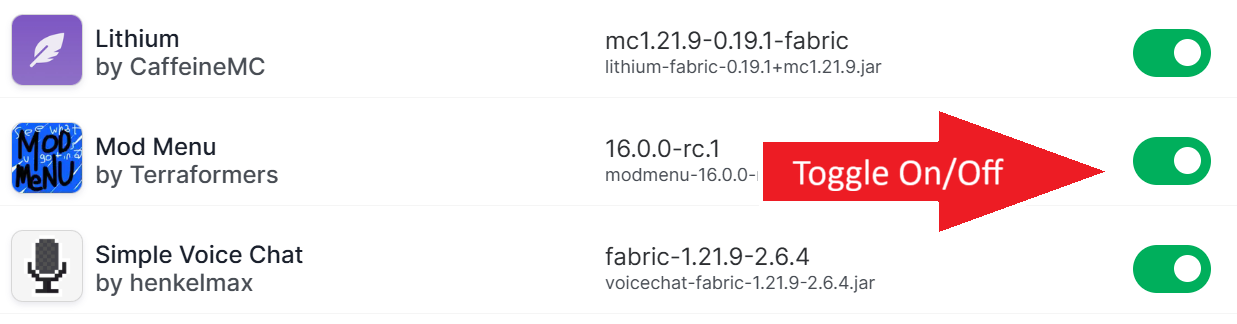
- In-Game Menu: When you get to the main menu, the Mod Menu mod adds a "Mods" button to your options screen. This is your in-game command center. From here, you can click on any mod and, if it has a gear icon, dive into its specific settings to tweak it to your liking.

- Deeper Integration: For even deeper customization, VTDownloader integrates directly into that same Mod Menu. Open its configuration screen, and you can browse and install any VanillaTweaks resource pack or data pack you want, all without ever leaving the game.

Our Purpose
The three BassetBlocks Modpacks—Core, Community, and Creator—are a user-friendly solution designed to simplify the process of installing and managing the mods, datapacks, and resource packs for use on the BassetBlocks server. Our purpose is to ensure all players, regardless of their technical expertise, can easily get started on the server with the correct and most current mods, eliminating the frustration of manual installation and versioning. The modpacks make it simple to stay updated with every Minecraft release, allowing you to focus on what matters most—playing on the BassetBlocks server.
Tired of the hassle?
Tired of the complicated, time-consuming process of manually installing mods, datapacks, and resource packs just to play on the BassetBlocks server? The BassetBlocks Modpacks are here to help. With a single click using the Modrinth App, you can get everything you need to jump into the action. No more searching for individual mods, dealing with compatibility issues, or struggling with updates. The modpack is built for convenience, making sure you have a seamless experience from the moment you launch Minecraft.
The BassetBlocks Modpack Collection
BassetBlocks: Core
The BassetBlocks: Core modpack is the essential modpack required to connect and play on the BassetBlocks server. It contains the absolute minimum of mods needed for core gameplay mechanics and performance, ensuring a smooth and stable experience. If you are new to the server or prefer a lightweight, vanilla-plus experience, this is the perfect place to start.
BassetBlocks: Community
Building upon the Core modpack, the BassetBlocks: Community modpack is the recommended choice for the definitive BassetBlocks experience. It includes all essential mods plus a curated selection of popular, player-requested additions that enhance gameplay with quality-of-life features, aesthetic blocks, and visual tweaks. This pack is perfect for players who want to enjoy everything the server community has to offer.
BassetBlocks: Creator
Designed specifically for streamers and video producers, the BassetBlocks: Creator modpack is the all-in-one solution for content creation. It includes everything from the Core and Community modpacks, plus powerful client-side tools for recording, creating cinematic shots, and managing your visual presentation. If you plan on sharing your BassetBlocks adventures with an audience, this pack provides all the tools you need.
BassetBlocks: ServerSide
This is a modpack collection for server administration purposes only and should not be downloaded by players. It contains all the necessary backend mods, datapacks, and configuration files that run the BassetBlocks world, manage performance, and provide support for player-side features. This pack runs exclusively on the server to make the magic happen for everyone. The modpack is available for admins that want to set up a server similar to BassetBlocks.
What's Inside?
Key Mods for Creators
- Cinematic Tools: Record, replay, and create stunning camera shots with ReplayMod, Flashback, and Camera Utils. Includes Replay Voice Chat for full audio capture.
- Creative Utilities: Plan and execute complex builds with Litematica, get detailed information with MiniHUD, customize game mechanics with Tweakeroo, and set up scenes perfectly with Armor Poser.
- Performance: Get the smoothest recording experience possible with a full suite of optimization mods, including Sodium, Lithium, FerriteCore, and Bobby.
- Quality of Life & Visuals: See recipes with REI, map your world with JourneyMap, get realistic Sound Physics Remastered, and see inside containers with Peek.
- Social: Collaborate and interact with your community using Simple Voice Chat, Chat Heads, and the Status mod.
Key Resource Packs
- Animations & Models: Bring your world to life with the incredible mob animations of Fresh Animations and add depth to your builds with 3D Textures.
- Visual Polish: Create a more dynamic and consistent look with block Variations, More Zombies, and a collection of Fixes and Consistency tweaks.
- Utility & UI: Get a cleaner interface with the GUI pack and clear visual cues for Farming, Mining, and Redstone.
- Sound: Enjoy a more peaceful recording environment with the Quieter Sounds pack.
Full Mod & Resource Pack List
- 3D Textures by VanillaTweaks (Resource Pack)
- [EMF] Entity Model Features by Traben (Mod)
- [ETF] Entity Texture Features by Traben (Mod)
- AppleSkin by squeek502 (Mod)
- Architectury API by architectury, Juuz, MaxNeedsSnacks (Mod)
- Armor Poser by mrscyco, ShyNieke (Mod)
- bad packets by badasintended, deirn (Mod)
- BetterF3 by cominixo, TreyRuffy (Mod)
- Bobby by Johni0702 (Mod)
- Camera Utils by henkelmax (Mod)
- Chat Heads by dzwzdx, Fourmisain (Mod)
- Chat Signing Hider by henkelmax (Mod)
- Cloth Config API by shedaniel (Mod)
- Controlling by jaredlll08 (Mod)
- Datapack Injector by henkelmax (Mod)
- Fabric API by modmuss50, Player7457 (Mod)
- Fabric Language Kotlin by modmuss50, Player7457 (Mod)
- Facebar by cortex (Mod)
- Farming Utility by VanillaTweaks (Resource Pack)
- FerriteCore by malte0811 (Mod)
- Fixes and Consistency by VanillaTweaks (Resource Pack)
- Flashback by Moulberry (Mod)
- Freecam by hashalite (Mod)
- Fresh Animations by FreshLX (Resource Pack)
- General Utility by VanillaTweaks (Resource Pack)
- GUI by VanillaTweaks (Resource Pack)
- ImmediatelyFast by RaphiMC (Mod)
- ItemSwapper by Stridey, tr7zw (Mod)
- JourneyMap by mysticdrew (Mod)
- Krypton by astei (Mod)
- Litematica by masa, sakura-ryoko (Mod)
- Lithium by 2No2Name, CaffeineMC, jellysquid3 (Mod)
- MaliLib by masa, sakura-ryoko (Mod)
- MiniHUD by masa, sakura-ryoko (Mod)
- Mining Utility by VanillaTweaks (Resource Pack)
- Mod Menu by modmuss50, Prospector, Terraformers (Mod)
- More Zombies by VanillaTweaks (Resource Pack)
- Mouse Tweaks by YaLTeR (Mod)
- No Fortune Chest by TheVoidBlock (Mod)
- No Pumpkin Overlay by VanillaTweaks (Resource Pack)
- Peek by henkelmax (Mod)
- Quieter Sounds by VanillaTweaks (Resource Pack)
- Redstone Utility by VanillaTweaks (Resource Pack)
- Replay Voice Chat by BreadLoaf, henkelmax (Mod)
- ReplayMod by Johni0702 (Mod)
- Roughly Enough Items (REI) by shedaniel (Mod)
- Searchables by jaredlll08 (Mod)
- Server Resourcpack Checker by henkelmax (Mod)
- Shulker Box Tooltip by MisterPeModder (Mod)
- Simple Voice Chat by BreadLoaf, henkelmax, Stridey (Mod)
- Sodium by CaffeineMC, IMS, jellysquid3 (Mod)
- Sound Physics Remastered by henkelmax (Mod)
- spark by lucko (Mod)
- Spinning Skull on Fire Painting by VanillaTweaks (Resource Pack)
- Status by henkelmax (Mod)
- Tweakeroo by masa, sakura-ryoko (Mod)
- Unique Dyes by VanillaTweaks (Resource Pack)
- Variations by VanillaTweaks (Resource Pack)
- VTDownloader by lotaPrea (Mod)
- WTHIT by badasintended, deirn (Mod)
- YetAnotherConfigLib (YACL) by isxander (Mod)
- Zoomify by isxander (Mod)
License Information
The BassetBlocks Creator Modpack includes mods and resource packs that fall under various licenses. To my knowledge, no authors have explicitly forbidden their inclusion. Should I be notified otherwise, I will promptly remove the content in question.
According to Modrinth's documentation, you are generally permitted to include any project hosted on Modrinth within your modpack, provided that your modpack is also hosted on Modrinth. This is considered an implicit agreement, though you must respect the wishes of any author who explicitly disallows their project's inclusion in modpacks.
ARR (All Rights Reserved)
This is a copyright notice that indicates that the copyright holder reserves all the rights provided by copyright law. It means you cannot use, modify, or distribute the content without explicit permission.Apache-2.0
A permissive open-source license. You can freely use, modify, and distribute the licensed software, but you must include a copy of the license and a notice of any changes you made.BSD-3-Clause
A permissive open-source license that requires that redistributions retain the copyright notice and that the names of contributors are not used for endorsement without permission.CC-BY-NC-SA-4.0
Allows you to share and adapt the work for non-commercial purposes, as long as you give appropriate credit and distribute any contributions under the same license.GPL-3.0-only / GPL-3.0-or-later
A strong copyleft license. If you use code licensed under GPL-3.0, your entire project must also be licensed under GPL-3.0 and you must make the source code available.LGPL-3.0-only / LGPL-3.0-or-later
A copyleft license often used for libraries. It allows you to link to the licensed software in your own applications, but if you modify the library itself, you must release your modifications under the same license.MIT License
A very popular permissive license. It allows you to do almost anything with the code, as long as you include the original copyright and license notice.MPL-2.0 (Mozilla Public License 2.0)
A "file-level" copyleft license. It requires modifications to MPL-licensed files to be released under the MPL, but allows you to combine them with proprietary code in a larger project.Polyform Shield 1.0.0
A source-available license that allows use of the code for any purpose *except* for creating a product that competes with the original software.Terms: Fresh Animations
You may use the pack in videos, and edit it for personal use. You may not re-upload the pack or use its assets in other projects. You must credit 'FreshLX' and link to the original page if showcasing the pack.Terms: VanillaTweaks
You cannot redistribute their tweaks without modification, place them behind a paywall, or fail to give credit. You can include them in your pack if it's free, you've made additions, and you give credit. **Required Credit Statement:** "Includes assets from VanillaTweaks.net, used in accordance with their terms and conditions."Available Versions
How to Set Up a BassetBlocks: Creator Server
Order Server
Choose at least 6 GB RAM (8 GB recommended for BassetBlocks: Creator). Based on player count: per 5 players.
Install Modpack in Dashboard
Open the modpack browser in the dashboard, search for "BassetBlocks: Creator" and click "Install". The fabric loader and Minecraft 1.21.11 are configured automatically.
Start Server & Play
Start the server – all mods are loaded automatically. Share the server IP with friends and play together!
Frequently Asked Questions
BassetBlocks: Creator server crashes or won't start – what to do?
Most common causes: insufficient RAM or wrong fabric loader. Check latest.log for "OutOfMemoryError" → increase RAM to at least 8 GB. For "Mixin" or "ClassNotFoundException" errors: modpack version and loader don't match. With Mado Hosting, loader and Minecraft version are auto-configured on modpack install – preventing most startup issues.
How much RAM does a BassetBlocks: Creator server really need?
Minimum 6 GB, recommended 8 GB for stable performance. per 5 players. Important: Minecraft modpacks need more RAM than vanilla – plan extra per additional player. With Mado Hosting, you can scale RAM up live at any time without data loss (from €12/month).
Can I add custom mods to BassetBlocks: Creator without conflicts?
Yes, but check compatibility: only use mods for the same loader (fabric) and same Minecraft version (1.21.11). Common issues: ID conflicts with recipe mods and incompatible coremod versions. The Mado dashboard mod browser only shows compatible mods and warns about known conflicts.
BassetBlocks: Creator server lagging – performance tips
1) Increase RAM to 8 GB+. 2) Reduce server view-distance to 8 (server.properties). 3) Pre-generate chunks with the "Chunky" plugin. 4) Use /spark profiler to check which mods consume the most tick time. With Mado Hosting, all servers run on NVMe SSDs with dedicated CPU cores – eliminating hardware as a bottleneck.
Similar Modpacks
![Cobblemon Official Modpack [Fabric]](https://cdn.modrinth.com/data/5FFgwNNP/e7f9ee2e9d361623847853fe2ddce42f519ee64f.png)
![COBBLEVERSE - Pokemon Adventure [Cobblemon]](https://cdn.modrinth.com/data/Jkb29YJU/581ecf54530972afb18a04660afd820f2f24f6c7.png)
![Better MC [FABRIC] - BMC2](https://cdn.modrinth.com/data/shFhR8Vx/a19c2bcb51d38f32f138d3607e91cb2b7b8e387f_96.webp)


![Better MC [FORGE] - BMC4](https://cdn.modrinth.com/data/4BV47HRn/7f5ef7cc61b2593609aabef3ed07a866a4f11b73_96.webp)
Rent BassetBlocks: Creator Server
Start your own server with automatic modpack installation.
Supported Versions
Start your BassetBlocks: Creator Server now
From €12.00/month with 8 GB RAM for the best performance.
Configure Server →