
BeautiCraft
A modpack of mods to beautify Minecraft and improve the soundscape.
Screenshots
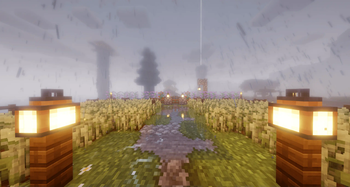
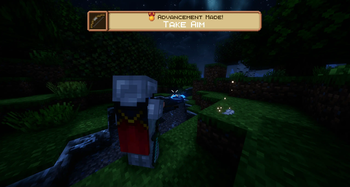
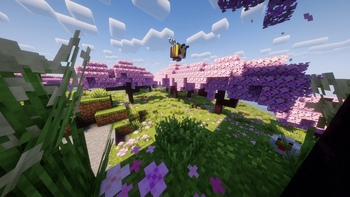
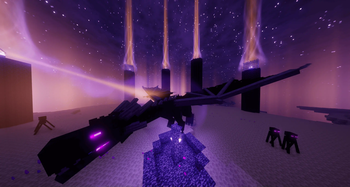
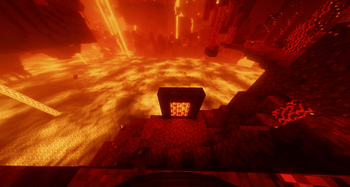
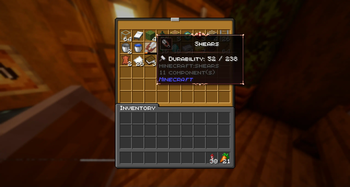
About this Modpack
This modpack, BeautiCraft, focuses on making Minecraft more beautiful and sonorous without changing the basic gameplay experience. It is packed with client-side improvements:
👀Visual enhancement: A large collection of mods and resource packs (incl. Fresh Animations, Physics Mod, Continuity, 3D models) for improved particles, animations, UI and textures for a more appealing look.
🎧Acoustic modifications: With mods such as AmbientSounds or Reactive Music, the soundscape becomes more diverse and immersive.
🛠Quality-of-Life: Includes minor adjustments to improve the user experience, such as the display of hunger/satiety values (AppleSkin), information about viewed entity (WTHIT), a zoom function (Zoomify) and a quick quit feature (FastQuit).
You can find which mods and resource packs are used in the version tab in the corresponding version.
The four shaders listed below are pre-installed in the modpack, and the FPS results reflect performance on my personal system:
| Shader Pack | Average FPS | 1% Low FPS |
|---|---|---|
| Complementary Shaders | 47.4 FPS | 36.2 FPS |
| BSL Shaders (default) | 65.7 FPS | 45.4 FPS |
| MakeUp - Ultra Fast | 122 FPS | 64.7 FPS |
| Vanilla | 432 FPS | 144.8 FPS |
complete fps test
Note: The FPS were slightly lower because the recording program and server were running on the same computer.camera movement was made with Typewriter plugin
Test system:
- GPU: NVIDIA RTX 3060
- CPU: AMD Ryzen 5 5600X
- RAM: 16 GB
- Resolution: 2560×1440 (1440p)
- Minecraft Render Distance: 12 chunks
- Modpack version 3.1.0
This was a simple FPS test on my Minecraft server using a smooth camera fly-through to compare the performance of different shaders. It's not a full benchmark (e.g., no mobs, redstone, or heavy gameplay), but it gives a general idea of how well each shader performs in this environment.
Available Versions
How to Set Up a BeautiCraft Server
Order Server
Choose at least 6 GB RAM (8 GB recommended for BeautiCraft). Based on player count: per 5 players.
Install Modpack in Dashboard
Open the modpack browser in the dashboard, search for "BeautiCraft" and click "Install". The fabric loader and Minecraft 1.21.11 are configured automatically.
Start Server & Play
Start the server – all mods are loaded automatically. Share the server IP with friends and play together!
Frequently Asked Questions
BeautiCraft server crashes or won't start – what to do?
Most common causes: insufficient RAM or wrong fabric loader. Check latest.log for "OutOfMemoryError" → increase RAM to at least 8 GB. For "Mixin" or "ClassNotFoundException" errors: modpack version and loader don't match. With Mado Hosting, loader and Minecraft version are auto-configured on modpack install – preventing most startup issues.
How much RAM does a BeautiCraft server really need?
Minimum 6 GB, recommended 8 GB for stable performance. per 5 players. Important: Minecraft modpacks need more RAM than vanilla – plan extra per additional player. With Mado Hosting, you can scale RAM up live at any time without data loss (from €12/month).
Can I add custom mods to BeautiCraft without conflicts?
Yes, but check compatibility: only use mods for the same loader (fabric) and same Minecraft version (1.21.11). Common issues: ID conflicts with recipe mods and incompatible coremod versions. The Mado dashboard mod browser only shows compatible mods and warns about known conflicts.
BeautiCraft server lagging – performance tips
1) Increase RAM to 8 GB+. 2) Reduce server view-distance to 8 (server.properties). 3) Pre-generate chunks with the "Chunky" plugin. 4) Use /spark profiler to check which mods consume the most tick time. With Mado Hosting, all servers run on NVMe SSDs with dedicated CPU cores – eliminating hardware as a bottleneck.
Similar Modpacks
![Cobblemon Official Modpack [Fabric]](https://cdn.modrinth.com/data/5FFgwNNP/e7f9ee2e9d361623847853fe2ddce42f519ee64f.png)
![COBBLEVERSE - Pokemon Adventure [Cobblemon]](https://cdn.modrinth.com/data/Jkb29YJU/581ecf54530972afb18a04660afd820f2f24f6c7.png)
![Better MC [FABRIC] - BMC2](https://cdn.modrinth.com/data/shFhR8Vx/a19c2bcb51d38f32f138d3607e91cb2b7b8e387f_96.webp)


![Better MC [FORGE] - BMC4](https://cdn.modrinth.com/data/4BV47HRn/7f5ef7cc61b2593609aabef3ed07a866a4f11b73_96.webp)
Rent BeautiCraft Server
Start your own server with automatic modpack installation.
Supported Versions
Start your BeautiCraft Server now
From €12.00/month with 8 GB RAM for the best performance.
Configure Server →