
Beautified Vanilla
A modpack that puts perfectly tweaked and selected mods, resource packs and shaders to create a completely unparalleled Minecraft experience!
Screenshots
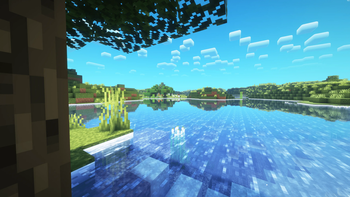

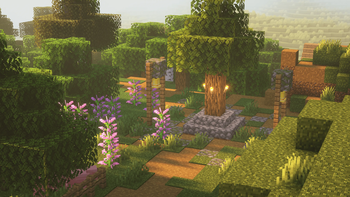

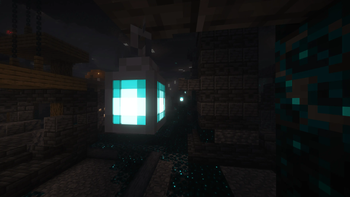
About this Modpack
A Modpack that puts perfectly tweaked and selected mods, resource packs and shaders to create a completely unparalleled Minecraft experience - While maintaining wonderful performance at all times.
I've been working on making sure this modpack looks beautiful while still providing exceptional performance.
Current Version:
1.1.1
As I play Minecraft, I like to add, remove, and tweak different Mods, Shaders and Resource Packs. I've decided to start a Modpack of all the mods that I use on a day-to-day basis. Beautified Vanilla is a modified version of "Fabulously Optimised" (See below for links) with a heavy emphasis on making Minecraft look and feel gorgeous to play, without changing the gameplay - besides a few QOL tweaks. I have tweaked all the mods to squeeze as much performance out of them as I can without reducing visual quality at all. I hope you enjoy Beautified Vanilla!
Full mod list
FastQuit
- Fzzy Config
- Bare Bones
- Debugify
- Model Gap Fix
- Simple Grass Flowers
- ThreadTweak
- Fresh Moves
- FabricSkyboxes
- Language Reload
- ModernFix
- FerriteCore
- Iris Shaders
- FabricSkyBoxes Interop
- Continuity
- Particular ✨
- Essential Mod
- Sound Physics Remastered
- OptiGUI
- Xaero's World Map
- Fancy Crops
- Iceberg
- ComplementaryReimagined.txt
- Held Item Info
- Fabrishot
- Chest Tracker
- Krypton
- Architectury API
- Legendary Tooltips
- Animatica
- Forge Config API Port
- Zoomify
- Dynamic FPS
- AmbientSounds
- Translations for Sodium
- Main Menu Credits
- Wakes
- M.R.U
- Faithful 64x
- Complementary Shaders - Reimagined
- Fabric Language Kotlin
- Concurrent Chunk Management Engine (Fabric)
- Dandelion X 1.21.zip
- Surveyor Map Framework
- Flow
- Stay_True_1.21(1).zip
- Cubes Without Borders
- Bare Bones - Better Leaves
- Enhanced Block Entities
- Sodium
- Reese's Sodium Options
- Prism
- More Culling
- Fog
- Paginated Advancements & Custom Frames
- Sodium Extra
- Xaero's Minimap
- Visuality
- Complementary Reimagined.zip.txt
- Entity Culling
- [ETF] Entity Texture Features
- Advancement Plaques
- oωo (owo-lib)
- Presence Footsteps
- Mod Menu Helper.zip
- ScalableLux
- Stack to Nearby Chests
- Your Options Shall Be Respected (YOSBR)
- Fabric API
- Roughly Enough Items (REI)
- Cave Dust
- CreativeCore
- Explosive Enhancement
- Mod Menu
- BadOptimizations
- Indium
- Sounds
- Shulker Box Tooltip
- Lightingless
- Tiny Item Animations
- YetAnotherConfigLib
- Lithium
- Better Mount HUD
- ImmediatelyFast
- MixinTrace
- Fresh Animations
- [EMF] Entity Model Features
- More Chat History
- No Chat Reports
- Cloth Config API
This Modpack is new - There may be some bugs.
Credits:
This is a heavily modified version of the "Fabulously Optimised" Modpack, the link can be found here: https://modrinth.com/modpack/fabulously-optimized
Available Versions
How to Set Up a Beautified Vanilla Server
Order Server
Choose at least 6 GB RAM (8 GB recommended for Beautified Vanilla). Based on player count: per 5 players.
Install Modpack in Dashboard
Open the modpack browser in the dashboard, search for "Beautified Vanilla" and click "Install". The fabric loader and Minecraft 1.21.1 are configured automatically.
Start Server & Play
Start the server – all mods are loaded automatically. Share the server IP with friends and play together!
Frequently Asked Questions
Beautified Vanilla server crashes or won't start – what to do?
Most common causes: insufficient RAM or wrong fabric loader. Check latest.log for "OutOfMemoryError" → increase RAM to at least 8 GB. For "Mixin" or "ClassNotFoundException" errors: modpack version and loader don't match. With Mado Hosting, loader and Minecraft version are auto-configured on modpack install – preventing most startup issues.
How much RAM does a Beautified Vanilla server really need?
Minimum 6 GB, recommended 8 GB for stable performance. per 5 players. Important: Minecraft modpacks need more RAM than vanilla – plan extra per additional player. With Mado Hosting, you can scale RAM up live at any time without data loss (from €12/month).
Can I add custom mods to Beautified Vanilla without conflicts?
Yes, but check compatibility: only use mods for the same loader (fabric) and same Minecraft version (1.21.1). Common issues: ID conflicts with recipe mods and incompatible coremod versions. The Mado dashboard mod browser only shows compatible mods and warns about known conflicts.
Beautified Vanilla server lagging – performance tips
1) Increase RAM to 8 GB+. 2) Reduce server view-distance to 8 (server.properties). 3) Pre-generate chunks with the "Chunky" plugin. 4) Use /spark profiler to check which mods consume the most tick time. With Mado Hosting, all servers run on NVMe SSDs with dedicated CPU cores – eliminating hardware as a bottleneck.
Similar Modpacks
![Cobblemon Official Modpack [Fabric]](https://cdn.modrinth.com/data/5FFgwNNP/e7f9ee2e9d361623847853fe2ddce42f519ee64f.png)
![COBBLEVERSE - Pokemon Adventure [Cobblemon]](https://cdn.modrinth.com/data/Jkb29YJU/581ecf54530972afb18a04660afd820f2f24f6c7.png)
![Better MC [FABRIC] - BMC2](https://cdn.modrinth.com/data/shFhR8Vx/a19c2bcb51d38f32f138d3607e91cb2b7b8e387f_96.webp)


![Better MC [FORGE] - BMC4](https://cdn.modrinth.com/data/4BV47HRn/7f5ef7cc61b2593609aabef3ed07a866a4f11b73_96.webp)
Rent Beautified Vanilla Server
Start your own server with automatic modpack installation.
Supported Versions
Start your Beautified Vanilla Server now
From €12.00/month with 8 GB RAM for the best performance.
Configure Server →