
Bedrock Edition: Legacy
Minecraft Bedrock edition, Except its java...
Screenshots
About this Modpack
A Modpack that Turns Java into Bedrock (Lite)
Download Full and New Improved Version
Description
I got the idea to make this in the middle of my sleep on a friday
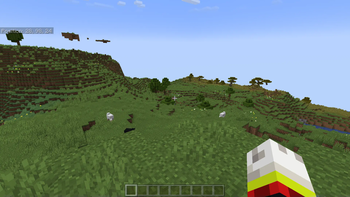
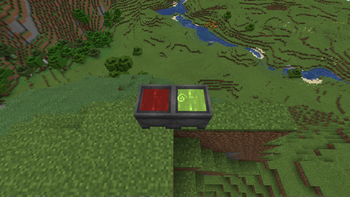
This is a modpack that was made to turn java into bedrock (just for fun lol), It also includes some performance mods (cuz bedrock is more optimized) and sadly this doesnt include the glitches. Theres the resourcify mod that acts like the marketplace (just imagine that it actually is) to access it go to the resourcepacks menu and click the resourcify button, or on the world menu, datapack menu, shaderpack menu. Cameras are also here and function just like they do in bedrock edition. Cauldrons are dyable and can be used to create potion arrows. UI is mostly the same and when i say mostly the same i mean only the hud currently. Fallen trees are also added to the world generation, And the bridging is also the same, Leaves become white when snowing, World hosting and friends list and controller support.
Current Features
Third Person Animations.
Bedrock edition chunk loading animation.
Accarute block placement.
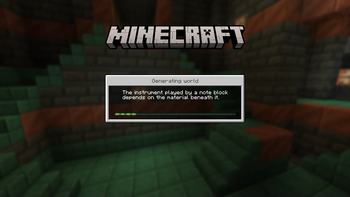
Bedrock- like loading screens with helpful tips.
Third person eating animations.
Sheared Sheep Colors.
No attack cooldown (Toggleable).
In game screenshot viewer.
Position and "paper doll" overlay.
Dynamic Inactive Hud Opacity.
Saving status overlay.
3D fishing hook.
Bedrock Cauldrons that hold dyed water and potions.
Bedrock Sun Glare.
Reduce the lag from chests and paintings.
Bedrock Crafting Recipes (Toggleable).
Bedrock- like chat.
Bedrock Edition world color noise for grass and water.
Idle hand animations.
Held item descriptions (enchantments, books and potions).
Reach around block placement.
Quick armor swap.
Dying and Fallen Trees!
Bedrock Light block shading.
Disable flying momentum (Drift) in creative mode.
Stop elytra flying by pressing space on air.
Inventory animations.
Falling snow layers.
Condensed items in Creative menu.
Bedrock edition styled wither.
Bedrock edition styled World creation screen.
Armor stands with hands.
Bedrock edition styled Chunk fade.
Bedrock edition styled "How to play".
World hosting & Friends list.
Controller Support.
ViaFabricPlus (Allows you to join bedrock edition servers, although very wip)
Bedrock edition "Fast mode" Bubble columns.
Bedrock edition Impaling enchant.
Bedrock edition Jump sounds.
Fabric Skyboxes. (Allows you to use skyboxes in texture packs)
Bedrock edition air placing.
More chat history.
Better menu performance.
See greater then the server's render distance.
Marketplace button (Resourcify).
And alot of performance mods!
Modpack Credits
Bedrock Edition modpack is made by xdf_
Made with ❤️ & Passion
Available Versions
How to Set Up a Bedrock Edition: Legacy Server
Order Server
Choose at least 6 GB RAM (8 GB recommended for Bedrock Edition: Legacy). Based on player count: per 5 players.
Install Modpack in Dashboard
Open the modpack browser in the dashboard, search for "Bedrock Edition: Legacy" and click "Install". The fabric loader and Minecraft 1.21.1 are configured automatically.
Start Server & Play
Start the server – all mods are loaded automatically. Share the server IP with friends and play together!
Frequently Asked Questions
Bedrock Edition: Legacy server crashes or won't start – what to do?
Most common causes: insufficient RAM or wrong fabric loader. Check latest.log for "OutOfMemoryError" → increase RAM to at least 8 GB. For "Mixin" or "ClassNotFoundException" errors: modpack version and loader don't match. With Mado Hosting, loader and Minecraft version are auto-configured on modpack install – preventing most startup issues.
How much RAM does a Bedrock Edition: Legacy server really need?
Minimum 6 GB, recommended 8 GB for stable performance. per 5 players. Important: Minecraft modpacks need more RAM than vanilla – plan extra per additional player. With Mado Hosting, you can scale RAM up live at any time without data loss (from €12/month).
Can I add custom mods to Bedrock Edition: Legacy without conflicts?
Yes, but check compatibility: only use mods for the same loader (fabric) and same Minecraft version (1.21.1). Common issues: ID conflicts with recipe mods and incompatible coremod versions. The Mado dashboard mod browser only shows compatible mods and warns about known conflicts.
Bedrock Edition: Legacy server lagging – performance tips
1) Increase RAM to 8 GB+. 2) Reduce server view-distance to 8 (server.properties). 3) Pre-generate chunks with the "Chunky" plugin. 4) Use /spark profiler to check which mods consume the most tick time. With Mado Hosting, all servers run on NVMe SSDs with dedicated CPU cores – eliminating hardware as a bottleneck.
Similar Modpacks
![Cobblemon Official Modpack [Fabric]](https://cdn.modrinth.com/data/5FFgwNNP/e7f9ee2e9d361623847853fe2ddce42f519ee64f.png)
![COBBLEVERSE - Pokemon Adventure [Cobblemon]](https://cdn.modrinth.com/data/Jkb29YJU/581ecf54530972afb18a04660afd820f2f24f6c7.png)
![Better MC [FABRIC] - BMC2](https://cdn.modrinth.com/data/shFhR8Vx/a19c2bcb51d38f32f138d3607e91cb2b7b8e387f_96.webp)


![Better MC [FORGE] - BMC4](https://cdn.modrinth.com/data/4BV47HRn/7f5ef7cc61b2593609aabef3ed07a866a4f11b73_96.webp)
Rent Bedrock Edition: Legacy Server
Start your own server with automatic modpack installation.
Supported Versions
Start your Bedrock Edition: Legacy Server now
From €12.00/month with 8 GB RAM for the best performance.
Configure Server →