
Bedwars Optimized
A lightweight modpack for maximum FPS and smooth gameplay in Bedwars and PvP without any bloat
Screenshots
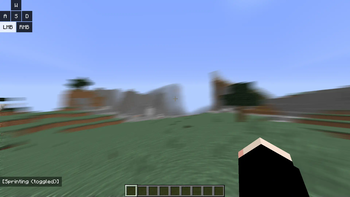
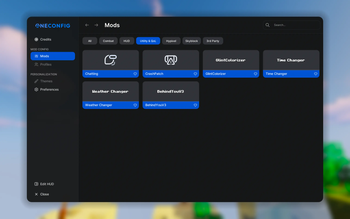
About this Modpack
What does this modpack do?
Bedwars Optimized is a lightweight, high-performance Forge 1.8.9 client modpack built for maximum FPS, smooth combat, and a clean PvP experience. Designed specifically for Bedwars, duels, and competitive gameplay on servers like Hypixel without adding any bloat.
📝 Notes:
This modpack requires OptiFine to function properly and to achieve maximum FPS.
Due to legal reasons, OptiFine cannot be bundled directly with the modpack. You will need to download and install it manually.Made for Forge 1.8.9
Multiplayer-safe (Hypixel friendly)
No gameplay-changing mods or cheats
Light on RAM and perfect for low-end systems
📦 Full Modlist
PolySprint – by Polyfrost
Toggle sprint and sneak mod for Minecraft 1.8.9 and 1.12.2No Hurt Cam – by ilofizisinsane
Removes that pesky hurt cameraAutoGG Reimagined – by QWERTZexe
Automatically says “gg” at the end of games in hypixel.PolyCrosshair – by Polyfrost
An extremely customizable crosshair modOverflow Particles – by Polyfrost
Advanced particles mod for 1.8.9Canelex Keystrokes Revamp – by Polyfrost
Displays WASD/mouse input on screenEvergreenHUD – by Polyfrost
Improves your heads up display.Velox Caelo – by nea89o
OptiFine CIT performance optimizer for 1.8.9PolyBlur – by Polyfrost
Apply motion blur in-game in way.Wavey Capes – by tr7zw
Makes capes wave and animate realistically.Raw Input – by Chromatic
Fixes mouse jittering and increases smoothnessOverflow Animations – by PolyFrost
1.7 and modern animations in 1.8PolyPatcher – by Polyfrost
A Forge mod full of Vanilla bug fixes, Quality of Life improvements, and performance enhancements.Behind You v3 - by Polyfrost
Allows looking behind you without pressing F5 twice.
📜 License:
This modpack is licensed under CC BY-NC 4.0.
✅ You are free to play, edit, and share the pack with credit.
❌ Do not reupload or sell this modpack.
Available Versions
How to Set Up a Bedwars Optimized Server
Order Server
Choose at least 4 GB RAM (6 GB recommended for Bedwars Optimized). Based on player count: per 5 players.
Install Modpack in Dashboard
Open the modpack browser in the dashboard, search for "Bedwars Optimized" and click "Install". The forge loader and Minecraft 1.8.9 are configured automatically.
Start Server & Play
Start the server – all mods are loaded automatically. Share the server IP with friends and play together!
Frequently Asked Questions
Bedwars Optimized server crashes or won't start – what to do?
Most common causes: insufficient RAM or wrong forge loader. Check latest.log for "OutOfMemoryError" → increase RAM to at least 6 GB. For "Mixin" or "ClassNotFoundException" errors: modpack version and loader don't match. With Mado Hosting, loader and Minecraft version are auto-configured on modpack install – preventing most startup issues.
How much RAM does a Bedwars Optimized server really need?
Minimum 4 GB, recommended 6 GB for stable performance. per 5 players. Important: Minecraft modpacks need more RAM than vanilla – plan extra per additional player. With Mado Hosting, you can scale RAM up live at any time without data loss (from €8/month).
Can I add custom mods to Bedwars Optimized without conflicts?
Yes, but check compatibility: only use mods for the same loader (forge) and same Minecraft version (1.8.9). Common issues: ID conflicts with recipe mods and incompatible coremod versions. The Mado dashboard mod browser only shows compatible mods and warns about known conflicts.
Bedwars Optimized server lagging – performance tips
1) Increase RAM to 6 GB+. 2) Reduce server view-distance to 8 (server.properties). 3) Pre-generate chunks with the "Chunky" plugin. 4) Use /spark profiler to check which mods consume the most tick time. With Mado Hosting, all servers run on NVMe SSDs with dedicated CPU cores – eliminating hardware as a bottleneck.
Similar Modpacks

![Cobblemon Official Modpack [Fabric]](https://cdn.modrinth.com/data/5FFgwNNP/e7f9ee2e9d361623847853fe2ddce42f519ee64f.png)
![COBBLEVERSE - Pokemon Adventure [Cobblemon]](https://cdn.modrinth.com/data/Jkb29YJU/581ecf54530972afb18a04660afd820f2f24f6c7.png)
![Better MC [FABRIC] - BMC2](https://cdn.modrinth.com/data/shFhR8Vx/a19c2bcb51d38f32f138d3607e91cb2b7b8e387f_96.webp)


Rent Bedwars Optimized Server
Start your own server with automatic modpack installation.
Details
- License
- Creative Commons Attribution Non Commercial 4.0 International
- Server-side
- Unsupported
- Client-side
- Required
Supported Versions
Start your Bedwars Optimized Server now
From €8.00/month with 6 GB RAM for the best performance.
Configure Server →