
Bedwars Package
A Minecraft Bedwars Modpack for 1.8.9.
Screenshots
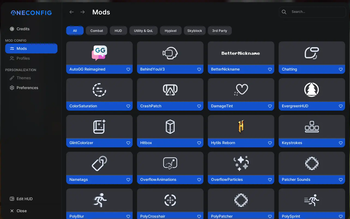
About this Modpack
WARNING: Don´t update to Versions with t. in the front if you don´t want to change System Environment Variables!
Bedwars Package
The Bedwars Package Modpack combines a variety of modifications specifically designed to optimize your gameplay experience and provide you with crucial advantages in the intense competitive mode. With a clear focus on performance and adaptability, the modpack offers a stable and powerful foundation that allows you to play faster, more precisely, and more efficiently.
Thanks to mods like BetterFps and FPS Reducer, the game will run more smoothly, while enhancements like PolyHitbox and PolyCrosshair give you visual precision and better control in PvP battles. At the same time, mods like Quickjoin and Mouse Tweaks improve your game management, helping you join Bedwars matches faster and handle your inventory more efficiently. Additional features like BetterHurtCam and DamageTint ensure that you maintain an overview even in chaotic situations.
By integrating these mods, you get a balanced set of optimizations that provide you with significant advantages in both strategy and performance, allowing you to fully focus on the game.
Key Features
Performance Boosts
- BetterFps and FPS Reducer help optimize your system's performance, providing smoother gameplay and higher frame rates.
- PolyPatcher further reduces lag and improves overall game stability, ensuring a seamless Bedwars experience.
PvP Enhancements
- PolyHitbox gives you enhanced hit detection, improving your ability to land critical hits in fast-paced battles.
- PolyCrosshair allows for precise aiming, giving you a tactical advantage when engaging in PvP.
Quality of Life Features
- Quickjoin allows you to join Bedwars games in seconds, reducing downtime and increasing gameplay time.
- Mouse Tweaks makes inventory management easier and faster by streamlining mouse interactions.
- BetterHurtCam and DamageTint provide visual feedback for damage taken, ensuring you can react swiftly in combat.
Keybinds
P - open OneConfig Menu
X - open Quickjoin Menu
Credits
A huge thank you to the talented mod developers who made this modpack possible! Each mod contributes a unique piece to the overall experience, and we encourage players to explore their incredible work.
List of Mods and where to find the creators of them.
- 3D Skin Layers
- AutoGG Reimagined
- Bedwars Mod
- BehindYouV3
- BetterFps
- BetterHurtCam
- BetterNickname
- Canelex Keystrokes Revamp
- Chatting
- ColorSaturation
- Controlling
- Compact Chat
- CraftPresence
- Craftify
- CrashPatch
- DamageTint
- Entity Culling
- Essential
- EvergreenHUD
- FPS Reducer
- GlintColorizer
- HitDelayFix (Copyright (c) 2020-2024 AuraSide, Inc.)
- Hytils Reborn
- ItemPhysic Lite
- Ksyxis
- Modern KeyBinding
- Modern Sound
- MoreCosmetics
- Mouse Tweaks
- OneConfig Bootstrap
- OverflowAnimations
- OverflowParticles
- Particles Enhanced
- PolyBlur
- PolyCrosshair
- PolyHitbox
- PolyNametag
- PolyPatcher
- PolySprint
- PolyTime
- PolyWeather
- Quickjoin
- Reward Claim
- UniLib
- VanillaHUD
- Wavey Capes
- Windowed Fullscreen
- Hit Particles
- Titanium
- SkyClient Updater
List of Resource Packs and where to find the creators of them.
Disclaimer
The mods included in The Bedwars Package have been carefully selected to comply with the general rules and policies of most Minecraft servers. While we believe all included mods fall within acceptable usage guidelines, some may be considered in a "gray area" depending on server-specific interpretations of the rules.
We recommend players familiarize themselves with the specific rules of the servers they play on to avoid any misunderstandings. The Bedwars Package is provided with the intention of enhancing gameplay while respecting server policies.
The (t.) version stays for use with the Titanium Mod.
Available Versions
How to Set Up a Bedwars Package Server
Order Server
Choose at least 4 GB RAM (6 GB recommended for Bedwars Package). Based on player count: per 5 players.
Install Modpack in Dashboard
Open the modpack browser in the dashboard, search for "Bedwars Package" and click "Install". The forge loader and Minecraft 1.21.8 are configured automatically.
Start Server & Play
Start the server – all mods are loaded automatically. Share the server IP with friends and play together!
Frequently Asked Questions
Bedwars Package server crashes or won't start – what to do?
Most common causes: insufficient RAM or wrong forge loader. Check latest.log for "OutOfMemoryError" → increase RAM to at least 6 GB. For "Mixin" or "ClassNotFoundException" errors: modpack version and loader don't match. With Mado Hosting, loader and Minecraft version are auto-configured on modpack install – preventing most startup issues.
How much RAM does a Bedwars Package server really need?
Minimum 4 GB, recommended 6 GB for stable performance. per 5 players. Important: Minecraft modpacks need more RAM than vanilla – plan extra per additional player. With Mado Hosting, you can scale RAM up live at any time without data loss (from €8/month).
Can I add custom mods to Bedwars Package without conflicts?
Yes, but check compatibility: only use mods for the same loader (forge) and same Minecraft version (1.21.8). Common issues: ID conflicts with recipe mods and incompatible coremod versions. The Mado dashboard mod browser only shows compatible mods and warns about known conflicts.
Bedwars Package server lagging – performance tips
1) Increase RAM to 6 GB+. 2) Reduce server view-distance to 8 (server.properties). 3) Pre-generate chunks with the "Chunky" plugin. 4) Use /spark profiler to check which mods consume the most tick time. With Mado Hosting, all servers run on NVMe SSDs with dedicated CPU cores – eliminating hardware as a bottleneck.
Similar Modpacks

![Better MC [FABRIC] - BMC2](https://cdn.modrinth.com/data/shFhR8Vx/a19c2bcb51d38f32f138d3607e91cb2b7b8e387f_96.webp)
![Better MC [FORGE] - BMC4](https://cdn.modrinth.com/data/4BV47HRn/7f5ef7cc61b2593609aabef3ed07a866a4f11b73_96.webp)


Rent Bedwars Package Server
Start your own server with automatic modpack installation.
Details
- License
- BSD 3-Clause "New" or "Revised" License
- Server-side
- Unsupported
- Client-side
- Required
Supported Versions
Start your Bedwars Package Server now
From €8.00/month with 6 GB RAM for the best performance.
Configure Server →