
Beneath a Dying Sun
You are living under the ground hiding from the sun!
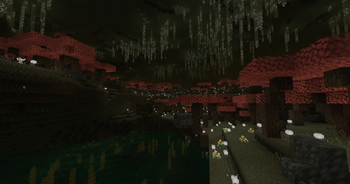
Screenshots
About this Modpack


The surface is a bad place. The light from the sun is very dangerous to you.
The sun used to make things grow and be healthy. Now it is like a killer from space. Something strange happened to the sun. It made the Overworld a very bad place where everything dies when the sun is out. If you stay on the surface during the day you will die quickly from the heat.
Your story does not start in a forest or a big open area. It starts in an scary place called The Undergarden. The Undergarden is under the ground. It is full of weird plants and strange animals that glow. You are not just exploring The Undergarden you are living there because it is the place you can breathe.
Key Features
You start underground: This is not like the way of playing Minecraft. You start in The Undergarden, which's a tough and confusing place. It is hard to find wood. The stone is different. The animals that live there do not want to share their home with you.
The sun is bad for you: You can still go to the surface. You have to be very careful. If you go outside during the day the sun will hurt you badly and you will die quickly.
You have to wait for night: If you want to find things on the surface you have to wait until it is dark.. Be careful because the monsters that come out at night are very hungry and want to eat you.
You can use technology and magic: The Undergarden has special things that you can use to help you survive. You can melt down metals grow plants that glow and use machines to help you.
⚠️ Be careful:
If you hear the wind blowing from a cave that leads to the surface do not go that way. The sun is very dangerous. Will hurt you if you make a mistake.
Are you ready to dig
Beneath a Dying Sun is a very different way of playing Minecraft. It is a game that is all, about surviving in a tough world. If you like games that are challenging and exciting you will like this.
Take your pickaxe be afraid of the sun and make The Undergarden your home.
I hope you enjoy it and good luck:)
Available Versions
How to Set Up a Beneath a Dying Sun Server
Order Server
Choose at least 6 GB RAM (8 GB recommended for Beneath a Dying Sun). Based on player count: per 5 players.
Install Modpack in Dashboard
Open the modpack browser in the dashboard, search for "Beneath a Dying Sun" and click "Install". The forge loader and Minecraft 1.20.1 are configured automatically.
Start Server & Play
Start the server – all mods are loaded automatically. Share the server IP with friends and play together!
Frequently Asked Questions
Beneath a Dying Sun server crashes or won't start – what to do?
Most common causes: insufficient RAM or wrong forge loader. Check latest.log for "OutOfMemoryError" → increase RAM to at least 8 GB. For "Mixin" or "ClassNotFoundException" errors: modpack version and loader don't match. With Mado Hosting, loader and Minecraft version are auto-configured on modpack install – preventing most startup issues.
How much RAM does a Beneath a Dying Sun server really need?
Minimum 6 GB, recommended 8 GB for stable performance. per 5 players. Important: Minecraft modpacks need more RAM than vanilla – plan extra per additional player. With Mado Hosting, you can scale RAM up live at any time without data loss (from €12/month).
Can I add custom mods to Beneath a Dying Sun without conflicts?
Yes, but check compatibility: only use mods for the same loader (forge) and same Minecraft version (1.20.1). Common issues: ID conflicts with recipe mods and incompatible coremod versions. The Mado dashboard mod browser only shows compatible mods and warns about known conflicts.
Beneath a Dying Sun server lagging – performance tips
1) Increase RAM to 8 GB+. 2) Reduce server view-distance to 8 (server.properties). 3) Pre-generate chunks with the "Chunky" plugin. 4) Use /spark profiler to check which mods consume the most tick time. With Mado Hosting, all servers run on NVMe SSDs with dedicated CPU cores – eliminating hardware as a bottleneck.
Similar Modpacks
![Cobblemon Official Modpack [Fabric]](https://cdn.modrinth.com/data/5FFgwNNP/e7f9ee2e9d361623847853fe2ddce42f519ee64f.png)
![COBBLEVERSE - Pokemon Adventure [Cobblemon]](https://cdn.modrinth.com/data/Jkb29YJU/581ecf54530972afb18a04660afd820f2f24f6c7.png)
![Better MC [FABRIC] - BMC2](https://cdn.modrinth.com/data/shFhR8Vx/a19c2bcb51d38f32f138d3607e91cb2b7b8e387f_96.webp)


![Better MC [FORGE] - BMC4](https://cdn.modrinth.com/data/4BV47HRn/7f5ef7cc61b2593609aabef3ed07a866a4f11b73_96.webp)
Rent Beneath a Dying Sun Server
Start your own server with automatic modpack installation.
Supported Versions
Start your Beneath a Dying Sun Server now
From €12.00/month with 8 GB RAM for the best performance.
Configure Server →