
Best look
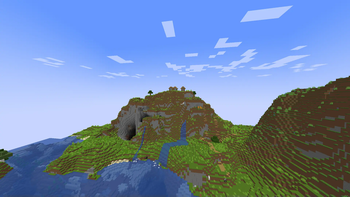
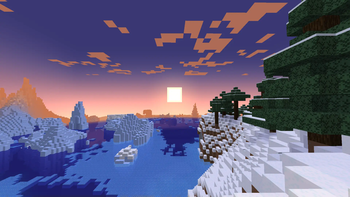
Best Look is a lightweight visual modpack that transforms Minecraft to look closer to the official trailers
Screenshots
About this Modpack
Modpack Showcase
🎥 Best Look - Inspired by Minecraft Trailers
Ever wondered why Minecraft trailers look so beautiful?
This modpack aims to replicate that stunning, vibrant look — combining stylish textures, smooth animations, immersive particles, and realistic sounds — all while staying lightweight and performance-friendly.
🌈 Resource Packs Included
🟡 Bare Bones
A minimal, vibrant resource pack that strips Minecraft down to its "bare bones." It enhances color, clarity, and trailer-like visuals while staying true to the vanilla feel.
🔵 Fresh Animations
Brings Minecraft to life with expressive new animations. Although OptiFine isn’t supported in Fabric, don’t worry — I’ve added 11 mods to provide compatibility.
Expect minor issues since this is an early build, and feel free to share feedback!
🎮 Key Mods
🔄 Not Enough Animations
Adds third-person animations for smoother, more realistic movement.
✨ Visuality
Client-side mod that adds ambient particles like sparkles, slime effects, hit particles, and more.
🍽 Eating Animation [Fabric]
Adds sprite-based eating and drinking animations.
💨 Cave Dust
Adds fine dust particles underground for a more immersive feel.
🌧 Particle Rain
Replaces vanilla rain/snow with detailed particle weather (even sandstorms in deserts!).
💬 Make Bubbles Pop
Revamps bubble physics, adding realistic rise and burst behavior — and extra effects for chests, barrels, and explosions underwater.
🌊 Wakes
Adds water wake effects when you move through water.
👣 Presence Footsteps
Adds dynamic footstep sounds based on block type for deeper immersion.
🔊 Sound Physics Remastered
Realistic sound propagation: muffled audio through walls, echoes in caves, etc.
🎵 Ambient Sounds
Adds ambient background audio to every biome and environment.
⚔️ Better Combat
Combat overhaul with spectacular melee animations, inspired by Minecraft Dungeons.
And more Mods to explore.
🧱 OptiFine Parity for Fabric
These mods recreate OptiFine features without needing OptiFine:
- [EMF] Entity Model Features – Enables custom entity models (CEM).
- [ETF] Entity Texture Features – Enables custom textures for entities and players.
- Continuity – Supports connected and emissive textures.
- CIT Resewn – Adds custom item textures (CIT) support.
- Nyf’s Spiders – Makes spiders more realistic and creepy.
⚙️ Performance Mods
For low-end PCs, Sodium is included for enhanced performance.
❌ OptiFine is not compatible with Fabric — but don’t worry, we’ve replaced its best features with better mods.
✨ Shader recommendations
BSL Shaders are recommended for the best visual experience.
Make sure to install and enable shaders via Iris (This well not Be included in the modpack).
🙌 Special Thanks
Huge thanks to @lowresbones,this modpack wouldn’t be possible without him.
📦 Final Step Before You Play
After launching the game:
- Go to Options → Resource Packs
- You well need to Apply all the Resource packs.
💬 Feedback is welcome!
Report bugs or suggestions via GitHub Issues or message me on social media.
Available Versions
How to Set Up a Best look Server
Order Server
Choose at least 4 GB RAM (6 GB recommended for Best look). Based on player count: per 8 players.
Install Modpack in Dashboard
Open the modpack browser in the dashboard, search for "Best look" and click "Install". The fabric loader and Minecraft 1.21.11 are configured automatically.
Start Server & Play
Start the server – all mods are loaded automatically. Share the server IP with friends and play together!
Frequently Asked Questions
Best look server crashes or won't start – what to do?
Most common causes: insufficient RAM or wrong fabric loader. Check latest.log for "OutOfMemoryError" → increase RAM to at least 6 GB. For "Mixin" or "ClassNotFoundException" errors: modpack version and loader don't match. With Mado Hosting, loader and Minecraft version are auto-configured on modpack install – preventing most startup issues.
How much RAM does a Best look server really need?
Minimum 4 GB, recommended 6 GB for stable performance. per 8 players. Important: Minecraft modpacks need more RAM than vanilla – plan extra per additional player. With Mado Hosting, you can scale RAM up live at any time without data loss (from €8/month).
Can I add custom mods to Best look without conflicts?
Yes, but check compatibility: only use mods for the same loader (fabric) and same Minecraft version (1.21.11). Common issues: ID conflicts with recipe mods and incompatible coremod versions. The Mado dashboard mod browser only shows compatible mods and warns about known conflicts.
Best look server lagging – performance tips
1) Increase RAM to 6 GB+. 2) Reduce server view-distance to 8 (server.properties). 3) Pre-generate chunks with the "Chunky" plugin. 4) Use /spark profiler to check which mods consume the most tick time. With Mado Hosting, all servers run on NVMe SSDs with dedicated CPU cores – eliminating hardware as a bottleneck.
Similar Modpacks

![Cobblemon Official Modpack [Fabric]](https://cdn.modrinth.com/data/5FFgwNNP/e7f9ee2e9d361623847853fe2ddce42f519ee64f.png)
![COBBLEVERSE - Pokemon Adventure [Cobblemon]](https://cdn.modrinth.com/data/Jkb29YJU/581ecf54530972afb18a04660afd820f2f24f6c7.png)
![Better MC [FABRIC] - BMC2](https://cdn.modrinth.com/data/shFhR8Vx/a19c2bcb51d38f32f138d3607e91cb2b7b8e387f_96.webp)


Rent Best look Server
Start your own server with automatic modpack installation.
Supported Versions
Start your Best look Server now
From €8.00/month with 6 GB RAM for the best performance.
Configure Server →