
Client Craft
A modpack that allows you to still play on vanilla minecraft servers, but with extra visual and utility mods.
Screenshots
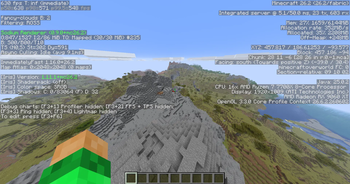
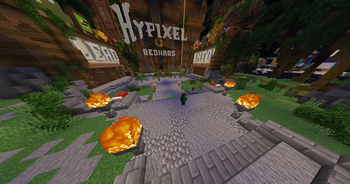
About this Modpack
Client Craft is an immersive Minecraft modpack built for vanilla minecraft servers. It doesn't matter if you are playing a vanilla multiplayer server, or a single player world, Client Craft will look amazing, and have a bunch of tools to help you with every aspect of minecraft.
Features
Improved Performance
A bunch of performance mods working together to get the best performance out of minecraft without changing how to game works.
Tools
Multiple different mods that make building, designing, exploring, and fighting easier for you.
Recent Content Update
It's only the first version, so it was just the modpack
Current Compatablilities
Minecraft Versions
26.2
Mod Loader
Fabric
Upcoming Plans
Currently Working On
Updating the 26.2 version
Minecraft Versions
I'm planning on making versions of this modpack for all the big future updates. Also maybe some older versions, depending on how much is needed to be done.
Mod Loader
I'm planning on adding Quilt if enough people are asking for it
Mods and Resource Packs
None of this would even be possible without all of the Mods and Resource Packs that have been created, so I want to give a big thanks to all of the creaters of the Mods and Resource Packs listed below.
Content
Performance Mods
Sodium
Link to Sodium's mod page
A high-performance rendering engine replacement for Minecraft, which greatly improves frame rates and reduces micro-stutter
Sodium Extra
Link to Sodium Extra's mod page
A Sodium addon that adds features that shouldn't be in Sodium
Reese's Sodium Options
Link to Reese's Sodium Options' mod page
Alternative Options Menu for Sodium
Entity Culling
Link to Entity Culling's mod page
Using async path-tracing to hide Block-/Entities that are not visible
More Culling
Link to More Culling's mod page
A mod that changes how multiple types of culling are handled in order to improve performance
Lithium
Link to Lithium's mod page
No-compromises game logic optimization mod, useful for both single-player games and multi-player servers
Ferrite Core
Link to Ferrite Core's mod page
Memory usage optimizations
Immediately Fast
Link to Immediately Fast's mod page
Speed up immediate mode rendering in Minecraft
Dynamic FPS
Link to Dynamic FPS' mod page
Reduce resource usage while Minecraft is in the background, idle, or on battery
Clumps
Link to Clumps' mod page
Clumps XP orbs together to reduce lag
Better Block Entities
Link to Better Block Entities' mod page
A Minecraft optimization mod for Fabric-Sodium that improves framerates by improving block entity rendering via a hybrid renderer
Concurrent Chunk Management Engine
Link to Concurrent Chunk Management Engine's mod page
A Fabric mod designed to improve the chunk performance of Minecraft
ScalableLux
Link to ScalableLux's mod page
A Fabric mod based on Starlight that improves the performance of light updates in Minecraft
Visual Mods
Iris Shaders
[ETF] Entity Texture Features
Link to [ETF] Entity Texture Features' mod page
Emissive, Random & Custom texture support for entities in resourcepacks just like Optifine but for Fabric
[EMF] Entity Model Features
Link to [EMF] Entity Model Features' mod page
EMF is an, OptiFine format, Custom Entity Model replacement mod available for Fabric and Forge
Distant Horizons
Link to Distant Horizons' mod page
See farther without turning your game into a slide show
Continuity
Link to Continuity's mod page
A Minecraft mod that allows for efficient connected textures
3D Skin Layers
Link to 3D Skin Layers' mod page
Render the player skin layer in 3d
LambDynamicLights
Link to LambDynamicLights' mod page
Adds dynamic lights to Minecraft as the most feature-complete and optimized dynamic lighting mod
Gamma Utils
Link to Gamma Utils' mod page
Gamma / Brightness / Night Vision mod, making it easy to see in the dark. Basically Fullbright for Fabric and NeoForge.
Physics Mod
Link to Physics Mod's mod page
Welcome to a more destructive Minecraft than you've ever seen before
Animated Mojang Logo
Link to Animated Mojang Logo's mod page
Replaced the old (boring) Minecraft loading screen
Cursors Extended
Link to Cursors Extended's mod page
Configurable Minecraft-themed cursors
Better Friends
Link to Better Friends' mod page
Make the new friends menu feel like it belongs
Visuality
Link to Visuality's mod page
Little visual improvements by adding a bunch of new particles
Blur+
Link to Blur+'s mod page
Spices up the boring vanilla blur effect – featuring animations, colors and lots of customizability
Armor Statues
Link to Armor Statues' mod page
Unlock the full potential of armor stands! Works on vanilla servers, too
Not Enough Animations
Link to Not Enough Animations' mod page
Bringing first-person animations to the third-person
Explosive Enhancement
Link to Explosive Enhancement's mod page
Makes the explosion animation look cooler
Detail Armor Bar Reconstructed
Link to Detail Armor Bar Reconstructed's mod page
More details about armor in the armor bar
Audio Mods
Simple Voice Chat
Link to Simple Voice Chat's mod page
A working voice chat in Minecraft
Sound Physics Remastered
Link to Sound Physics Remastered's mod page
A Minecraft mod that provides realistic sound attenuation, reverberation, and absorption through blocks
Presence Footsteps
Link to Presence Footsteps' mod page
An Overly complicated Sound Mod
Cool Rain
Link to Cool Rain's mod page
Creates ambient sounds for certain blocks during rain
Quality of Life Mods
Mod Menu
Link to Mod Menu's mod page
Adds a mod menu to view the list of mods you have installed
Apple Skin
Link to Apple Skin's mod page
Food/hunger-related HUD improvements
Mouse Tweaks
Link to Mouse Tweaks' mod page
Enhances inventory management by adding various functions to the mouse buttons
Shulker Box Tooltip
Link to Shulker Box Tooltip's mod page
View the contents of shulker boxes from your inventory
Crash Assistant
Link to Crash Assistant's mod page
Shows a GUI after Minecraft crashes, immediately showing and analyzing all affected logs
Zoomify
Link to Zoomify's mod page
A zoom mod with infinite customizability
WI Zoom
Link to WI Zoom's mod page
WI Zoom is a Minecraft mod offering up to 50x zoom with smooth camera movement
Better Statistics Screen
Link to Better Statistics Screen's mod page
A Minecraft mod that improves the statistics screen and makes it more useful
Better Mount HUD
Link to Better Mount HUD's mod page
Improves the ingame HUD while riding a mount
Litematica
Link to Litematica's mod page
A client-side schematic mod with extra features for creative mode work
Litematica Printer
Link to Litematica Printer's mod page
This fork adds the missing printing functionality for Litematica
Freecam
Link to Freecam's mod page
A highly customizable freecam mod
Axiom
Link to Axiom's mod page
The all-in-one tool for editing Minecraft Worlds
Better Command Block UI
Link to Better Command Block UI's mod page
Provides a more usable Command Block UI
Chunky
Link to Chunky's mod page
Pre-generates chunks, quickly and efficiently
Accurate Block Placement Reborn
Link to Accurate Block Placement Reborn's mod page
Makes block placement smarter by timing it for you
Resourcify
Link to Resourcify's mod page
In-game resource pack, data pack and shader browser and updater
Packed Packs
Link to Packed Packs' mod page
Pack resource and data packs into profiles with multiple selection, drag and drop, and extended mouse and keyboard controls
Tweakeroo
Link to Tweakeroo's mod page
Various client-side tweaks, such as hand restock, hotbar swap/cycle, flexible/fast block placement etc.
Just Enough Items (JEI)
Link to Just Enough Items' (JEI) mod page
View Items and Recipes
Library Mods
Fabric API
Link to Fabric API's mod page
Lightweight and modular API providing common hooks and intercompatibility measures utilized by mods using the Fabric toolchain
Cloth Config API
Link to Cloth Config API's mod page
Configuration Library for Minecraft Mods
Text Placeholder API
Link to Text Placeholder API's mod page
Placeholder and Text manipulation library for your Minecraft mods
Fabric Language Kotlin
Link to Fabric Language Kotlin's mod page
This is a mod that enables usage of the Kotlin programming language for Fabric mods
YetAnotherConfigLib
Link to YetAnotherConfigLib's mod page
A builder-based configuration library for Minecraft
TCDCommons API
Link to TCDCommons API's mod page
TheCSDev's personal library mod for the Minecraft modding environment
MaLiLib
Link to MaLiLib's mod page
A library mod for client-side mods. Contains most of the common/shared code of masa's client mods, and adds some inter-operation support between the dependent mods
Timeless Lib
Link to Timeless Lib's mod page
A lib for all things time
Puzzles Lib
Link to Puzzles Lib's mod page
Why is it called Puzzles? That's the puzzle.
Forge Config API Port
Link to Forge Config API Port's mod page
NeoForge's & Forge's config systems provided to other modding ecosystems. Designed for a multiloader architecture.
EclipseUI
Link to Eclipse UI's mod page
A modern config and config UI lib
Modpack Support
If this modpack gets enough downloads then I will make an official discord for suggestions and bug reports for all of you to submit.
Available Versions
How to Set Up a Client Craft Server
Order Server
Choose at least 4 GB RAM (6 GB recommended for Client Craft). Based on player count: per 8 players.
Install Modpack in Dashboard
Open the modpack browser in the dashboard, search for "Client Craft" and click "Install". The fabric loader and Minecraft 26.2 are configured automatically.
Start Server & Play
Start the server – all mods are loaded automatically. Share the server IP with friends and play together!
Frequently Asked Questions
Client Craft server crashes or won't start – what to do?
Most common causes: insufficient RAM or wrong fabric loader. Check latest.log for "OutOfMemoryError" → increase RAM to at least 6 GB. For "Mixin" or "ClassNotFoundException" errors: modpack version and loader don't match. With Mado Hosting, loader and Minecraft version are auto-configured on modpack install – preventing most startup issues.
How much RAM does a Client Craft server really need?
Minimum 4 GB, recommended 6 GB for stable performance. per 8 players. Important: Minecraft modpacks need more RAM than vanilla – plan extra per additional player. With Mado Hosting, you can scale RAM up live at any time without data loss (from €8/month).
Can I add custom mods to Client Craft without conflicts?
Yes, but check compatibility: only use mods for the same loader (fabric) and same Minecraft version (26.2). Common issues: ID conflicts with recipe mods and incompatible coremod versions. The Mado dashboard mod browser only shows compatible mods and warns about known conflicts.
Client Craft server lagging – performance tips
1) Increase RAM to 6 GB+. 2) Reduce server view-distance to 8 (server.properties). 3) Pre-generate chunks with the "Chunky" plugin. 4) Use /spark profiler to check which mods consume the most tick time. With Mado Hosting, all servers run on NVMe SSDs with dedicated CPU cores – eliminating hardware as a bottleneck.
Similar Modpacks


![Cobblemon Official Modpack [Fabric]](https://cdn.modrinth.com/data/5FFgwNNP/e7f9ee2e9d361623847853fe2ddce42f519ee64f.png)
![COBBLEVERSE - Pokemon Adventure [Cobblemon]](https://cdn.modrinth.com/data/Jkb29YJU/581ecf54530972afb18a04660afd820f2f24f6c7.png)
![Better MC [FABRIC] - BMC2](https://cdn.modrinth.com/data/shFhR8Vx/a19c2bcb51d38f32f138d3607e91cb2b7b8e387f_96.webp)

Rent Client Craft Server
Start your own server with automatic modpack installation.
Supported Versions
Start your Client Craft Server now
From €8.00/month with 6 GB RAM for the best performance.
Configure Server →