
Better of Fabric 3
Offers the latest & best of Vanilla+ Fabric mods on 1.21 | Explore breathtaking biomes & structures | Fight new bosses | Enter new dungeons & dimensions | Vanilla will feel empty after this
Screenshots
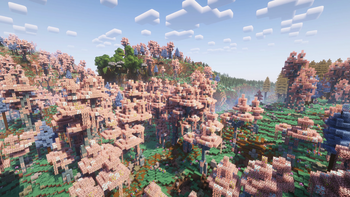
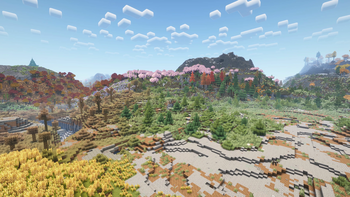
About this Modpack
A Vanilla-Plus Exploration & Adventure Modpack
Originally made to play with some friends, I turned it into a fully-fledged modpack because I thought other players might enjoy it too.
This Modpack is a Vanilla+ Exploration and Adventure Modpack that will make you rediscover Minecraft without losing its Vanilla feel. Create a world, discover new biomes, fight bosses, make a farm, explore new dimensions, level up your equipment, find artifacts, build a beautiful house, craft insane new items... Everything that is in Minecraft, but Enhanced.
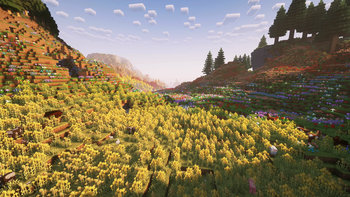
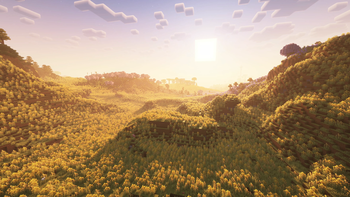
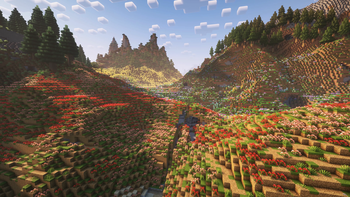
With stunning shaders, vivid new biomes, and thousands of new blocks and structures, this modpack turns Minecraft into a true visual masterpiece. Still not convinced? Head to the screenshots tab and see the beauty for yourself!

- 🌍 Fully overhauled world generation (Terralith, Biomes'o'Plenty, BYG, BetterEnd, BetterNether & more)
- ⚙️ Greatly optimized, with shader support (Sodium, Iris, Nvidium, Concurrent Chunk Management Engine, etc.)
- 🌀 New dimensions like Paradise Lost, Deep Dark, and many more
- 🎧 Amazing and immersive new sounds (Sound Physics Remastered, Presence Footsteps, MAmbiance)
- 🗺️ Incredible QoL features such as JourneyMap, Waystones, Zoom, etc.
- 👾 Over 150 new mobs and 15 new bosses to defeat with increasing difficulty (MobZ, Bosses of Mass Destruction, etc.)
- 🏞️ Explore more than 200 new biomes
- 🏰 Discover 300+ new structures and formations
- 🪵 Build with over 5000 new blocks and furniture that let you express your creativity without limits
- 🌾 More than 150 new Foods and Crops (Croptopia & more)
- 🎙️ Proximity Voice Chat that interacts with the world (like sculk sensors) for ultimate immersion
- 🌑 Beautiful Dark mode UI

The modpack performs really well, even on low-end hardware, especially when playing on a server. Singleplayer also runs well, even though it is your PC that generates the chunks instead of an external server.
Requirements
Client-side
Minimum allocated RAM: 10 GB
Recommended allocated RAM: 12 GB
Server-side
Minimum allocated RAM: 6 GB
Recommended allocated RAM: 8 GB
Shaders
By default, shaders are disabled, but you can enable them at any time: the game looks absolutely stunning with shaders on. You'll notice more vibrant, colorful lighting and an overall enhanced atmosphere.
I've already configured the shaders with better settings than the defaults, so you get a great experience right away. However, these improved settings can also reduce performance a bit more than the default.
If your PC struggles with a particular shader pack, open its settings and lower the graphics preset (almost all shaders have this option). Just keep in mind that changing presets may overwrite some of my custom settings, but it shouldn’t be a big deal; just some cool effects might get disabled.
The screenshots you see in the gallery tab were taken using Complementary+Euphoria. The game looks incredible with this shader, and I really recommend that you play with it for the best possible experience.

Here are the questions that are most likely to be asked.
I don't like the immersive first person; how do I disable it?
You can simply press F6 to toggle between the original and the new one.
Why isn't there x mod?
This modpack focuses on performance and stability over mod count, so if a mod isn't there, it's probably because of that. But feel free to suggest mods in the comments.
Distant Horizon
It slows down chunk generation. The pack already runs well with 32 chunks of render distance, so this one's optional.
Effective
Great mod, I wanted to include it, but the combination with other mods causes crashes. It's not the mod's fault, just the combination with other mods. It was replaced with Particular here.

Setting up your server
To manually download the server pack, search for the version of the modpack you are using on this page, click on it and download the server pack zip file.
If you want faster chunk loading, I recommend using Chunky to pre-generate chunks. You can set a high radius and let it run overnight. Pre-generated chunks load almost instantly.
The modpack is available on both CurseForge and Modrinth, so choose the one you prefer. The only thing that is only on CurseForge is the server pack since we can't upload file larger than 500mb on Modrinth.
Available Versions
How to Set Up a Better of Fabric 3 Server
Order Server
Choose at least 6 GB RAM (8 GB recommended for Better of Fabric 3). Based on player count: per 5 players.
Install Modpack in Dashboard
Open the modpack browser in the dashboard, search for "Better of Fabric 3" and click "Install". The fabric loader and Minecraft 1.21.1 are configured automatically.
Start Server & Play
Start the server – all mods are loaded automatically. Share the server IP with friends and play together!
Frequently Asked Questions
Better of Fabric 3 server crashes or won't start – what to do?
Most common causes: insufficient RAM or wrong fabric loader. Check latest.log for "OutOfMemoryError" → increase RAM to at least 8 GB. For "Mixin" or "ClassNotFoundException" errors: modpack version and loader don't match. With Mado Hosting, loader and Minecraft version are auto-configured on modpack install – preventing most startup issues.
How much RAM does a Better of Fabric 3 server really need?
Minimum 6 GB, recommended 8 GB for stable performance. per 5 players. Important: Minecraft modpacks need more RAM than vanilla – plan extra per additional player. With Mado Hosting, you can scale RAM up live at any time without data loss (from €12/month).
Can I add custom mods to Better of Fabric 3 without conflicts?
Yes, but check compatibility: only use mods for the same loader (fabric) and same Minecraft version (1.21.1). Common issues: ID conflicts with recipe mods and incompatible coremod versions. The Mado dashboard mod browser only shows compatible mods and warns about known conflicts.
Better of Fabric 3 server lagging – performance tips
1) Increase RAM to 8 GB+. 2) Reduce server view-distance to 8 (server.properties). 3) Pre-generate chunks with the "Chunky" plugin. 4) Use /spark profiler to check which mods consume the most tick time. With Mado Hosting, all servers run on NVMe SSDs with dedicated CPU cores – eliminating hardware as a bottleneck.
Rent Better of Fabric 3 Server
Start your own server with automatic modpack installation.
Supported Versions
Start your Better of Fabric 3 Server now
From €12.00/month with 8 GB RAM for the best performance.
Configure Server →