
Better Server Side
A server-side Fabric modpack focused on optimization, utility, and quality-of-life features for SMPs. Improves performance, adds useful server tools, anti-cheat, customization, and cross-play support.
Screenshots
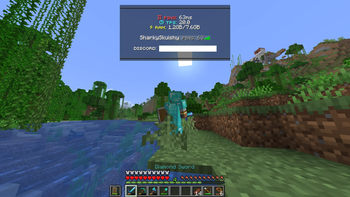
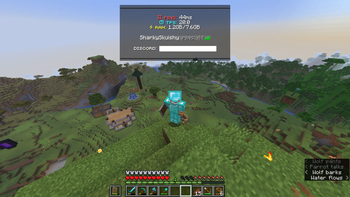
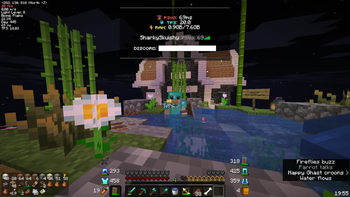
About this Modpack
Better Server Side
A server-side Fabric modpack focused on optimization, utility, and quality-of-life features for SMPs. Improves performance, adds useful server tools, anti-cheat, customization, and cross-play support.
💎 What this modpack offers
- Heavy optimization: mods like Alternate Current, Lithium, Lithostitched, ServerCore, TT20 and others boost server TPS (ticks-per-second) and reduce lag;
- Utility and quality-of-life: this modpack integrates some helpful functionalities compatible with some client-side mods such as AppleSkin, Distant Horizons, Jade and others;
- Anti Cheat: players will not cheat so easily with Grim Anticheat and AntiXray installed on the server, both in terms of movement and x-ray use;
- Customization: your server will have another look with customization mods like Styled Chat and TAB;
- Multiple connections: the server can be played by Bedrock Edition players with GeyserMC and by players with older and newer versions than server version with ViaVersion mods;
- Testing: with mclo.gs and spark it makes server testing easier, sharing logs and viewing performances with simple interfaces.
⚡ Optimization mods
Below is a categorized overview of the main optimization areas covered by the pack:
- Worldgen: with Chunky, Concurrent Chunk Management Engine (Fabric), Lithostitched, NoisiumForked, Structure Layout Optimizer
- Processes: with Achievements Optimizer, Alternate Current, Async, Krypton, Lithium
- Memory usage: with Achievements Optimizer, FerriteCore, Krypton, ModernFix-mVUS
- Tick boosting: with Async, Krypton, Lithium, Structure Layout Optimizer, TT20 (TPS Fixer)
- Game physics (and others): with Alternate Current, Lithium, ScalableLux
- Network stacking: with Krypton, Very Many Players (Fabric)
- General: with Async, Lithium, ModernFix-mVUS, ScalableLux, ServerCore, TT20 (TPS Fixer), Very Many Players (Fabric)
⚠️ I am not an expert, so I am not entirely sure about the various types of optimizations offered by mods.
🌻 Cool features (ideal for SMPs)
CalcMod gives a calculator (usable with /calc command) for many Minecraft features, like coordinates, storages, trades, conversion and basic math. AppleSkin (a mod that allows to view hunger restore, saturation and regeneration of food), Jade (that shows information in the HUD about what players are looking at), Ping Wheel (this mod let players use temporary pings to mark places) and Distant Horizons (a mod that renders more chunks decreasing definitions) are popular client-side mods that work better if installed on server too and they aren't required to play. This modpack integrates dynamic light directly on the server from Dynamic Lights, so they are part of world lights (for example melt the snow if a torch is equipped).
🎨 Customization
With the mods of this pack, you can easily and entirely customize server chat (with Styled Chat) and tab players list, nametags, custom bossbars, scoreboards and more (with TAB). There's already a default configuration of these two mods with styled chat, tablist, scoreboard (disabled by default) and bossbar (disabled by default). To enhance customization with TAB, I recommend use text placeholders of the mod Text Placeholder API (installed), Birdflop: Animated TAB to create text animations (to be used as placeholder in config/tab/animaions.yml) and simple translators such as Small Text Generator by (Lingo Jam) to get a different and cool font (without using resource pack).
🚫 Anti Cheat
This modpack mainly has two mods to avoid cheating in the server: a mod to deny the use of X-Ray (tools like Xray Ultimate that allows players to view ores or treasures through blocks), AntiXray and Grim Anticheat, that avoids unexpected movements like flying. These mods significantly reduce common cheats, but no anticheat is 100% foolproof.
🎙️ Voice Chat built-in
Simple Voice Chat can be used to talk between players directly into the game without using other platforms like Discord. To use it, players have to install it on client (it's not required, players can play normally without install it). The mod offers many features like proximity chat, voice groups, push-to-talk and more.
🎩 Skin management
Skin Restorer is a mod that enhances skins system of players. This is ideal for servers with online-mode property disabled, for example in cracked servers, because in this case player skins will be loaded (without this mod player skins aren't loaded). In addition, players can choose and switch skins from online sources (with URLs to PNG files) or from Mojang players names.
🔌 Multiple connections
With the power of GeyserMC players of Minecraft: Bedrock Edition can connect to the Java Edition server in real time, bridging the two editions, and with Floodgate, it even works for server with the online-mode property disabled.
In addition, also clients with older and newer versions of Java Edition can play on the server with ViaBackwards, ViaVersion and ViaFabric.
🖥️ Testing
With mclo.gs, server owners can easily share server logs with a simple link, and with spark, they can view server performances with a simple web interface.
❤️ Thanks
to all the mod developers for their work, also the ones whose mods are not listed here. This modpack would not be possible without their contributions to the community.
Available Versions
How to Set Up a Better Server Side Server
Order Server
Choose at least 4 GB RAM (6 GB recommended for Better Server Side). Based on player count: per 8 players.
Install Modpack in Dashboard
Open the modpack browser in the dashboard, search for "Better Server Side" and click "Install". The fabric loader and Minecraft 1.21.10 are configured automatically.
Start Server & Play
Start the server – all mods are loaded automatically. Share the server IP with friends and play together!
Frequently Asked Questions
Better Server Side server crashes or won't start – what to do?
Most common causes: insufficient RAM or wrong fabric loader. Check latest.log for "OutOfMemoryError" → increase RAM to at least 6 GB. For "Mixin" or "ClassNotFoundException" errors: modpack version and loader don't match. With Mado Hosting, loader and Minecraft version are auto-configured on modpack install – preventing most startup issues.
How much RAM does a Better Server Side server really need?
Minimum 4 GB, recommended 6 GB for stable performance. per 8 players. Important: Minecraft modpacks need more RAM than vanilla – plan extra per additional player. With Mado Hosting, you can scale RAM up live at any time without data loss (from €8/month).
Can I add custom mods to Better Server Side without conflicts?
Yes, but check compatibility: only use mods for the same loader (fabric) and same Minecraft version (1.21.10). Common issues: ID conflicts with recipe mods and incompatible coremod versions. The Mado dashboard mod browser only shows compatible mods and warns about known conflicts.
Better Server Side server lagging – performance tips
1) Increase RAM to 6 GB+. 2) Reduce server view-distance to 8 (server.properties). 3) Pre-generate chunks with the "Chunky" plugin. 4) Use /spark profiler to check which mods consume the most tick time. With Mado Hosting, all servers run on NVMe SSDs with dedicated CPU cores – eliminating hardware as a bottleneck.
Similar Modpacks

![Cobblemon Official Modpack [Fabric]](https://cdn.modrinth.com/data/5FFgwNNP/e7f9ee2e9d361623847853fe2ddce42f519ee64f.png)
![COBBLEVERSE - Pokemon Adventure [Cobblemon]](https://cdn.modrinth.com/data/Jkb29YJU/581ecf54530972afb18a04660afd820f2f24f6c7.png)
![Better MC [FABRIC] - BMC2](https://cdn.modrinth.com/data/shFhR8Vx/a19c2bcb51d38f32f138d3607e91cb2b7b8e387f_96.webp)


Rent Better Server Side Server
Start your own server with automatic modpack installation.
Supported Versions
Start your Better Server Side Server now
From €8.00/month with 6 GB RAM for the best performance.
Configure Server →