
Better Survival Modpack
A pack aiming to make the Minecraft survival experience as fun as possible.
Screenshots
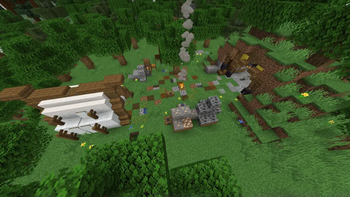
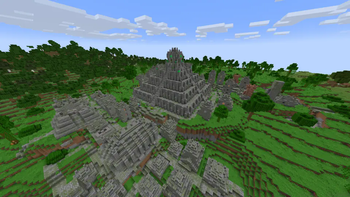
About this Modpack
Description
Overview
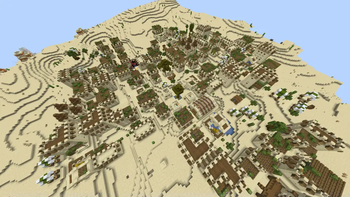
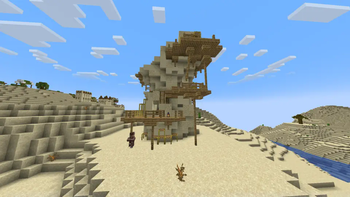
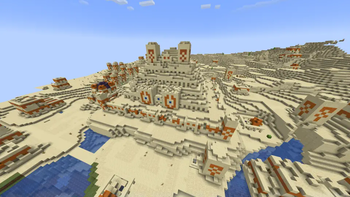
Better Survival is a modpack focusing on adventure, adding tons of structures all while keeping Minecraft still feeling like Minecraft. As you explore your world you won't have to search long before you find a fun structure to loot, and with bundles being added in 1.21.4, now is the perfect time to start a world or server all about the adventure and discovery aspect of the game.
The main twist of this pack comes when you play on a multiplayer server. With Simple Voice Chat, players can now talk in game from a close proximity. However, groups are disabled, and so is chat and msg. This means that the only way to communicate is to stay together, or head to a server landmark and hope that someone will find you. Try searching for structures with a friend. Don't get lost though, as it is much more difficult now to meet up again.
Some optimizations such as Sodium have also been added to keep your game running nicely.
Content
There are many additions, but here are some examples:
Pale Garden
Spoiler
Thanks to The Pale Garden Remastered, you can now enter the gardens in a differnt way then before. There is now dense fog, and creepy ambience, plus structures added by other packs, making this biome far more worth your time.
Ancient City
Spoiler
You simply must try invading an ancient city with a friend. With Voice Chat Interaction and Dungeons and Taverns Ancient City Overhaul, the sculk sensors will hear your voices if you are not quiet, so remember to whisper as you explore the upgraded ancient city.
Nether
Spoiler
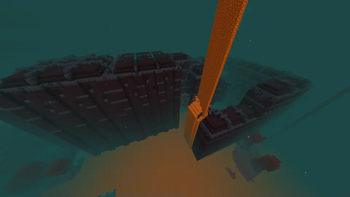
Due to Amplified Nether, the nether is now double the height, so more room for structures! The nether's world gen has been improved, adding some more variation, and the nether fortress has been revamped as well.
End
Spoiler
Dungeons and Taverns Stronghold Overhaul completely upgrades the stronghold, adding hundreds of rooms, and once you enter the portal, you'll find that the ender dragon also has gotten an update. True Ending: Ender Dragon Overhaul turns the end fight into the most epic boss battle ever, a great way to end your journey. That is, if you want to stop there! Try the outer islands too, which are far more interesting now, with insane loot just waiting to be obtained.
Configuring
Before you Start
Before starting a server, I would recommend running /gamerule showDeathMessages false. This will turn off death messages showing up in chat, which will add the fun of not knowing if someone died while looting a structure.
Many mods can be edited through Mod Menu, so you can chnage things as you like before starting a world or server. A fullbrightness toggle has also been added, for those who can't stand playing without fullbright. To toggle it, press 'G' by default. You should also enable resource packs before you start, or at least the ones you want.
Mod List/Credits
Mods
Spoiler
- [EMF] Entity Model Features https://modrinth.com/mod/entity-model-features
- [ETF] Entity Texture Features https://modrinth.com/mod/entitytexturefeatures
- 3D Skin Layers https://modrinth.com/mod/3dskinlayers
- Additional Structures https://modrinth.com/mod/additional-structures
- Amplified Nether https://modrinth.com/datapack/amplified-nether
- AppleSkin https://modrinth.com/mod/appleskin
- Architectury API https://modrinth.com/mod/architectury-api
- Axiom https://modrinth.com/mod/axiom
- Better Advancements https://modrinth.com/mod/better-advancements
- Better Mount HUD https://modrinth.com/mod/better-mount-hud
- Better Ping Display [Fabric] https://modrinth.com/mod/better-ping-display-fabric
- Better Statistics Screen https://modrinth.com/mod/better-stats
- BetterF3 https://modrinth.com/mod/betterf3
- Capes https://modrinth.com/mod/capes
- Chat Heads https://modrinth.com/mod/chat-heads
- Cherry Grove Villages https://modrinth.com/datapack/cherry-villages
- ChoiceTheorem’s Overhauled Village https://modrinth.com/mod/ct-overhaul-village
- Cloth Config API https://modrinth.com/mod/cloth-config
- Clumps https://modrinth.com/mod/clumps
- Collective https://modrinth.com/mod/collective
- Continents https://modrinth.com/datapack/continents
- Continuity https://modrinth.com/mod/continuity
- CreativeCore https://modrinth.com/mod/creativecore
- Cristel Lib https://modrinth.com/mod/cristel-lib
- Debugify https://modrinth.com/mod/debugify
- Double Doors https://modrinth.com/mod/double-doors
- Dungeons and Taverns https://modrinth.com/datapack/dungeons-and-taverns
- Dungeons and Taverns Ancient City Overhaul https://modrinth.com/datapack/dungeons-and-taverns-ancient-city-overhaul
- Dungeons and Taverns Desert Temple Replacement https://modrinth.com/datapack/dungeons-and-taverns-desert-temple-replacement
- Dungeons and Taverns End Castle Standalone https://modrinth.com/datapack/dungeons-and-taverns-end-castle-standalone
- Dungeons and Taverns Jungle Temple Replacement https://modrinth.com/datapack/dungeons-and-taverns-jungle-temple-replacement
- Dungeons and Taverns Nether Fortress Overhaul https://modrinth.com/datapack/dungeons-and-taverns-nether-fortress-overhaul
- Dungeons and Taverns Ocean Monument Replacement https://modrinth.com/datapack/dungeons-and-taverns-ocean-monument-replacement
- Dungeons and Taverns Pillager Outpost Overhaul https://modrinth.com/datapack/dungeons-and-taverns-pillager-outpost-overhaul
- Dungeons and Taverns Stronghold Overhaul https://modrinth.com/datapack/dungeons-and-taverns-stronghold-overhaul
- Dungeons and Taverns Swamp Hut Overhaul https://modrinth.com/datapack/dungeons-and-taverns-swamp-hut-overhaul
- Dungeons and Taverns Woodland Mansion Replacement https://modrinth.com/datapack/dungeons-and-taverns-woodland-mansion-replacement
- Durability Tooltip https://modrinth.com/mod/durability-tooltip
- Dynamic FPS https://modrinth.com/mod/dynamic-fps
- Entity Culling https://modrinth.com/mod/entityculling
- Essential Mod https://modrinth.com/mod/essential
- Explorify https://modrinth.com/datapack/explorify
- Fabric API https://modrinth.com/mod/fabric-api
- Fabric Language Kotlin https://modrinth.com/mod/fabric-language-kotlin
- Falling Leaves https://modrinth.com/mod/fallingleaves
- Farlands Reborn https://modrinth.com/mod/farlands-reborn
- FerriteCore https://modrinth.com/mod/ferrite-core
- Freecam https://modrinth.com/mod/freecam
- Full Brightness Toggle https://modrinth.com/mod/full-brightness-toggle
- Geckolib https://modrinth.com/mod/geckolib
- Hearths https://modrinth.com/datapack/hearths
- ImmediatelyFast https://modrinth.com/mod/immediatelyfast
- Iris Shaders https://modrinth.com/mod/iris
- Jade https://modrinth.com/mod/jade
- Krypton https://modrinth.com/mod/krypton
- LambDynamicLights https://modrinth.com/mod/lambdynamiclights
- Litematica https://modrinth.com/mod/litematica
- Litematica Printer https://modrinth.com/mod/litematica-printer
- Lithium https://modrinth.com/mod/lithium
- Lithostitched https://modrinth.com/mod/lithostitched
- Make Bubbles Pop https://modrinth.com/mod/make_bubbles_pop
- MaLiLib https://modrinth.com/mod/malilib
- MES - Moog’s End Structures https://modrinth.com/mod/mes-moogs-end-structures
- MidnightLib https://modrinth.com/mod/midnightlib
- Mine Spawners https://modrinth.com/mod/mine-spawners
- Mod Menu https://modrinth.com/mod/modmenu
- Model Gap Fix https://modrinth.com/mod/modelfix
- ModernFix https://modrinth.com/mod/modernfix
- More Chat History https://modrinth.com/mod/morechathistory
- More Mobs https://modrinth.com/datapack/more-mobs
- More Music Discs https://modrinth.com/mod/more-music-discs
- MVS - Moog’s Voyager Structures https://modrinth.com/mod/moogs-voyager-structures
- No Chat Reports https://modrinth.com/mod/no-chat-reports
- No Enderman Grief https://modrinth.com/datapack/no-enderman-grief
- Not Enough Animations https://modrinth.com/mod/not-enough-animations
- Nullscape https://modrinth.com/datapack/nullscape
- Polytone https://modrinth.com/mod/polytone
- Reese’s Sodium Options https://modrinth.com/mod/reeses-sodium-options
- Remove Chat https://modrinth.com/mod/remove-chat
- Replay Voice Chat https://modrinth.com/mod/replay-voice-chat
- Replay Mod https://modrinth.com/mod/replaymod
- Repurposed Structures - Quilt/Fabric https://modrinth.com/mod/repurposed-structures-fabric
- Revamped Shipwrecks https://modrinth.com/datapack/revamped-shipwrecks
- Roughly Enough Items (REI) https://modrinth.com/mod/rei
- Shulker Box Tooltip https://modrinth.com/mod/shulkerboxtooltip
- Silk Touch Budding Amethyst [PurpurPack] https://modrinth.com/datapack/purpurpacks-silk-touch-budding-amethyst
- Simple Voice Chat https://modrinth.com/plugin/simple-voice-chat
- Sleep https://modrinth.com/datapack/sleep
- Sodium https://modrinth.com/mod/sodium
- Sodium Extra https://modrinth.com/mod/sodium-extra
- Sodium Shadowy Path Blocks https://modrinth.com/mod/sodium-shadowy-path-blocks
- Structory https://modrinth.com/datapack/structory
- Structory: Towers https://modrinth.com/datapack/structory-towers
- SuperMarijn642’s Config Lib https://modrinth.com/mod/supermartijn642s-config-lib
- TCDCommons API https://modrinth.com/mod/tcdcommons
- Tectonic https://modrinth.com/datapack/tectonic
- Text Placeholder API https://modrinth.com/mod/placeholder-api
- The Pale Garden Remastered https://modrinth.com/datapack/pale-garden-remastered
- Tidal Towns https://modrinth.com/datapack/tidal-towns
- Towns and Towers https://modrinth.com/mod/towns-and-towers
- True Ending: Ender Dragon Overhaul https://modrinth.com/datapack/true-ending
- Very Many Players (Fabric) https://modrinth.com/mod/vmp-fabric
- Villager Transportation https://modrinth.com/datapack/villager-transportation
- Visuality https://modrinth.com/mod/visuality
- Voice Chat Interaction https://modrinth.com/mod/voice-chat-interaction
- Wavey Capes https://modrinth.com/mod/wavey-capes
- WorldEdit https://modrinth.com/plugin/worldedit
- Xaero’s Minimap https://modrinth.com/mod/xaeros-minimap
- Xaero’s World Map https://modrinth.com/mod/xaeros-world-map
- YetAnotherConfigLib (YACL) https://modrinth.com/mod/yacl
- Zoomify https://modrinth.com/mod/zoomify
Resource Packs
Spoiler
- 3D Ladders https://modrinth.com/resourcepack/3d-ladders
- 3D Mace! https://modrinth.com/resourcepack/3d-mace!
- Better Survival Resource Pack https://modrinth.com/resourcepack/better-minecraft-resource-pack
- Fresh Animations https://modrinth.com/resourcepack/fresh-animations
- Link’s 3D Rails https://modrinth.com/resourcepack/links-3d-rails
- Low On Fire https://modrinth.com/resourcepack/low-on-fire
- Simple 3D Chain https://modrinth.com/resourcepack/simple-3d-chain
- Undopia 3D Doors https://modrinth.com/resourcepack/undopia-3d-doors
Shaders
Spoiler
No shaders have been added yet.
Available Versions
How to Set Up a Better Survival Modpack Server
Order Server
Choose at least 6 GB RAM (8 GB recommended for Better Survival Modpack). Based on player count: per 5 players.
Install Modpack in Dashboard
Open the modpack browser in the dashboard, search for "Better Survival Modpack" and click "Install". The fabric loader and Minecraft 1.21.4 are configured automatically.
Start Server & Play
Start the server – all mods are loaded automatically. Share the server IP with friends and play together!
Frequently Asked Questions
Better Survival Modpack server crashes or won't start – what to do?
Most common causes: insufficient RAM or wrong fabric loader. Check latest.log for "OutOfMemoryError" → increase RAM to at least 8 GB. For "Mixin" or "ClassNotFoundException" errors: modpack version and loader don't match. With Mado Hosting, loader and Minecraft version are auto-configured on modpack install – preventing most startup issues.
How much RAM does a Better Survival Modpack server really need?
Minimum 6 GB, recommended 8 GB for stable performance. per 5 players. Important: Minecraft modpacks need more RAM than vanilla – plan extra per additional player. With Mado Hosting, you can scale RAM up live at any time without data loss (from €12/month).
Can I add custom mods to Better Survival Modpack without conflicts?
Yes, but check compatibility: only use mods for the same loader (fabric) and same Minecraft version (1.21.4). Common issues: ID conflicts with recipe mods and incompatible coremod versions. The Mado dashboard mod browser only shows compatible mods and warns about known conflicts.
Better Survival Modpack server lagging – performance tips
1) Increase RAM to 8 GB+. 2) Reduce server view-distance to 8 (server.properties). 3) Pre-generate chunks with the "Chunky" plugin. 4) Use /spark profiler to check which mods consume the most tick time. With Mado Hosting, all servers run on NVMe SSDs with dedicated CPU cores – eliminating hardware as a bottleneck.
Rent Better Survival Modpack Server
Start your own server with automatic modpack installation.
Supported Versions
Start your Better Survival Modpack Server now
From €12.00/month with 8 GB RAM for the best performance.
Configure Server →