
Beware the Fog
There's something lurking in the fog
Screenshots

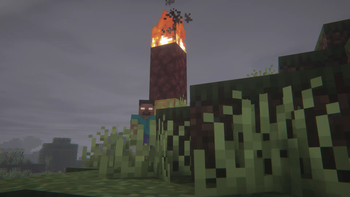
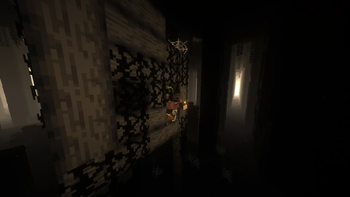
About this Modpack
There's something lurking in the fog. BEWARE!
This modpack includes a collection of popular mods to improve the game experience (optimization mods, QoL Features like Essentials), and some mods to achieve a Horror setting (From the fog, Graveyard and many others!).
This modpack also comes with Insanity & Spooklementary Shaders pre-installed, to help with the overall lightning and mood.
PS: More mods, texture packs, shaders will be added in future updates.
- Clean Tooltips [1.0] by stal111
- Indium [1.0.27+mc1.20.1] by comp500
- Moonlight [1.20-2.8.67] by MehVahdJukaar
- Mythic Upgrades [2.3.2+mc1.20.1] by TriQue
- Amethyst Golem Refreshed [1.0] by Anas099, jeekoo200
- Simple armor hud [1.20.2-1.3.2] by LegoRaft
- Friends&Foes [2.0.0] by Faboslav
- Held Item Info [1.5.0] by Neecko5b84
- AdventureZ [1.4.19] by Globox_Z
- YUNG's API [1.20-Fabric-4.0.2] by YUNGNICKYOUNG
- Trim Effects [1.0.1-fabric] by luavixen
- CreativeCore [2.11.10] by CreativeMD, AriaFreeze
- Lookin' Sharp! [1.0.2] by Joosh, CodexAdrian
- Smooth Swapping [0.9.3.1] by Schauweg
- Dungeons and Taverns Swamp Hut Rework [1] by NovaWostra
- More Mobs [1.5+mod] by Tschipcraft
- Xaero's World Map [1.37.1] by Xaero96
- Sleep Rework [beta-1.20.1-1.1.0] by Lemons
- Reese's Sodium Options [1.6.5+mc1.20.1-build.95] by FlashyReese
- Better Cooked Axolotls [1.0-1.20.1] by sScorpioNn
- Drip Sounds [1.19-0.3.2] by PieKing1215
- Explorify [1.3.0-mc1.20] by bebebea_loste
- Dungeons and Taverns Ancient City Overhaul [1] by NovaWostra
- MCPitanLib [1.8.4-1.20.1-fabric] by Pitan
- Oxidized [1.8.2] by Safro
- Windchimes [1.2.4+1.20] by Hibi
- YetAnotherConfigLib [3.2.1+1.20] by isXander
- Things [0.3.1+1.20] by glisco
- Cave Dust [1.4.1] by LizIsTired
- Illusory Walls [0.1.0+1.20] by LCLP
- Xaero's Minimap [23.9.1] by Xaero96
- LambDynamicLights [2.3.2+1.20.1] by LambdAurora
- Tree Harvester [8.3] by Rick South
- Supplementaries Squared [1.20-1.1.11] by Mehvahdjukaar, Plantkillable
- Bookshelf [20.1.6] by Darkhax
- Patchouli [1.20.1-83-FABRIC] by Vazkii, williewillus
- Enderman Overhaul [1.0.3] by Alex Nijjar, Joosh
- Deeper and Darker [1.2.3] by Kyanite Mods
- Resourceful Lib [2.1.18] by ThatGravyBoat, Epic_Oreo
- Skeletal Remains [1.4.2] by Lightglow
- Culinaire [3.0.0] by Hugman, YanisBft
- Creeper Overhaul [3.0.1] by Artist/Creator - Joosh, Dev - ThatGravyBoat
- Plenty Of Armors [1.3.0] by aleganza, rickorso
- Traveler's Titles [1.20-Fabric-4.0.1] by YUNGNICKYOUNG
- Seamless Loading Screen [2.0.3+1.20.1] by Minenash
- CorgiLib [4.0.0.4] by Corgi Taco, J.T. McQuigg (JT122406)
- EMI Loot [0.6.5+1.20.1] by fzzyhmstrs, lxly9 (art)
- Chunks Fade In [1.0.4-1.20.1] by Koteinik
- Reinforced Chests [2.4.2+1.20] by Aton-Kish
- Elytra Trinket [1.0.3] by Travis Martin
- Better Archeology [1.1.0] by Pandarix, Dunk3ll1cht
- AppleSkin [2.5.1+mc1.20] by squeek502
- Iceberg [1.1.15] by Grend
- Twigs [3.1.0] by Ninni
- Warden Tools [mc1.20.1-2.3.2] by TriQue
- Switcheroo [1.0.11] by Nato Boram
- Elytra Trims [1.4.4] by KikuGie
- AmbientSounds [3XEpPTC0]
- Cloth Config v11 [11.1.106] by shedaniel
- Shulker Box Tooltip [4.0.4+1.20.1] by MisterPeModder
- Resourcefulconfig [2.1.0] by ThatGravyBoat
- Zombie Horse Spawn [4.7] by Rick South
- Scorched [1.1.3c] by limesplatus
- Dynamic Crosshair Compat [3.6+1.20.1] by Crendgrim
- Glowing Ores [NONE] by Apothic0n
- Spider Caves [${version}] by HexagonNico
- Fabric API [0.91.0+1.20.1] by FabricMC
- Mod Menu [7.2.2] by Prospector, haykam821, TerraformersMC
- Warrior Rage [1.20.1-fabric-1.0.0] by Tiviacz1337
- Sleep Tight [1.20-1.1.11] by Mehvahdjukaar, Plantkillable
- Iris [1.6.10] by coderbot, IMS212, Justsnoopy30, FoundationGames
- Simple Voice Chat [1.20.1-2.4.29] by Max Henkel
- Geophilic [2.1.0-mc1.20u1.20.2] by bebebea_loste
- Beautify [1.1.0+1.20] by Suel_ki
- EntityCulling-Fabric [1.6.2-mc1.20.1] by tr7zw
- Stackable [1.1.1] by Lonkachu
- Aquamirae [6] by Obscuria
- Obscure API [16] by Obscuria
- The Backrooms [0.2.2+1.20.1] by V-Fast
- More Geodes [1.8.2] by TheDeathlyCow
- Traveler's Backpack [1.20.1-9.1.8] by Tiviacz1337
- Continuity [3.0.0-beta.4+1.20.1] by PepperCode1
- EMI Trades [1.2.1+mc1.20.1] by Prismwork, Flamarine
- The Graveyard [2.9.1] by Finallion
- EnchantmentDescriptions [17.0.9] by Darkhax
- Void Fog [2.10.0] by Tamaized, Sollace
- Immersive Ores [1.20.1-0.3] by Block_Legend001
- Incendium [5.3.3] by Stardust Labs
- essential-container [1.0.0]
- Reinforced Barrels [2.4.1+1.20] by Aton-Kish
- Skeleton Horse Spawn [3.7] by Rick South
- Another Furniture [1.20.1-3.0.1] by Starfish Studios
- Additional Additions [6.0.1] by Dqu1J
- NotEnoughAnimations [1.6.4] by tr7zw
- Dungeons and Taverns Pillager Outpost Rework [1.1] by NovaWostra
- Architectury [9.1.12] by shedaniel
- Jade [11.6.2] by Snownee
- oωo [0.11.2+1.20] by glisco, BasiqueEvangelist, Noaaan
- Pure Copper Tools [1.0.0] by purejosh
- Clutter [1.20-0.4.3] by EmilSG
- Sound Physics Remastered [1.20.1-1.2.1] by Sonic Ether, vlad2305m, Max Henkel
- EnhancedVisuals_FABRIC_v1.6.9_mc1.20.1
- Presence Footsteps [1.9.1] by Hurricaaane (Ha3), Sollace
- Dungeons and Taverns [3.0.3] by NovaWostra, Walls17
- Inventory Management [1.3.1] by Roundaround
- Enhanced Celestials [5.0.0.2] by Corgi Taco
- Double Doors [5.1] by Rick South
- Paladin's Furniture [1.2.0] by UnlikePaladin
- Reinforced Shulker Boxes [2.5.0+1.20] by Aton-Kish
- ukulib [0.7.0+1.20] by uku
- JamLib [0.6.1+1.20.x] by Jamalam
- Show Me What You Got [1.1.1] by Apace
- Subsurface [1.0] by EMD123
- Dawn API [5.0.0] by Hugman
- Uncrafting Table [1.2.9] by Pitan
- FirstpersonModel [2.2.4] by tr7zw
- Equipment Compare [1.3.7] by Grend
- Blockus [2.7.6+1.20.1] by Brandcraft
- Connectible Chains [2.2.1+1.20.1] by legoatoom, Qendolin
- Detail Armor Bar [2.6.3+1.20.1-fabric] by RedLime
- Advanced Netherite [2.0.2-1.20.1] by Autovw
- Cardinal Components API [5.2.2] by UpcraftLP, Pyrofab
- Visuality [0.7.1+1.20] by PinkGoosik
- LIMBO Dimension Datapack [2.9] by Reppeti
- Jade Addons [5.2.3] by Snownee
- Enhancer Mod [1.4.2.0-1.20.1] by GreyL1me
- Sodium [0.5.3] by @jellysquid3
- TriQue API [mc1.20.1-1.1.0] by TriQue
- Supplementaries [1.20-2.7.0] by MehVahdJukaar, Plantkillable
- Dungeons and Taverns Stronghold Rework [1] by NovaWostra
- EMI [1.0.25+1.20.1+fabric] by Emi
- Veinminer [1.1.0] by Miraculixx
- Weeping Angels [46.0.1] by Suff, 50ap5ud5, Ed, Violet, Rolf, Nictogen, Lukas, ShadowBolt, teacup, DocArcane, Dhi_awesome, ConnorDawn, Classic, The_MidFord, Hiveius
- Bedrock Plus Mod [1.6] by anvian
- Etcetera [1.1.2-fabric] by Ninni
- Archon [0.5.7] by Safro
- From The Fog [1.9.2] by Bret06
- Ender Dragon Fight Remastered [4.3] by MrGenie151
- Forgotten Graves [1.20.1-3.2.5] by Ginsm
- Enderite Mod [1.5.0] by PITTI11, Nic4las
- Cosmetic Armor [1.6.0] by Apace
- MmmMmmMmmMmm [1.20-1.8.13] by Mehvahdjukaar, Bonusboni, Gooigipunch, Plantkillable
- Elytra Slot [6.3.0+1.20.1] by Illusive Soulworks
- Immersive Armors [1.6.1+1.20.1] by Luke100000
- Collective [7.9] by Rick South
- Utility Belt [1.3.6+1.20.1] by Jamalam
- GeckoLib 4 [4.2.4] by Gecko, Eliot, AzureDoom, DerToaster, Tslat, Witixin
- Status Effect Bars [1.0.3] by Neecko5b84
- Nyf's Spiders [2.1.1] by Nyfaria
- Forge Config API Port [8.0.0] by Fuzs
- EMIffect [1.1.2+mc1.20.1] by Prismwork
- DarkPaintings [17.0.4] by Darkhax
- Trinkets [3.7.1] by Emi, C4
- Sodium Extra [0.5.1+mc1.20.1-build.112] by FlashyReese
- Eating Animation [1.20+1.9.5-CMDfix] by theone_ss, spusik_, PinkGoosik, DoctorNight1
- Lithium [0.11.2] by JellySquid, 2No2Name
- Charm of Undying [6.4.5+1.20.1] by Illusive Soulworks
- Dynamic Crosshair [7.4.1+1.20] by Crendgrim
- Carry On [2.1.2.7] by Tschipp, Purplicious_Cow, cy4n
Available Versions
How to Set Up a Beware the Fog Server
Order Server
Choose at least 6 GB RAM (8 GB recommended for Beware the Fog). Based on player count: per 5 players.
Install Modpack in Dashboard
Open the modpack browser in the dashboard, search for "Beware the Fog" and click "Install". The fabric loader and Minecraft 1.20.1 are configured automatically.
Start Server & Play
Start the server – all mods are loaded automatically. Share the server IP with friends and play together!
Frequently Asked Questions
Beware the Fog server crashes or won't start – what to do?
Most common causes: insufficient RAM or wrong fabric loader. Check latest.log for "OutOfMemoryError" → increase RAM to at least 8 GB. For "Mixin" or "ClassNotFoundException" errors: modpack version and loader don't match. With Mado Hosting, loader and Minecraft version are auto-configured on modpack install – preventing most startup issues.
How much RAM does a Beware the Fog server really need?
Minimum 6 GB, recommended 8 GB for stable performance. per 5 players. Important: Minecraft modpacks need more RAM than vanilla – plan extra per additional player. With Mado Hosting, you can scale RAM up live at any time without data loss (from €12/month).
Can I add custom mods to Beware the Fog without conflicts?
Yes, but check compatibility: only use mods for the same loader (fabric) and same Minecraft version (1.20.1). Common issues: ID conflicts with recipe mods and incompatible coremod versions. The Mado dashboard mod browser only shows compatible mods and warns about known conflicts.
Beware the Fog server lagging – performance tips
1) Increase RAM to 8 GB+. 2) Reduce server view-distance to 8 (server.properties). 3) Pre-generate chunks with the "Chunky" plugin. 4) Use /spark profiler to check which mods consume the most tick time. With Mado Hosting, all servers run on NVMe SSDs with dedicated CPU cores – eliminating hardware as a bottleneck.
Similar Modpacks
![Cobblemon Official Modpack [Fabric]](https://cdn.modrinth.com/data/5FFgwNNP/e7f9ee2e9d361623847853fe2ddce42f519ee64f.png)
![COBBLEVERSE - Pokemon Adventure [Cobblemon]](https://cdn.modrinth.com/data/Jkb29YJU/581ecf54530972afb18a04660afd820f2f24f6c7.png)
![Better MC [FABRIC] - BMC2](https://cdn.modrinth.com/data/shFhR8Vx/a19c2bcb51d38f32f138d3607e91cb2b7b8e387f_96.webp)


![Better MC [FORGE] - BMC4](https://cdn.modrinth.com/data/4BV47HRn/7f5ef7cc61b2593609aabef3ed07a866a4f11b73_96.webp)
Rent Beware the Fog Server
Start your own server with automatic modpack installation.
Supported Versions
Start your Beware the Fog Server now
From €12.00/month with 8 GB RAM for the best performance.
Configure Server →