
Bloodalypse
Post-apocalyptic, Zombie Invasion discover a new experience in a world where zombies take the disappointment of everything don't die don't get contaminated
Screenshots
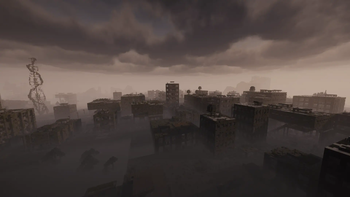
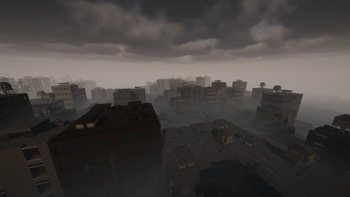
About this Modpack

It is recommended to add the mod below for a better experience (due to the license I cannot integrate it directly into the modpack)
🟥Recommended to install them🟥
Chaos Z Pack Lost Cities
Chaos Z Pack Lost Cities, is a complementary mod of Lost Cities made for the zombie apocalypse theme this mods requires certain mods which are not installed by default due to their rights of others CurseForge it is requested to install them via the direct links
This list of mods is really recommended for a better experience.
⚙️ How to Set It Up
- Select
testworldas the world style when creating a world. - Open your Lost Cities profile config:
- File path:
config/lostcities/profiles/your-profile.json- Update the following values:
your-profile.json "cities":{ "cityStyleAlternative": "citystyle_border1", }, "lostcity": { "buildingMinFloors": 0, "worldStyle": "testworld", }
🟦⬜🟥French Community🟦⬜🟥
Attention !! 🔴
- Ce jeu peut contenir des effets de surprise susceptibles de choquer certains utilisateurs.
- Pour une expérience de jeu optimale, jouez avec des shaders et un casque.

200 ans après la terrible explosion de l'usine CRAFORY, un mystérieux virus est apparu un peu partout et a recouvert le monde entier. < Une sorte de zombies ?? > C'est bel et bien vrai et c'est à vous, joueurs, de survivre dans ce monde post-apocalyptique où rien n'évite le danger. Où que vous soyez, les zombies sont là aussi. Vous n'avez qu'une seule option : survivre à l'invasion et ne pas mourir.

✔️ Entièrement optimisé avec prise en charge des shaders
✔️ Nouveau type de zombie
✔️ IA des monstres améliorée
✔️ Technologie sans dénaturer Minecraft
✔️ Optimisé pour les petites configurations
✔️ 6 Go de RAM minimum
✔️ Mods en constante évolution
✔️ Structure Apocalypse
✔️ +100 mods !
✔️ Nombreuses fonctionnalités personnalisées pour une expérience améliorée
Warning !! 🔴
- This game may contain surprise effects that may offend some users.
- For optimal gameplay, play with shaders and headphones.
200 years after the terrible explosion of the CRAFORY factory, a mysterious virus has appeared everywhere and covered the entire world. < A kind of zombies?? > It's indeed true and it's up to you, players, who will have to survive in this post-apocalypse world where nothing avoids danger, wherever you are, the zombies are there too. You only have one option: survive the invasion and not die.
✔️ Fully Optimized with Shader Support
✔️ New Kind of Zombie
✔️ Improved mob AI
✔️ Technology without distorting Minecraft
✔️ Optimized for small configurations
✔️ 6 GB ram minimum
✔️ Mods in perpetual evolution
✔️ Apocalypse Structure
✔️ +100 Mods !!
✔️ Many Custom Features for an Improved Experience
Available Versions
How to Set Up a Bloodalypse Server
Order Server
Choose at least 6 GB RAM (8 GB recommended for Bloodalypse). Based on player count: per 5 players.
Install Modpack in Dashboard
Open the modpack browser in the dashboard, search for "Bloodalypse" and click "Install". The forge loader and Minecraft 1.20.1 are configured automatically.
Start Server & Play
Start the server – all mods are loaded automatically. Share the server IP with friends and play together!
Frequently Asked Questions
Bloodalypse server crashes or won't start – what to do?
Most common causes: insufficient RAM or wrong forge loader. Check latest.log for "OutOfMemoryError" → increase RAM to at least 8 GB. For "Mixin" or "ClassNotFoundException" errors: modpack version and loader don't match. With Mado Hosting, loader and Minecraft version are auto-configured on modpack install – preventing most startup issues.
How much RAM does a Bloodalypse server really need?
Minimum 6 GB, recommended 8 GB for stable performance. per 5 players. Important: Minecraft modpacks need more RAM than vanilla – plan extra per additional player. With Mado Hosting, you can scale RAM up live at any time without data loss (from €12/month).
Can I add custom mods to Bloodalypse without conflicts?
Yes, but check compatibility: only use mods for the same loader (forge) and same Minecraft version (1.20.1). Common issues: ID conflicts with recipe mods and incompatible coremod versions. The Mado dashboard mod browser only shows compatible mods and warns about known conflicts.
Bloodalypse server lagging – performance tips
1) Increase RAM to 8 GB+. 2) Reduce server view-distance to 8 (server.properties). 3) Pre-generate chunks with the "Chunky" plugin. 4) Use /spark profiler to check which mods consume the most tick time. With Mado Hosting, all servers run on NVMe SSDs with dedicated CPU cores – eliminating hardware as a bottleneck.
Similar Modpacks
![Cobblemon Official Modpack [Fabric]](https://cdn.modrinth.com/data/5FFgwNNP/e7f9ee2e9d361623847853fe2ddce42f519ee64f.png)
![COBBLEVERSE - Pokemon Adventure [Cobblemon]](https://cdn.modrinth.com/data/Jkb29YJU/581ecf54530972afb18a04660afd820f2f24f6c7.png)
![Better MC [FABRIC] - BMC2](https://cdn.modrinth.com/data/shFhR8Vx/a19c2bcb51d38f32f138d3607e91cb2b7b8e387f_96.webp)


![Better MC [FORGE] - BMC4](https://cdn.modrinth.com/data/4BV47HRn/7f5ef7cc61b2593609aabef3ed07a866a4f11b73_96.webp)
Rent Bloodalypse Server
Start your own server with automatic modpack installation.
Supported Versions
Start your Bloodalypse Server now
From €12.00/month with 8 GB RAM for the best performance.
Configure Server →