
Bonobocraft
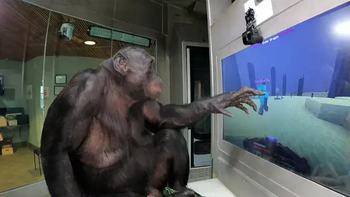
Touch controls designed for real Bonobo/Apes at ApeInitiative research centre.
Screenshots
About this Modpack
Bonobocraft
"Bonobocraft" is a project which involves teaching Bonobos (a type of Ape) to play Minecraft.
I was responsible for developing a mod that allows the Bonobos to play Minecraft with specialised touch
controls designed specifically for them. You can see Teco, one of the apes, playing another research game with
the same type of controls here.
You can download and use the mod that the Bonobos used on Modrinth.
The mod was not the only part of Bonobocraft. Spiralio played a significant role in making this happen, being
the map developer who made all of the levels that the Bonobos played on. He made really cool stuff with datapacks
including auto-generating cave pieces with structure blocks and lots of texture modelling work.
The main point of Bonobocraft is to make YouTube video's for Chris.
:YoutubeCarousel{:videos='["", "UKpFoYqN9-0", ""]' :itemsToShow='3'}
- The first video made by me, featuring Spiralio, the map developer. We talk about the development side that led to
the two other videos made by ChrisDaCow, the youtuber who made it all possible. - Part 1, Kanzi the Bonobo plays Minecraft with my touch controls.
- Part 2, where Kanzi and Teco team up to beat the Ender Dragon in Minecraft.
This was all made possible by the non-profit, ApeInitiative,
who looks after the Apes seen in this videos.
Please donate to them to help improve their
facilities and allow the Bonobos to have more experiences like this.
What is this modpack?
You can use this modpack to try out the mods and worlds that the actual Bonobos used in the videos.
Download either Part 1, which is about the first video, or part 2, which is about the second video and try it out by hitting singleplayer!
Table of Contents
A technical deep-dive
Bonobocraft is quite a simple mod at its roots: it enables the mouse whilst in-game and implements some simple touch-zones that you can click on. But as you dive deeper, a lot more is going on behind the scenes to make the experience truely intuitive for the bonobos.
Input
Touch Look
8 touch zones around the edge of the screen move the player camera in each direction.
| Up+Left | Up | Up+Right |
|---|---|---|
| Left | --- | Right |
| Down+Left | Down | Down+Right |
This behaviour is almost what the Bonobos expect. Their primitive brains just touch what they want to look at. I could have implemented this, but the researchers decided it would be more cognitively challenging if they were to learn these more basic controls.
After a certain period of time, the pitch of the player is re-centered to something just below straight forward (to avoid looking into Enderman's eyes). This is to help the Bonobos in case they get stuck looking up, it also makes the video more interesting.
Touch Walk
The middle sector of the screen is used for walking forward. Upon pressing, the 'W' key will be emulated for a second or so.
This behaviour is already familiar to the Bonobos, who have done screen tasks like this in the past.
Button Row
At the top center of the screen, a row of buttons (or lexigrams) are visible which do various actions.
Throughout the development of Bonobocraft, many buttons have been made, but at it's final state, only 3 are ever shown/enabled:
| Button | Action | Lexigram | Narration |
|---|---|---|---|
| Eat | Auto player task: Eat |  |
"eat" |
| Share | Auto player task: Share |  |
"share" |
| Clutch | Auto player task: Clutch |  |
"clutch" |
Touch Entity
Systems
There are many internal systems that make up the Bonobocraft mod, some obvious, some not.
Auto Player Task
An API responsible for stringing together simple player tasks, creating more complex tasks.
For example, if you want a player to eat something, you split this action up into individual actions like:
- Finding a food item
- Switching to the food item
- Using the food item
- Switching back to the previous slot
In a sense this is almost like the AI system that are attached to mobs where they have separate goals, but only
one action can take place at a time.
Whilst a task is in progress, all input is blocked to prevent the Bonobos from interfering with whatever is going
on.
These actions are either triggered through a button or through a touch of an entity.
Animation System
Behind the scenes, an animation system exists that handles the various smooth movements and animations.
For example, using the touch look input triggers an animation that powers the smooth looking
animation, or using the /indicate command to get the spinning and zooming.
Animator.INSTANCE.play(
    new Animator.AnimationInstance(durationTicks, t -> t)
        .addConsumer(x -> setX(x), start, end)
);
Here is an example of the animation system.
Available Versions
How to Set Up a Bonobocraft Server
Order Server
Choose at least 4 GB RAM (6 GB recommended for Bonobocraft). Based on player count: per 8 players.
Install Modpack in Dashboard
Open the modpack browser in the dashboard, search for "Bonobocraft" and click "Install". The fabric loader and Minecraft 1.20.1 are configured automatically.
Start Server & Play
Start the server – all mods are loaded automatically. Share the server IP with friends and play together!
Frequently Asked Questions
Bonobocraft server crashes or won't start – what to do?
Most common causes: insufficient RAM or wrong fabric loader. Check latest.log for "OutOfMemoryError" → increase RAM to at least 6 GB. For "Mixin" or "ClassNotFoundException" errors: modpack version and loader don't match. With Mado Hosting, loader and Minecraft version are auto-configured on modpack install – preventing most startup issues.
How much RAM does a Bonobocraft server really need?
Minimum 4 GB, recommended 6 GB for stable performance. per 8 players. Important: Minecraft modpacks need more RAM than vanilla – plan extra per additional player. With Mado Hosting, you can scale RAM up live at any time without data loss (from €8/month).
Can I add custom mods to Bonobocraft without conflicts?
Yes, but check compatibility: only use mods for the same loader (fabric) and same Minecraft version (1.20.1). Common issues: ID conflicts with recipe mods and incompatible coremod versions. The Mado dashboard mod browser only shows compatible mods and warns about known conflicts.
Bonobocraft server lagging – performance tips
1) Increase RAM to 6 GB+. 2) Reduce server view-distance to 8 (server.properties). 3) Pre-generate chunks with the "Chunky" plugin. 4) Use /spark profiler to check which mods consume the most tick time. With Mado Hosting, all servers run on NVMe SSDs with dedicated CPU cores – eliminating hardware as a bottleneck.
Similar Modpacks

![Better MC [FABRIC] - BMC2](https://cdn.modrinth.com/data/shFhR8Vx/a19c2bcb51d38f32f138d3607e91cb2b7b8e387f_96.webp)
![Better MC [FORGE] - BMC4](https://cdn.modrinth.com/data/4BV47HRn/7f5ef7cc61b2593609aabef3ed07a866a4f11b73_96.webp)


Rent Bonobocraft Server
Start your own server with automatic modpack installation.
Details
- License
- LicenseRef-All-Rights-Reserved
- Server-side
- Required
- Client-side
- Required
Supported Versions
Start your Bonobocraft Server now
From €8.00/month with 6 GB RAM for the best performance.
Configure Server →